
Summarize this documentation using AI
Event-triggered email is an automated message sent to one person because they did (or failed to do) a specific thing at a specific moment: viewed a product, started checkout, received a delivery, skipped a subscription. The event fires, the platform evaluates rules, and the email goes out in seconds to hours, not on a calendar the marketer picked in advance.
The trigger is not the email. The trigger is a row of data (an event name, its properties, a resolved identity, and a timestamp) that a lifecycle platform can act on. Brands that treat event-triggered email as "flows I turned on in Klaviyo" get the average result. Brands that treat it as an event pipeline with messaging on top get the top-decile result. For the cross-channel version (email, SMS, push, in-app), see What Is Triggered Messaging?
Event-triggered email vs drip campaigns vs batch sends
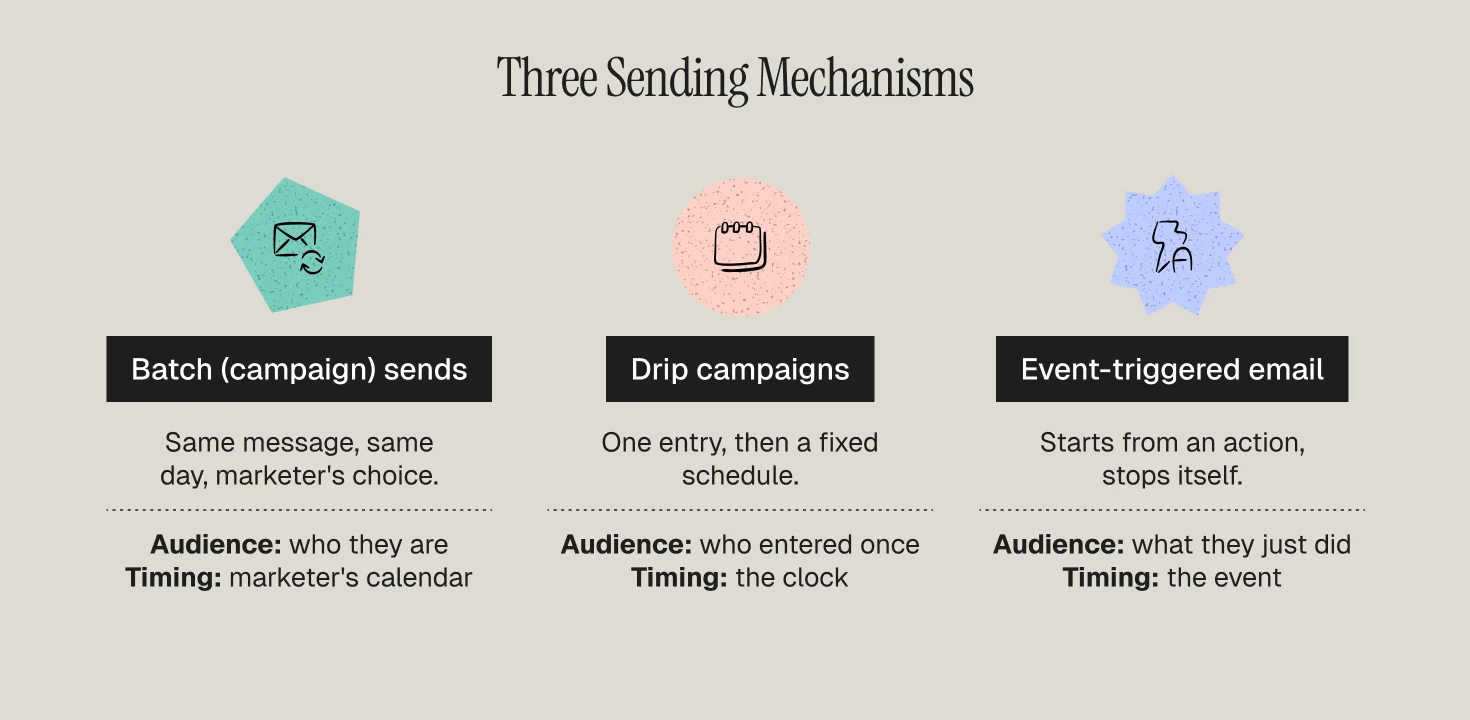
Batch (campaign) sends go to a segment at a time the marketer chooses. Everyone gets roughly the same message on the same day. The audience is defined by who they are, not by what they just did.
Drip campaigns are time-based sequences. A person enters once (usually on signup) and receives message 1 on day 0, message 2 on day 3, message 3 on day 7. The clock is the trigger. Behavior after entry rarely changes the path.
Event-triggered email starts from an action and reacts to it. The entry condition is "Checkout Started fired and Order Placed did not fire within 60 minutes." The content pulls from the event payload (cart contents, the SKU browsed, the delivery ETA). The exit condition is another event (the order completed). It is per-person, per-moment, and it stops itself.
A welcome series is where the three overlap: a drip welcome sends three emails on a schedule, an event-triggered welcome branches on whether the person browsed, carted, or bought before email 2 was due. Our welcome series definition covers why most brands build the drip version.
The performance gap is not subtle. Klaviyo's benchmark data shows automated flows averaging a 5.58% click rate against 1.69% for campaigns, and a 2.11% placed-order rate against 0.16%, roughly 3x on clicks and 13x on orders. Flows generated about 41% of email revenue from 5.3% of sends. That ratio is the entire argument for this article.
The event data model: events, properties, identity
Events
An event is a named thing that happened, with a timestamp. Segment's Track spec (the de facto standard that Klaviyo, Braze, and Customer.io all accept in some form) defines a track call as an event name plus a properties object, tied to a userId or anonymousId. Good event names are past-tense verbs on nouns: Product Viewed, Checkout Started, Order Delivered, Subscription Skipped. Bad names are UI descriptions or states. The list worth instrumenting is short: 15 to 25 events cover almost every trigger in this article.
Properties
Properties are the payload. Checkout Started should carry cart value, line items (SKU, name, image URL, price, quantity), discount code, and a checkout URL. Order Delivered should carry order ID, delivery date, and the products delivered. Properties are what make a triggered email specific. "You left something behind" is a template. Showing the two SKUs, the size, and the price is a triggered email. The click-rate difference is usually 2x or more (Propel client benchmark).
Identity resolution
The hardest part, and the one nobody budgets for. Web events start anonymous (a cookie or device ID) until the person enters an email at checkout, logs in, or clicks a link from an earlier email. Segment's Identify spec describes the call that ties an anonymousId to a userId and attaches traits, and the platform merges the anonymous history onto the known profile.
If identity is broken, browse abandonment does not fire, replenishment fires twice, and app churn signals never reach the email profile. Before building any trigger, pull 50 random profiles and check whether web, order, and subscription events are stitched together. For the plumbing, see our Segment and Customer.io integration guide.
The highest-value triggers for DTC and subscription brands
Ranked roughly by revenue per recipient in the programs we run.
1. Checkout started (abandoned checkout)
The highest revenue-per-recipient trigger in ecommerce. Klaviyo's analysis of 143,000+ abandoned cart flows found an average 50.5% open rate, 6.25% click rate, 3.33% conversion rate, and $3.65 revenue per recipient, with the top 10% of brands at $28.89. Baymard's meta-analysis of 50 studies puts the average cart abandonment rate at 70.22%, so the pool is large. Fire the first email 30 to 60 minutes after Checkout Started with an exit on Order Placed.
2. Cart added (abandoned cart) and browse abandonment
Lower intent, lower conversion, far higher volume. Browse abandonment needs strict caps: once per 24 hours, once per product, identified profiles only. Our cart vs browse abandonment breakdown covers timing and suppression for both.
3. First order placed and order delivered
Order Placed where order_count = 1 triggers the activation series: confirmation, a how-to-use message, and a second-purchase nudge. This is where DTC LTV is decided. Anchor the follow-ups on Order Delivered rather than order date, because delivery is when the product is in hand.
4. Replenishment window
For consumables, the trigger is a calculated date: Order Delivered plus expected days of supply minus 5 to 7 days, exiting on a new Order Placed in the same category. See What Is a Replenishment Flow? for the timing math.
5. Subscription skip, pause, and failed payment
For subscription brands these are the churn front line. Subscription Skipped deserves a "did we get the cadence wrong?" message with a one-click frequency change. Subscription Paused deserves a save offer before the pause ends. Payment Failed deserves dunning inside 24 hours, when card update rates are highest.
6. Churn-risk signals
Compound triggers: no Session Started in 21 days, a view of the cancellation page, a support ticket tagged "cancel," a drop in usage frequency. They fire a save flow before the cancel event, which is far cheaper than a win-back after it. Our guide on identifying users about to churn covers how to define these signals per business model.
Latency and suppression logic
Two settings decide whether a triggered program feels helpful or creepy.
Latency is the gap between event and send, and it should match intent decay. Checkout abandonment: 30 to 60 minutes. Browse abandonment: 2 to 4 hours. Delivery follow-up: 1 to 3 days after Order Delivered. Skip recovery: within the hour.
Suppression is every rule that stops a send. Four kinds:
- Exit events. Braze calls them exception events: if the person completes Order Placed between trigger and send, they drop out. Every abandonment and replenishment flow needs one.
- Frequency and re-entry. Customer.io lets a campaign trigger once, on every event, at fixed intervals, once within a time period, or on every re-match. "On every event" for browse abandonment is how a brand sends one person eight emails in a day.
- Cross-message caps. Klaviyo's Smart Sending skips a flow email if the profile received any email in the last 16 hours by default (24 hours for SMS). Turn it off for transactional and dunning, keep it on for marketing triggers.
- State filters. Suppress the abandoned checkout if the item is out of stock, the replenishment if the subscription is active, the win-back if the customer is in a support escalation.
Suppression is also a deliverability control. Triggered email earns high engagement partly because it is rare and relevant; strip the caps and the advantage disappears. See What Is Email Deliverability? for how sender reputation absorbs those mistakes.
Tooling: Klaviyo, Customer.io, Braze, Segment
Klaviyo is the fastest path for Shopify brands. Native integrations push Viewed Product, Added to Cart, Started Checkout, Placed Order, and Fulfilled Order with rich properties, and the flow builder handles filters, delays, and Smart Sending without engineering. It strains on cross-device identity and non-commerce events. Our best Klaviyo flows for DTC covers the standard build.
Customer.io is built around events and attributes rather than lists, the strongest fit for subscription and app-led brands where triggers come from a product database. Trigger types include segment, event, date, form, webhook, and object relationship changes, with granular frequency control. Propel is a Platinum Customer.io partner and it is our default for subscription and health brands.
Braze is the enterprise option: action-based delivery, exception events, Canvas branching, strong push and in-app alongside email. It expects an engineering team that owns the SDK and event taxonomy. See Klaviyo vs Braze for mid-market for the decision criteria.
Segment (or another CDP) sits underneath when a brand has more than one event source: it standardizes track and identify calls, resolves identity, and fans events out to messaging, warehouse, and ads. Not required for a single Shopify storefront; required once app, billing, and web events must land on one profile.
Benchmarks: triggered vs campaigns
- Klaviyo: flows 5.58% click vs campaigns 1.69%; 2.11% placed-order rate vs 0.16%; about 41% of email revenue from 5.3% of sends.
- Klaviyo abandoned cart flows: 50.5% open, 6.25% click, 3.33% conversion, $3.65 RPR average; top 10% at $28.89.
- Litmus: email returns about $36 for every $1 spent, and triggered sends are the highest-yield slice.
For a fuller table by flow type and industry, see Email Marketing Benchmarks for Ecommerce 2026.
Common mistakes
Building flows before fixing events. The abandoned checkout flow is live but Checkout Started only fires for logged-in users, so most abandoners never enter. Audit event coverage first.
No exit event. The customer buys, then gets "you forgot something" an hour later. The most common complaint in our audits and the cheapest to fix.
Treating drip as triggered. A post-purchase series timed from order date, ignoring delivery and repeat purchase. Add branches on Order Delivered and Order Placed.
Uncapped browse abandonment. Every product view fires an email. Cap at one per 24 hours per profile.
Ignoring the sunset. Triggered flows keep firing to profiles that stopped opening a year ago. Pair every triggered program with a sunset flow.
Measuring opens. Apple Mail Privacy Protection inflates them. Measure clicks, placed orders, and revenue per recipient.
Metrics that matter
For each trigger, track:
- Trigger volume and coverage: how many people fired the event, and what share were eligible. Coverage below 50% usually means an identity problem.
- Send rate: eligible profiles who received the message after exits and caps. A very high send rate on an abandonment flow means the exit event is missing.
- Click rate and placed-order rate: the two numbers that survive privacy changes.
- Revenue per recipient (RPR): the comparison metric across triggers and against campaigns. See What Is Revenue per Email?
- Incremental lift: a 5 to 10% holdout, measured on 30-day revenue. Abandonment flows claim revenue that would have happened anyway; the holdout tells you how much.
- Unsubscribe and complaint rate per trigger: the early warning that latency or caps are wrong.
Rank triggers monthly by RPR times volume; that ranking is next quarter's build queue. The prioritization logic is covered in Behavioral Triggers in Retention Marketing.
How Propel builds event-triggered email programs
Propel is a lifecycle and retention agency for DTC, subscription, and health brands, and a Platinum Customer.io partner that also runs Klaviyo and Braze programs. Engagements start with an event audit, then a trigger map ranked by expected RPR times volume, then the build with exit events, caps, and holdouts from day one. Most programs ship the top six triggers in the first 30 to 45 days.
Explore our retention marketing services and lifecycle marketing services, or talk to us about your event stack.
Frequently Asked Questions
What is the difference between event-triggered email and a drip campaign?
A drip campaign is a time-based sequence: a person enters once and receives messages on a fixed schedule regardless of what they do next. Event-triggered email starts from a specific action, pulls content from that event's properties, and exits when a follow-up event happens. Drips are calendar-driven; triggered emails are behavior-driven and stop themselves.
Which event-triggered emails should a DTC brand build first?
Start with abandoned checkout, then abandoned cart and browse abandonment, then a first-order post-purchase series anchored on the delivery event. Consumable brands should add a replenishment trigger next. Subscription brands should prioritize skip, pause, and failed-payment triggers before anything else.
How fast should a triggered email send after the event?
Match the delay to how quickly intent fades. Abandoned checkout: 30 to 60 minutes. Browse abandonment: 2 to 4 hours. Delivery follow-up: 1 to 3 days after delivery. Subscription skip: within the hour. Always pair the delay with an exit event.
Do I need a CDP like Segment for event-triggered email?
Not for a single Shopify storefront running Klaviyo; the native integration already sends the core commerce events. You need a CDP or equivalent pipeline when events come from multiple sources and must resolve to one customer profile, or when the same events need to reach a messaging platform, a warehouse, and ad platforms.
How much better do triggered emails perform than campaigns?
Klaviyo's benchmark data shows automated flows averaging a 5.58% click rate versus 1.69% for campaigns and a 2.11% placed-order rate versus 0.16%, roughly 3x and 13x respectively. Flows produced about 41% of email revenue from 5.3% of sends.