.webp)
Summarize this documentation using AI
Email deliverability is the ability of your emails to reach the inbox, rather than the spam folder or nowhere at all. It is different from delivery: an email can be "delivered" at 99% and still land in spam for half your list. Delivery means the receiving server accepted the message; deliverability means a human can actually see it.
In 2026 this distinction is enforced by hard rules. Google and Yahoo now require bulk senders to authenticate with SPF, DKIM, and DMARC, honor one-click unsubscribe, and stay under explicit spam-complaint thresholds, with Microsoft applying matching requirements to Outlook. Deliverability stopped being a dark art and became a compliance checklist with a reputation layer on top.
This definition anchor covers how deliverability works, the 2026 sender rules, the benchmarks that matter, and how to repair a damaged sender reputation. It underpins every metric in our ecommerce email benchmarks guide, because none of them exist for emails that never reach the inbox.
Deliverability vs Delivery Rate
Delivery rate = accepted messages ÷ sent messages. Routinely 97 to 99% and mostly meaningless, because spam-foldered mail counts as delivered.
Inbox placement rate = messages reaching the inbox ÷ messages delivered. This is real deliverability, and it is what mailbox providers decide per sender, per domain, and per send based on your reputation.
If opens fall while delivery rate stays high, suspect inbox placement first.
What Determines Deliverability in 2026
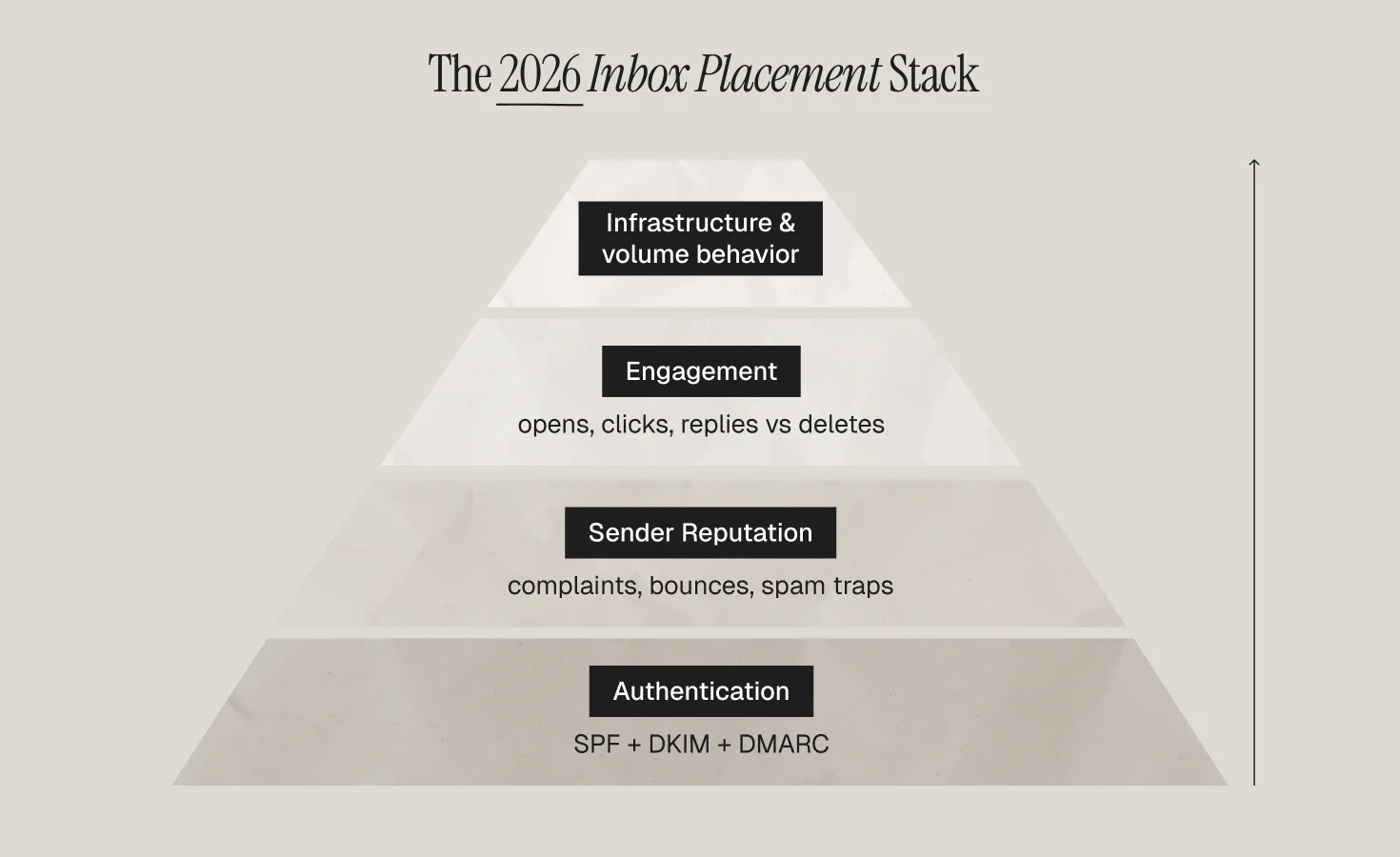
1. Authentication (the entry ticket)
Three DNS-level protocols prove you are who you claim to be. SPF authorizes which servers may send for your domain. DKIM cryptographically signs each message. DMARC tells mailbox providers what to do when the first two fail, and requires at least a p=none policy under Google's bulk sender guidelines. Since the 2024 Gmail and Yahoo requirements took effect and tightened through 2026, unauthenticated bulk mail is simply rejected.
2. Sender reputation (the ongoing score)
Mailbox providers score your sending domain and IP on complaint rates, engagement, bounce rates, spam-trap hits, and volume consistency. The hard line: spam complaints must stay below 0.3%, with under 0.1% as the safe operating target. Sustained breaches send entire domains to spam.
3. Engagement (the compounding signal)
Opens, clicks, replies, and "not spam" rescues raise reputation; deletes-without-reading and complaints lower it. This is why list hygiene is a deliverability tool: suppressing the disengaged via a sunset flow and catching lapsing subscribers with winback protects the inbox placement of everyone who still wants your mail.
4. Infrastructure and volume behavior
Dedicated vs shared IPs, warm-up discipline on new domains, and steady volume all feed the score. Sudden 10x spikes (hello, unplanned BFCM blasts) look like compromise or spam. Ramp sends gradually; the same discipline covered in our Black Friday email guide.
The 2026 Bulk Sender Rules at a Glance
For senders above roughly 5,000 messages per day to a provider, Gmail, Yahoo, and Microsoft all now require: SPF and DKIM passing and aligned, a DMARC policy published, one-click (RFC 8058) unsubscribe honored within two days, sending from a domain you own (no impersonating free-mail addresses), and complaint rates held under the 0.3% ceiling. Treat the checklist as table stakes; reputation and engagement decide everything above it.
Benchmarks Worth Tracking
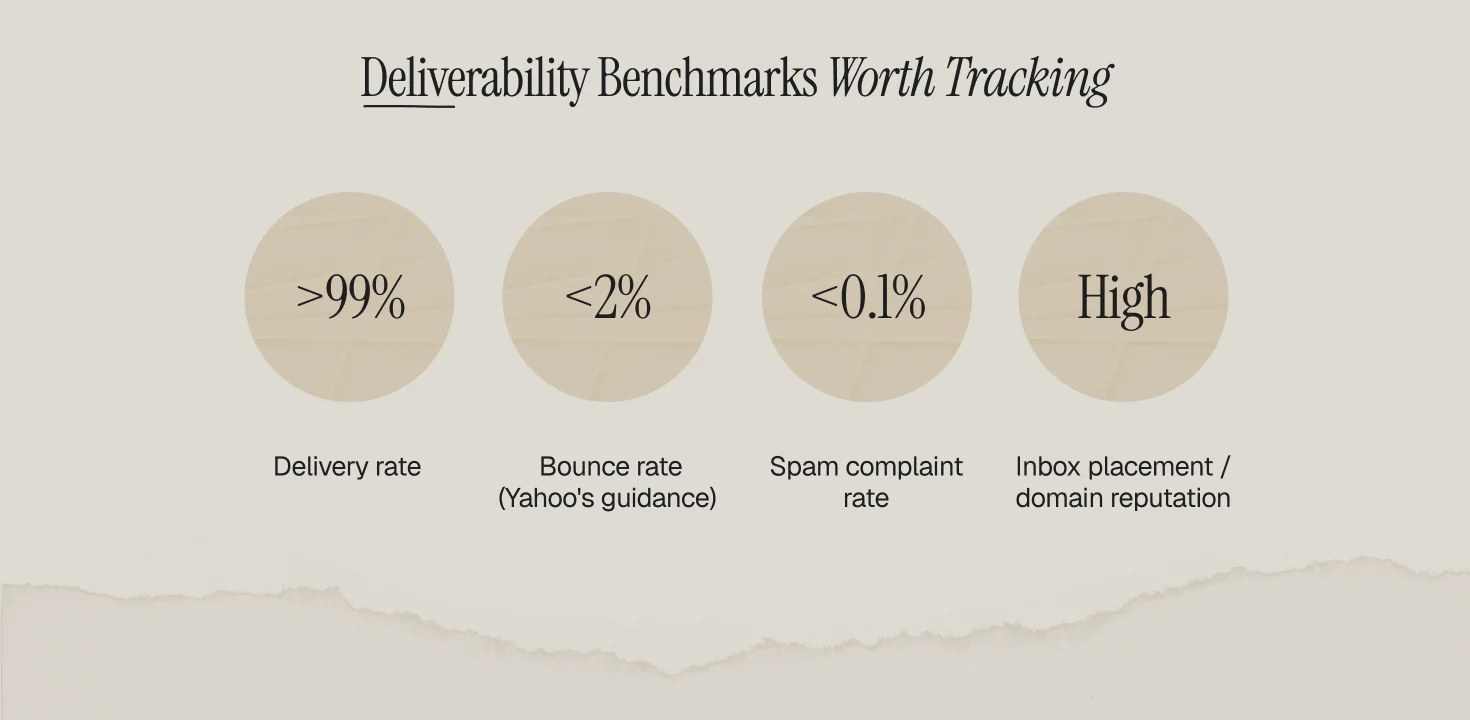
Delivery rate above 99%, bounce rate under 2% (Yahoo's guidance), spam complaint rate under 0.1%, and inbox placement, measured via seed testing or Google Postmaster Tools domain reputation, trending "high." Engagement baselines by vertical live in Klaviyo's 2026 benchmarks; regulated senders (health brands especially) face extra content scrutiny, covered in our healthcare email marketing guide.
How to Repair Damaged Deliverability
The sequence that works: fix authentication first; cut sending volume to your most-engaged 30-day segment only; rebuild positive engagement signals for 2 to 4 weeks; then expand outward by engagement tier while watching Postmaster Tools. Skip the shortcut services that promise instant reputation resets; mailbox providers score behavior over time, and only behavior changes the score. Prevention is cheaper: disciplined segmentation (behavioral segmentation tiers), automated suppression, and steady volume.
Deliverability is the foundation under every flow we build at Propel; it is audited in week one of any lifecycle marketing engagement, because a perfect welcome series sent to spam is worth exactly zero.
Frequently Asked Questions
What is email deliverability?
Email deliverability is the ability of your emails to land in recipients' inboxes rather than spam folders. It is determined by authentication (SPF, DKIM, DMARC), sender reputation, subscriber engagement, and sending infrastructure, and it differs from delivery rate, which only measures whether servers accepted the message.
What is a good email deliverability rate?
Aim for a delivery rate above 99%, bounce rate under 2%, spam complaint rate under 0.1% (the hard ceiling is 0.3% under Gmail and Yahoo rules), and "high" domain reputation in Google Postmaster Tools.
What are SPF, DKIM, and DMARC?
They are DNS-based email authentication protocols. SPF lists which servers may send for your domain, DKIM adds a cryptographic signature to each message, and DMARC instructs mailbox providers how to handle mail that fails the first two, plus where to send reports. All three are required for bulk senders under Google's sender guidelines.
Why are my emails going to spam even with authentication set up?
Authentication is the entry ticket, not the decision. Spam placement with valid SPF/DKIM/DMARC usually traces to reputation damage: high complaint rates, mailing stale segments, spam-trap hits, sudden volume spikes, or sustained low engagement. Cut volume to engaged segments and rebuild.
Do the Gmail and Yahoo sender rules apply to small senders?
The strictest requirements bind senders above ~5,000 daily messages to a provider, but authentication, low complaint rates, and easy unsubscribes improve inbox placement at any volume, and Microsoft has extended matching rules to Outlook. Treat the checklist as universal best practice.