
Summarize this documentation using AI
A drip campaign is a pre-written sequence of emails (or SMS) sent automatically to a subscriber on a fixed, time-based cadence after a single entry event, such as a signup or first purchase. Each message goes out after a set delay (day 0, day 2, day 5) regardless of what the subscriber does in between, unless an exit condition removes them.
That last clause is the whole debate. Modern lifecycle platforms like Klaviyo and Customer.io let you branch on behavior at every step, so many operators treat "drip" as a legacy word. It is not. A time-based drip is still the correct design for a specific class of jobs, and knowing when to use one (and when to switch to a behavioral flow) is what separates a tidy account from a noisy one.
Below: the definition, drip vs triggered vs nurture, the anatomy of a drip, four examples DTC and subscription brands actually run, cadence benchmarks, Klaviyo and Customer.io setup, mistakes, and the metrics that matter.
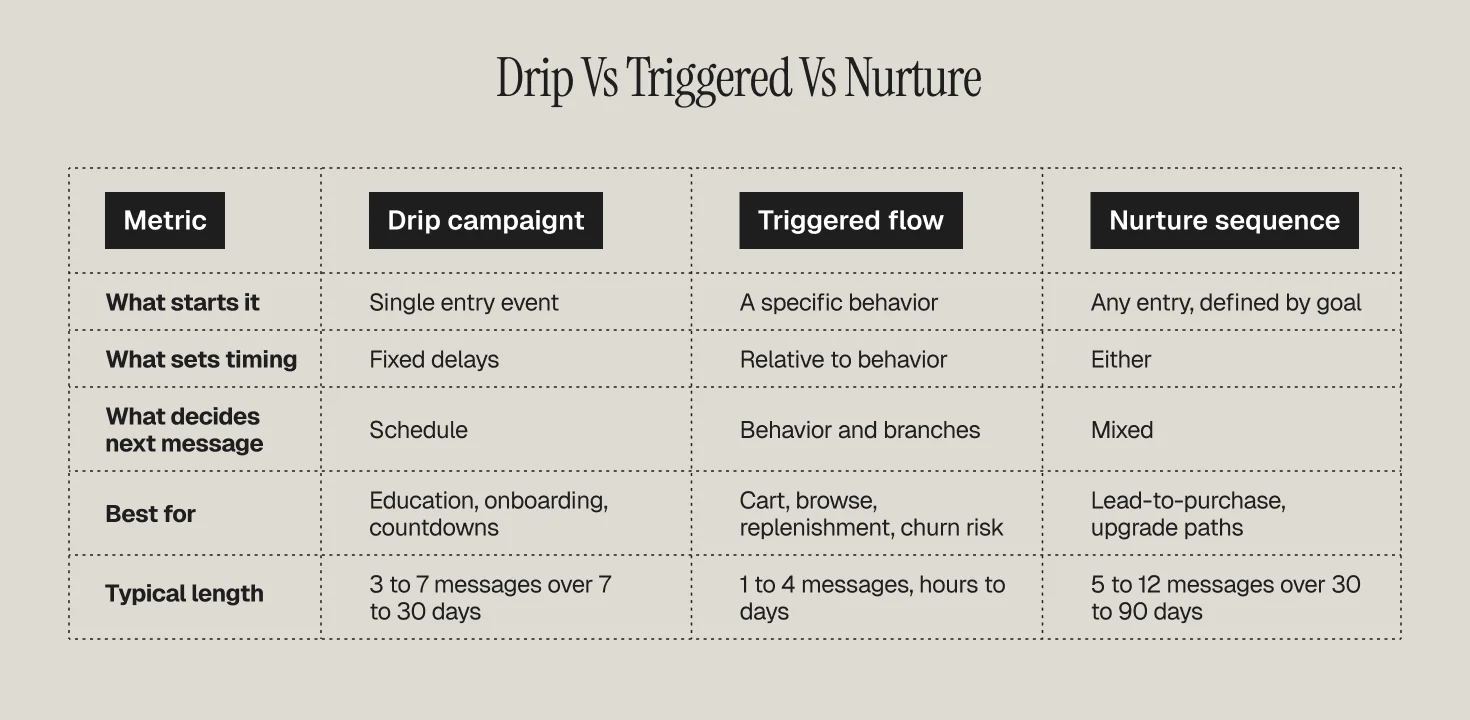
Drip campaign vs triggered flow vs nurture sequence
Drip campaign: time decides the next message
A drip has one entry event and a schedule. Message 2 sends X days after message 1. Behavior may pull someone out (they bought, they unsubscribed), but it does not decide which message comes next. Classic examples: a 5-email welcome sequence, a 30-day onboarding course, a pre-launch countdown.
Triggered (behavioral) flow: behavior decides the next message
A triggered flow fires because of something a person did or did not do: added to cart, viewed a product twice, hit a usage milestone, missed a refill window. Timing is relative to that behavior, and branches inside the flow are conditional on further behavior. See our full definition of triggered messaging and how behavioral triggers fit into a retention program.
Nurture: a goal, not a mechanism
"Nurture" describes the intent (move someone toward a purchase or upgrade), not the mechanism. It can be a pure drip, a pure triggered flow, or a hybrid. Most DTC nurtures are hybrids: time-based spine, behavioral branches.
When time-based drips still make sense for DTC and subscription brands
Whenever the message order matters more than the customer's next click. Four cases come up constantly.
Education with a logical sequence. A supplement brand explaining how to take the product, what to expect in weeks 1, 2, and 4, and when to reorder cannot let a random product view reshuffle that story.
Subscription onboarding to the first renewal. For a meal-kit, coffee, or skincare subscription, the days between order 1 and renewal 1 are a fixed window. A drip anchored to the order date mirrors the billing clock. We cover the wider window in subscription retention strategies.
Cohorts with thin behavioral data. Giveaway or lead-magnet subscribers have no browse or purchase history yet. A drip carries them until they generate signal.
Countdowns and launches. Pre-orders, waitlists, and BFCM early access have a hard date. Time-based sends are the only sensible option.
The rule we apply: use a drip when the calendar or the curriculum is the organizing principle. Use a triggered flow when a customer action is. Most mature accounts run both, and the drip includes exit conditions that hand people off to triggered flows the moment they act.
Anatomy of a drip campaign
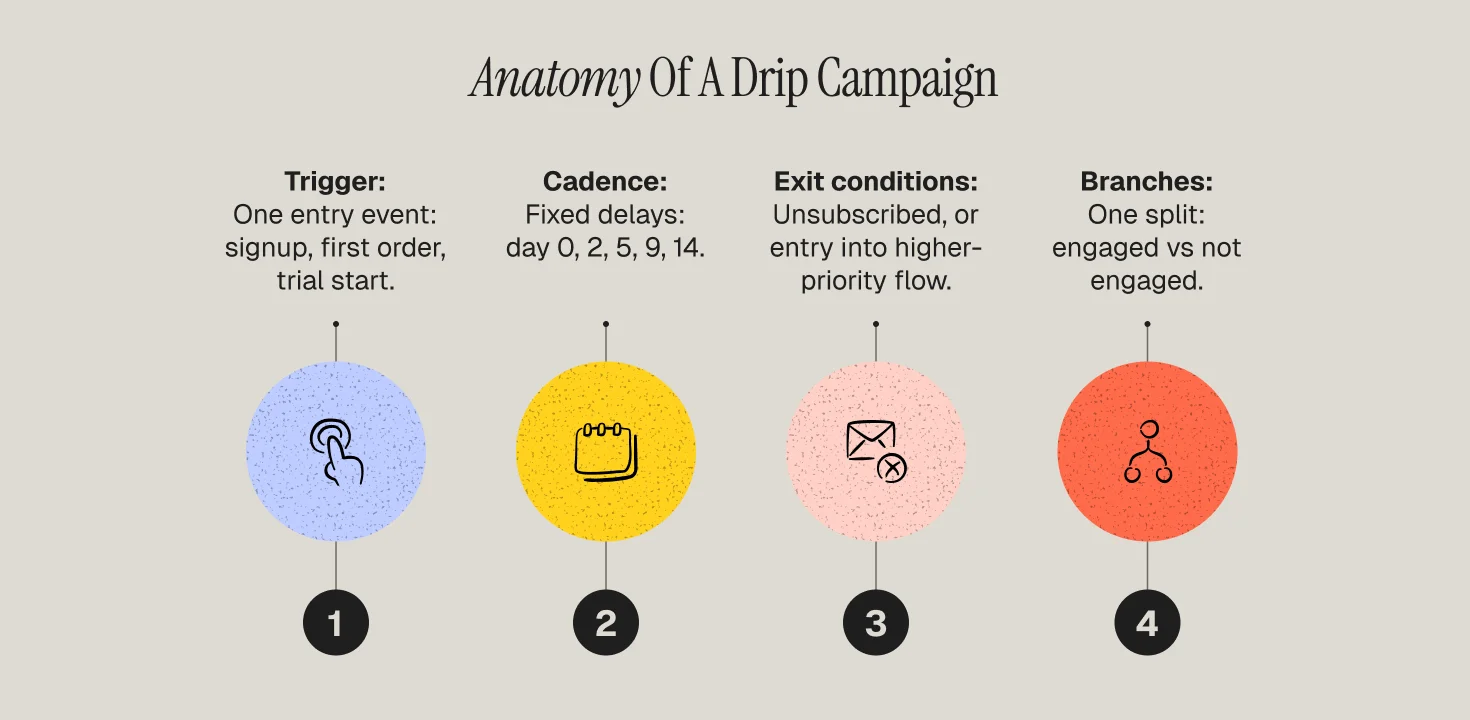
Every drip, in any platform, has four parts.
1. Trigger (entry)
The single event that enrolls someone: list join, form submit, first order, subscription start, trial start, date reached. Keep the entry narrow. "Anyone in the newsletter list" is a segment, not a trigger, and using it as one is how people get double-enrolled.
2. Cadence (delays)
The wait between messages. In Klaviyo this is a time delay step; in Customer.io it is a Time Delay or Wait Until block in the workflow builder. Set delays in days, then refine to send windows once you have open-time data.
3. Exit conditions
What removes someone before the sequence ends. The three you always want: purchased or converted (goal met), unsubscribed or suppressed, entered a higher-priority flow (post-purchase, win-back). Customer.io's exit conditions are OR statements: a profile leaves when it meets any one of them. In Klaviyo, the same effect comes from flow filters plus Smart Sending, which by default caps a profile at one flow or campaign email every 16 hours.
4. Branches (optional, but usually worth one)
Even a "pure" drip benefits from one conditional split: engaged with the previous message vs did not. Send non-openers a resend with a new subject line; send clickers the next lesson. One branch, not a spaghetti flow.
Four drip campaign examples that earn their place
Welcome drip (DTC)
Entry: email signup without a purchase. Cadence: Day 0 (welcome plus offer), Day 2 (brand story and best sellers), Day 4 (social proof), Day 7 (offer reminder), Day 10 (last call). Exit: placed order. Our welcome series guide covers why most brands build it backwards.
Education drip (supplements, skincare, wellness)
Entry: first order of a product with a learning curve. Cadence: Day 1 (how to use), Day 5 (what to expect this week), Day 12 (common mistakes), Day 21 (results check-in), Day 26 (reorder prompt that hands off to the replenishment flow). Exit: second order.
Subscription onboarding drip
Entry: subscription created. Cadence anchored to the renewal date: Day 1 (what happens next), Day 4 (rate the first delivery), Day 9 (customize or skip options), Day 13 (renewal reminder). Exit: cancel, pause, or renewal processed. Pair this with the practices in reducing churn through onboarding.
Re-engagement drip
Entry: no open or click in 90 days. Cadence: Day 0 (we miss you, best content), Day 5 (preference center or offer), Day 12 (final notice). Exit: any click, or unsubscribe. Non-responders exit into a sunset flow, which protects deliverability. This is the drip most often confused with a win-back flow: re-engagement targets email disengagement, win-back targets purchase lapse.
Cadence benchmarks
Published cadence data is thin, so treat these as operating ranges from Propel client accounts across DTC and subscription, cross-checked against platform guidance.
- Welcome drip: 4 to 6 emails over 10 to 14 days. First email within minutes of signup; the second within 48 hours.
- Education or onboarding drip: 4 to 7 emails over 21 to 30 days, spaced 3 to 7 days apart, denser in week 1.
- Subscription onboarding: 3 to 5 touches between order 1 and renewal 1, with the last one 24 to 72 hours before billing.
- Re-engagement: 3 emails over 10 to 14 days, then sunset.
Two external reference points shape those ranges. Klaviyo's benchmarks show automated flows generate over 3 times the click rate of campaigns (5.58% vs 1.69%) and roughly 18 times the revenue per recipient, which is why an under-built drip is such an expensive gap. And the DMA's Consumer Email Tracker still finds email is the first-choice channel for 64% of consumers when it comes to offers, so the constraint is not the channel, it is frequency discipline. Our ecommerce email benchmarks piece has the wider open, click, and RPR ranges.
How to build a drip in Klaviyo
- Flows, then Create Flow, then Build your own. Choose a metric-based trigger rather than a segment trigger unless you truly need segment-based enrollment.
- Add flow filters sparingly. Klaviyo checks trigger-level flow filters at entry; per-message filters are checked right before each send. Put "has not placed order since starting this flow" on each message, not only on the trigger.
- Insert time delays between messages. Use the "specific time of day" option once you have data.
- Leave Smart Sending on for every email except the transactional-feeling first message, so overlapping campaigns do not stack on top of the drip.
- Add one conditional split on "opened or clicked previous email" for the resend branch.
- Set each message live one at a time and watch the queue. Flipping a 6-email flow to Live in one click on a big backlog will back-fill everyone who qualifies.
For the broader set of automations DTC brands should run alongside a drip, see best Klaviyo flows for DTC.
How to build a drip in Customer.io
- Campaigns, then Create Campaign, then choose a trigger. For a drip, use an event trigger or a date-based trigger. Segment triggers are available but enroll on entering the segment, which is a broader net.
- Set frequency to once per person in campaign settings unless there is a reason to allow re-entry.
- Build the workflow with Send Email blocks separated by Time Delay blocks. Use Wait Until when you want "up to 3 days, but earlier if they hit the goal."
- Define the conversion goal so reporting attributes revenue correctly.
- Set exit conditions. By default the person exits when they no longer match the trigger or filter; add explicit exits for goal reached, unsubscribed, or entered a churn or win-back campaign.
- Add a True/False branch on "opened previous message" for a resend path, then start the campaign for new people only unless you have planned the back-fill.
Common drip campaign mistakes
- Enrolling from a segment instead of an event. People re-qualify, get re-enrolled, and receive message 1 twice.
- No purchase exit. Buyers get "here is 10% off your first order" after they have already ordered. This is the single most common complaint we find in lifecycle audits.
- Front-loading offers. Discount in email 1, again in email 2, again in email 3 trains people to wait.
- Ignoring flow overlap. A welcome drip, a browse abandonment flow, and a Tuesday campaign can all land in one afternoon. Frequency caps and Smart Sending exist for a reason.
- Turning on the whole flow to a backlog. A 40,000-person back-fill of a 6-email drip is a deliverability event, not a launch. Protect inbox placement by throttling.
Metrics that actually judge a drip
Open rate on message 1 tells you little (Apple's mail privacy inflates it). Judge a drip on:
- Conversion rate per enrollee (orders or renewals divided by people who entered), which is the only number that compares two drips fairly.
- Revenue per recipient by step, so you can see where value falls off and where a step is dead weight.
- Step-level drop-off: unsubscribes and spam complaints per message. A spike on message 3 usually means the cadence is too tight or the content shifted tone.
- Time to conversion: if 80% of buyers convert by day 4, your day 10 email is talking to a different audience and should be rewritten or cut.
Read together: build the drip, then let behavior segment it. That is the modern drip campaign in practice.
How Propel builds drip and triggered programs together
Propel is a lifecycle and retention agency (Platinum Customer.io partner, Klaviyo and Braze practitioners) that builds the full system for DTC, subscription, and health brands. See our retention marketing services and lifecycle marketing services, or bring your current flow map and we will show you what to keep, cut, and rebuild.
Frequently Asked Questions
What is the difference between a drip campaign and an email flow?
A drip campaign is a specific type of automated flow where timing between messages is fixed and set by the calendar (day 0, day 2, day 5). "Flow" is the broader platform term for any automated sequence, including behavioral flows that branch on clicks, purchases, or product views. Every drip is a flow; not every flow is a drip.
How many emails should a drip campaign have?
Most DTC welcome drips perform best at 4 to 6 emails over 10 to 14 days. Education and onboarding drips run 4 to 7 emails over 21 to 30 days. Re-engagement drips should stop at 3 before handing non-responders to a sunset flow.
Are drip campaigns still effective in 2026?
Yes, for the jobs they suit: sequential education, subscription onboarding tied to a billing date, cohorts with no behavioral data yet, and countdowns. Klaviyo's benchmarks show automated flows produce over 3 times the click rate and roughly 18 times the revenue per recipient of one-off campaigns.
What are exit conditions in a drip campaign?
Exit conditions are the rules that remove someone from a drip before the last message. Standard exits are: goal reached (purchased, renewed, activated), unsubscribed or suppressed, or entered a higher-priority flow such as win-back.
Can I run a drip campaign over SMS or push?
You can, and platforms like Klaviyo and Customer.io let you mix channels in one workflow. Keep SMS steps to one or two high-value moments rather than mirroring every email, since SMS tolerance for frequency is far lower.