
Summarize this documentation using AI
Email personalization at scale means using a customer's data (what they told you, what they browsed, what they bought, and what a model predicts they will do next) to change the content, timing, and offer of every email automatically. For DTC brands, it works when it is built into flows and dynamic blocks, not hand-crafted campaigns, and measured on revenue per recipient against a holdout.
Most DTC email programs stall at "Hi {{first_name}}." That is not personalization, it is a merge tag. Real personalization changes what a person sees: the products, the message angle, the send time, the offer depth, and whether they get the email at all. McKinsey's research found that 71% of consumers expect personalized interactions and 76% get frustrated when they do not get them, and that brands that do it well generate 40% more revenue from those activities than average players.
This guide covers the four data layers that power personalization, the segmentation versus 1:1 dynamic content decision, how Klaviyo, Customer.io, and Braze actually execute it, the five lifecycle moments where personalization pays, a four-level maturity model, and how to measure it without fooling yourself.
The four data layers behind DTC email personalization
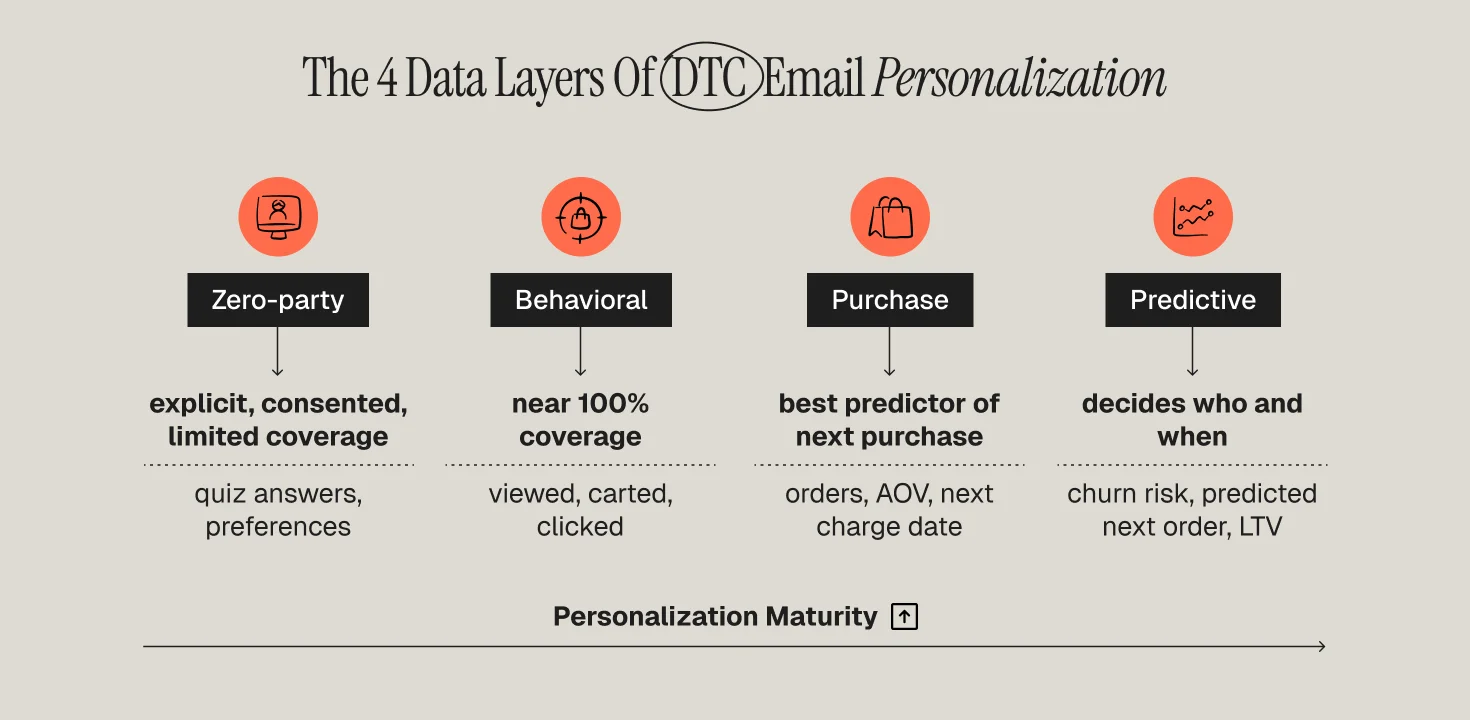
Personalization is only as good as the data feeding it. DTC brands typically have access to four layers, and the maturity of your program tracks how many you actually use in production.
Layer 1: Zero-party data
Zero-party data is what customers tell you on purpose: quiz answers, preference center choices, skin type, goal, household size, gifting versus self-purchase. It is explicit, consented, and immediately usable in Liquid or template logic. The catch is coverage: a quiz that 20% of subscribers complete only personalizes 20% of your list. Read our definition of zero-party data for collection tactics that lift completion.
Layer 2: Behavioral data
Behavioral data is what people do: viewed product, added to cart, opened, clicked, searched, visited a category three times this week. This layer has near-100% coverage because everyone leaves a trail, which is why browse and cart flows carry so much of email revenue. If your site tracking is not firing "Viewed Product" with product ID, category, and price, fix that before touching any template.
Layer 3: Purchase and subscription data
Orders, order lines, AOV, first-purchase category, subscription status, next charge date, refund history. Purchase data is the most reliable predictor of what someone will buy next, and it enables replenishment timing, cross-sell logic, and RFM tiers. Our guide to RFM analysis for segmentation shows how to turn raw order history into usable tiers.
Layer 4: Predictive data
Predicted next order date, churn risk score, predicted LTV, predicted gender, and product affinity scores. Klaviyo exposes some of these natively; Customer.io and Braze usually take them from a warehouse or a CDP as profile attributes. Predictive data does not replace the first three layers, it decides who gets which treatment and when.
Segmentation vs 1:1 dynamic content: which one, and when
There are two ways to make an email relevant. You can split the audience into segments and write a version for each, or you can send one template whose blocks render differently for each recipient. Most brands need both, applied to different jobs.
When segmentation wins
Segmentation is the right tool when the message angle changes, not just the product. A first-time buyer and a fifth-time buyer should not get the same launch email; the copy, the social proof, and the offer are different. Segmentation is also easier to QA and to report on. The limit is operational: past six to eight segments per send, version sprawl eats the team.
When 1:1 dynamic content wins
Dynamic content is the right tool when the structure of the email is the same but the objects inside it change: recommended products, the specific item left in cart, the next replenishment SKU, the nearest store, the loyalty balance. One template, one QA pass, infinite variants. Klaviyo's show/hide logic toggles blocks on profile or event variables. Customer.io renders Liquid against customer attributes, event payloads, and collections. Braze's Connected Content calls any API at send time to inject live data such as inventory or recommendations.
The practical rule
Segment on intent and lifecycle stage. Personalize dynamically on objects and timing. If you find yourself building segment 14 to handle "bought category X but not Y," that is a dynamic content job.
How Klaviyo, Customer.io, and Braze execute personalization
The three platforms Propel works in most reach the same outcomes by different routes. Choosing between them for personalization is mostly a question of where your data lives and how technical your team is. Our Klaviyo vs Braze mid-market comparison covers the wider platform decision.
Klaviyo
Klaviyo's strength is that ecommerce data is native. Shopify orders, product catalog, viewed product, and predictive analytics (next order date, churn risk, predicted CLV) arrive without engineering. Klaviyo's 2026 benchmark set across 183,000+ customers found that flows are 5.3% of sends but roughly 41% of email revenue, with roughly 18x higher revenue per recipient than campaigns. That gap is the personalization gap: flows fire on individual behavior, campaigns fire on the calendar.
Customer.io
Customer.io is built for teams that own their event schema. Everything is an attribute or an event, Liquid runs everywhere, and collections let you personalize from external data tables without a developer for each campaign. It rewards a clean data model and punishes a messy one. See how we build personalized flows without manual work in Customer.io.
Braze
Braze goes furthest on real-time and cross-channel. Connected Content pulls from any API at send time, Canvas orchestrates multi-step journeys across email, push, in-app, and SMS. It suits brands with a mobile app or a large engineering team that can maintain endpoints. It is overkill for a Shopify brand with one email marketer.
Where personalization actually lifts revenue: five lifecycle moments
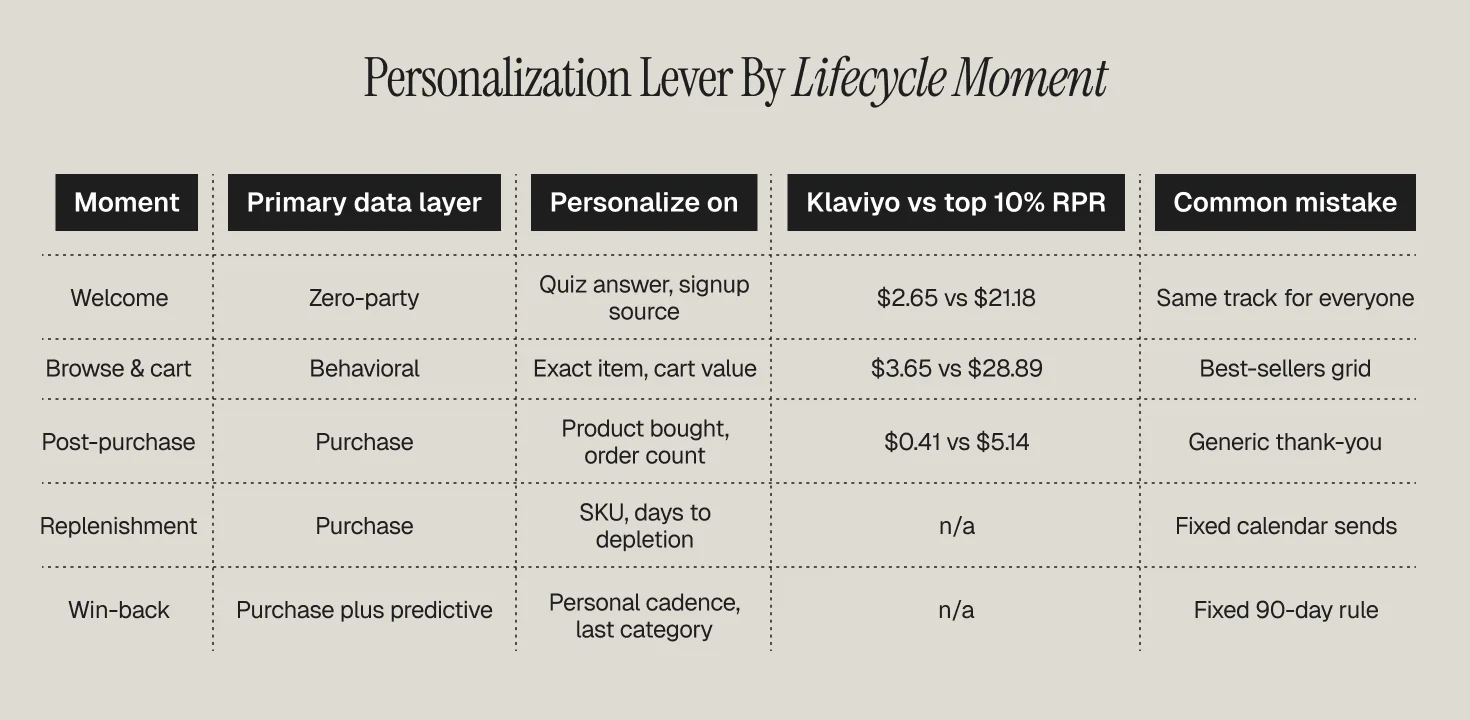
Personalization is not evenly valuable across the lifecycle. Klaviyo's flow benchmark data puts average revenue per recipient at $3.65 for abandoned cart, $2.65 for welcome, $1.07 for browse abandonment, and $0.41 for post-purchase, with top-decile brands at $28.89, $21.18, $7.21, and $5.14 respectively.
1. Welcome
Zero-party data does its best work here. A quiz answer, a signup source, or a first-viewed category should decide which welcome track a subscriber enters. Our welcome series guide covers sequencing.
2. Browse and cart abandonment
Baymard's meta-analysis of 50 studies puts the average cart abandonment rate at 70.22%. Split by cart value and by new versus returning, and vary the incentive accordingly. More on the split in cart vs browse abandonment flows.
3. Post-purchase
Post-purchase is the lowest average RPR because most brands send the same "thanks, here is how to use it" email to everyone. Personalize on the actual product bought, on order count, and on category.
4. Replenishment
Replenishment is pure purchase-data personalization: SKU, quantity, and days-to-depletion. See what a replenishment flow is for timing math.
5. Win-back
Win-back should key off each customer's own purchase cadence, not a fixed 90-day rule. Our win-back flow playbook has the tiering.
A four-level personalization maturity model
Level 1: Tokens and broad segments
First name, maybe a location. Flows exist but every recipient gets the same content. Most brands under $5M are here.
Level 2: Behavioral triggers with dynamic objects
Browse, cart, and post-purchase flows fire on events and render the actual product. This level typically doubles flow revenue relative to Level 1 (Propel client benchmark).
Level 3: Lifecycle-stage orchestration
Every subscriber sits in one lifecycle state that drives eligibility for every message. Read our behavioral segmentation guide for state design.
Level 4: Predictive and cross-channel
Churn risk, predicted next order, and product affinity choose the treatment, and holdouts run permanently to prove incremental lift.
Measuring personalization: revenue per recipient and holdouts
Open rate is not a personalization metric. Two measures matter.
Revenue per recipient (RPR). Divide attributed revenue by number of recipients for each flow and campaign version. Our explainer on revenue per email covers attribution windows.
Holdouts. Keep 5 to 10% of each flow's eligible audience in a no-send group and compare purchase rate and revenue over 30 to 60 days. Benchmarks for context are in our ecommerce email benchmarks 2026 piece.
Common mistakes that cap personalization ROI
- Personalizing on dirty data. A wrong first name is worse than no name. Audit attribute fill rates before you use them in copy.
- Recommendation blocks that ignore what was just bought. Recommending the same SKU someone ordered yesterday erodes trust in every future recommendation.
- Segment sprawl. Twenty segments nobody can explain. Collapse to lifecycle state plus two or three intent signals.
- Discounting everyone equally. Offer depth should follow margin, AOV, and churn risk.
- No holdout. Without one you are reporting attribution, not lift.
- Skipping SMS and push coordination. See how to personalize across email, SMS, and push.
How Propel builds personalization at scale for DTC brands
Propel runs personalization as a system: data model first, lifecycle states second, flows and dynamic content third, holdouts throughout. Our retention marketing services cover the flow build and testing program, and our lifecycle marketing services cover the data and orchestration layer beneath it.
Frequently Asked Questions
What is email personalization at scale for DTC brands?
Email personalization at scale is the practice of automatically changing content, products, timing, and offers for each recipient using zero-party, behavioral, purchase, and predictive data. It is delivered through triggered flows and dynamic content blocks rather than manually built campaign versions. The measure of success is incremental revenue per recipient, not open rate.
Should DTC brands use segmentation or dynamic content?
Both, for different jobs. Segment when the message angle changes by lifecycle stage or intent, such as first-time versus repeat buyers. Use dynamic content when the template is the same but the objects change, such as the abandoned item or recommended products. A practical limit is six to eight segments per send.
Which platform is best for email personalization: Klaviyo, Customer.io, or Braze?
Klaviyo is best when ecommerce data is native (Shopify) and the team is non-technical. Customer.io is best for teams that own their event schema and want Liquid, collections, and objects for precise logic. Braze suits brands with apps and engineering resources that need real-time API-driven content and cross-channel orchestration.
Where does personalization lift revenue most in the DTC lifecycle?
Cart and browse abandonment, welcome, replenishment, and win-back show the largest gaps between average and top-decile performance. Klaviyo's benchmark data shows abandoned cart RPR averaging $3.65 versus $28.89 for the top 10%, and welcome averaging $2.65 versus $21.18. Post-purchase is the most under-personalized moment.
How do you measure whether email personalization is working?
Track revenue per recipient per flow and per campaign version, then validate with holdouts: keep 5 to 10% of each eligible audience unsent and compare purchase rate and revenue over 30 to 60 days. Report incremental revenue, not attributed revenue.