Summarize this documentation using AI
Key Takeaways
- Email fatigue is what happens when subscribers receive more email, or less relevant email, than they are willing to engage with. It shows up as disengagement long before it shows up as unsubscribes.
- The clearest early signal is declining clicks among your previously engaged cohort, not a falling open rate across the whole list.
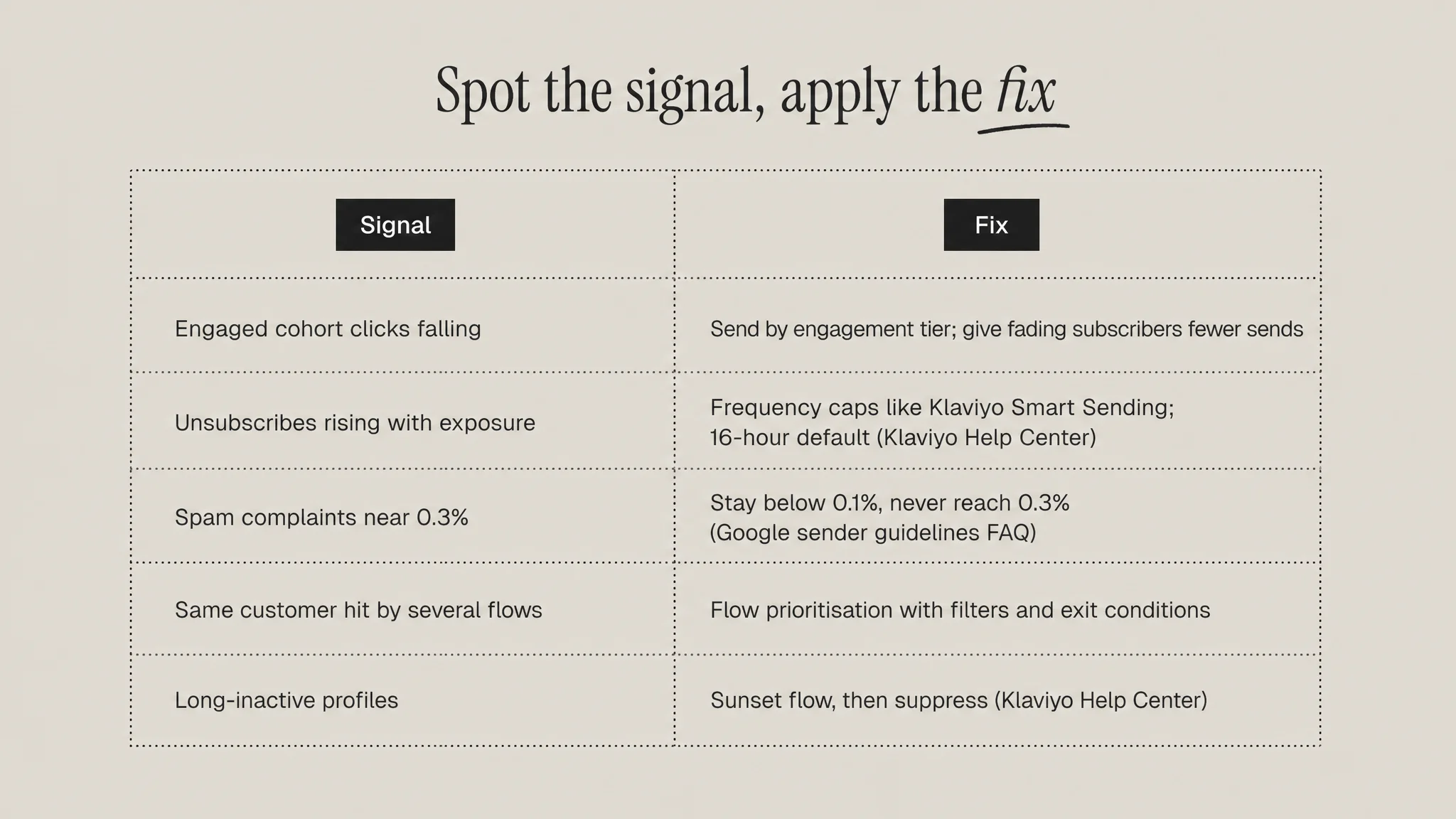
- Fatigue is now a deliverability problem as well as an engagement one: Gmail and Yahoo require bulk senders to keep spam rates below 0.3%, and Google advises staying below 0.1%.
- The three usual causes are raw frequency, irrelevant content and overlapping flows and campaigns hitting the same person in the same day.
- The fixes are operational: frequency caps, engagement-based sending tiers, a preference centre, a sunset flow and explicit flow prioritisation.
Email fatigue is the gradual decline in subscriber engagement caused by receiving too many emails, or emails that feel irrelevant, from the same sender. It is measured through falling clicks and opens among engaged subscribers, rising unsubscribes and, most dangerously, rising spam complaints.
It rarely arrives as a single bad send. It builds quietly across weeks of extra campaigns, overlapping automations and broad sends to people who stopped caring, until inbox providers start treating your mail as unwanted.
What email fatigue actually is
Every subscriber has a tolerance for how often they want to hear from a brand. That tolerance depends on how recently they bought, what they bought and how useful your last few emails were. When volume or irrelevance pushes past it, the subscriber responds in one of four ways: they ignore you, they unsubscribe, they mark you as spam, or they keep engaging. Only the last outcome is good, and the first is the most common, which is why fatigue is easy to miss.
The key distinction is between list-level decline and cohort-level decline. A list that is growing quickly will naturally show softer average engagement as new, less committed subscribers arrive. That is dilution, not fatigue. Fatigue is when the same people who used to click stop clicking.
How to spot it: the signals
Declining engagement among engaged cohorts
Build a fixed cohort of subscribers who clicked in a set earlier period and track their click rate over the following weeks. If that cohort's click rate falls while send volume rises, you are looking at fatigue. Clicks are more reliable than opens here, because privacy features such as Apple Mail Privacy Protection inflate open data and make open trends hard to read. Our guide to email open rate benchmarks explains why open figures diverge so widely between sources.
Rising unsubscribes per send
Watch unsubscribe rate per campaign alongside how many marketing emails each recipient received in the previous seven days. If the rate climbs with exposure, frequency is the driver. An unsubscribe is the healthier exit: the subscriber leaves without damaging your sender reputation.
Rising spam complaints
The spam button is the exit you cannot afford. The basic calculation is:
Spam complaint rate = spam complaints / emails delivered to the inbox x 100
Yahoo states that it calculates spam rate based on mail delivered to the inbox, so spam-foldered mail does not dilute the figure. A send of 100,000 inboxed emails that generates 300 complaints sits at 0.3% (an illustrative example), which is the ceiling both major mailbox providers now enforce.
The Gmail and Yahoo rules that raised the stakes
From February 2024, Google and Yahoo began enforcing new requirements on senders. Under Google's email sender guidelines, all senders must keep spam rates reported in Postmaster Tools below 0.3%, and senders of 5,000 or more messages a day to Gmail accounts face additional requirements, including one-click unsubscribe for marketing messages. Google's sender guidelines FAQ goes further: senders should keep their spam rate below 0.1% and prevent it from ever reaching 0.3% or higher. The same FAQ lists unsubscribe requests not honoured within 48 hours as a failure condition.
The Yahoo Sender Hub best practices set the same 0.3% ceiling, require a working list-unsubscribe header supporting one-click unsubscribe for bulk senders, and ask senders to honour unsubscribes within two days.
| Requirement | Gmail | Yahoo |
|---|---|---|
| Spam rate ceiling | Below 0.3%, ideally below 0.1% | Below 0.3% |
| One-click unsubscribe | Required for 5,000+ a day senders | Required for bulk senders |
| Honour unsubscribes | Within 48 hours | Within 2 days |
The practical consequence: fatigue used to cost you a few percent of engagement. Now a fatigued list can push complaints over the threshold and pull every email you send, including your highest-revenue flows, toward the spam folder. That is why fatigue belongs inside any discussion of email deliverability.
What causes email fatigue
Frequency
The obvious cause. Brands add campaigns to hit revenue targets, and each extra send produces a little revenue on its own, so the cost stays hidden until engagement across the whole program softens. Measuring revenue per email alongside total revenue shows when marginal sends stop paying for themselves.
Irrelevance
Volume people care about is tolerated far longer than volume they do not. A subscriber who bought a single gift once and now receives every new-arrival email is a fatigue risk at almost any frequency.
Flow overlap
This is the cause most teams underestimate. A customer who browses, abandons a cart and then buys can be enrolled in browse abandonment, cart abandonment, post-purchase and a promotional campaign within the same 48 hours. Each flow is sensible in isolation; together they read as spam.
How to fix it
Set frequency caps
In Klaviyo, Smart Sending limits how many messages a profile can receive within a set window. The email default is 16 hours, and SMS and push default to 24 hours, with each channel managed independently. Smart Sending applies only to marketing messages; transactional messages are never skipped. Klaviyo's guidance on flow sending frequency notes that flow messages do not enable Smart Sending by default, so it must be switched on per message.
Send by engagement tier
Do not send every campaign to everyone. Split the list into tiers, such as recently engaged, cooling and inactive, and give each a different cadence. Engaged subscribers get the full calendar; cooling subscribers get your strongest sends only. This is behavioral segmentation applied to volume rather than content.
Offer a preference centre
Let subscribers choose fewer emails or specific topics instead of leaving entirely. Yahoo explicitly allows the unsubscribe link in the body to direct to a preference page, so a "send me less" option can sit in the same place as the exit.
Run a sunset flow
Subscribers who no longer engage drag down every metric and raise complaint risk. Klaviyo's sunset flow guidance recommends a segment of profiles created at least 180 days ago that have received at least five emails in the last 72 weeks with no opens, clicks, site activity or orders, then giving them a final chance before suppression. Our explainer on sunset flows covers the sequence design.
Prioritise flows explicitly
Decide which automations outrank which. A cart abandonment email should suppress a browse abandonment email; a recent purchase should pause promotional campaigns for a few days. Use flow filters, exit conditions and Smart Sending together so a single customer moment triggers one message, not three.
Common mistakes
- Reading fatigue from open rates. Privacy-inflated opens hide disengagement. Use clicks, conversions and complaints.
- Turning Smart Sending on for everything. Applied to time-sensitive flows such as cart abandonment, it can skip your highest-intent messages. Cap campaigns first.
- Cutting frequency for everyone. Engaged subscribers often tolerate more. Reduce volume for the tiers that are fading.
- Suppressing without a sunset. Some inactive subscribers will re-engage with one direct question. Ask before you remove them.
How fatigue connects to the rest of the lifecycle program
Fatigue is a program-level failure, not a campaign-level one. It sits where your campaign calendar meets your automations, which is why fixing it usually means auditing both together. The architecture in the best Klaviyo flows for DTC brands assumes those flows are prioritised against each other, and a fatigued list also lowers the ceiling on any win-back flow, because lapsed customers who already learned to ignore you are harder to recover.
Treat complaint rate as a guardrail metric reviewed weekly, engaged-cohort clicks as your early warning, and frequency as something each tier earns rather than something the calendar imposes.
Sources
- Google, Email sender guidelines (Gmail Help)
- Google, Email sender guidelines FAQ (Gmail Help)
- Yahoo Sender Hub, Sender Best Practices
- Klaviyo Help Center, Understanding Smart Sending in Klaviyo
- Klaviyo Help Center, How to optimize your flow sending frequency
- Klaviyo Help Center, How to create a sunset flow
Frequently Asked Questions
How many emails per week is too many?
There is no universal number. The right frequency depends on how engaged each subscriber is and how relevant the content is. Highly engaged buyers often tolerate several campaigns a week, while subscribers who have not clicked in months may complain at one. Instead of picking a single cadence, segment by recent engagement and test frequency per tier, watching clicks, unsubscribes and spam complaints rather than opens to decide when to pull back.
What spam complaint rate will get my emails blocked by Gmail?
Google's sender guidelines require bulk senders to keep the spam rate shown in Postmaster Tools below 0.3%, and its FAQ recommends staying below 0.1%. Rates above 0.3% make a sender ineligible for delivery support and mitigation, and sustained high rates lead to rate limiting, rejections or spam foldering. Yahoo applies the same 0.3% ceiling, so treat 0.1% as your working limit.
Is email fatigue the same as list fatigue?
They are closely related. List fatigue usually describes a whole list becoming less responsive over time, often because it is old or rarely cleaned. Email fatigue describes the subscriber-level reaction to too many or irrelevant messages. In practice one causes the other: sending too much to everyone creates fatigued subscribers, and a list full of fatigued subscribers drags down engagement and sender reputation for the whole program.
Does Klaviyo Smart Sending apply to flows automatically?
No. According to Klaviyo's help documentation, flow messages do not have Smart Sending enabled by default, so it has to be switched on individually in each message's settings. The default email window is 16 hours. Be selective: turning it on for urgent, high-intent flows such as abandoned cart can cause those emails to be skipped because a campaign went out earlier that day. Many teams cap campaigns and lower-priority flows first.
Should I delete unengaged subscribers?
Run them through a sunset flow first rather than deleting them outright. A short sequence asking whether they still want to hear from you gives some people a chance to re-engage or reduce frequency. Those who stay silent can then be suppressed, which protects engagement metrics and spam rates. Suppression also keeps the record, so you avoid re-importing the same addresses later by accident.