
Summarize this documentation using AI
In-app messaging is any message delivered to a user inside your app while they are actively using it: modals, banners, tooltips, slide-ups, and full-screen takeovers, triggered by behavior rather than sent to a device's lock screen.
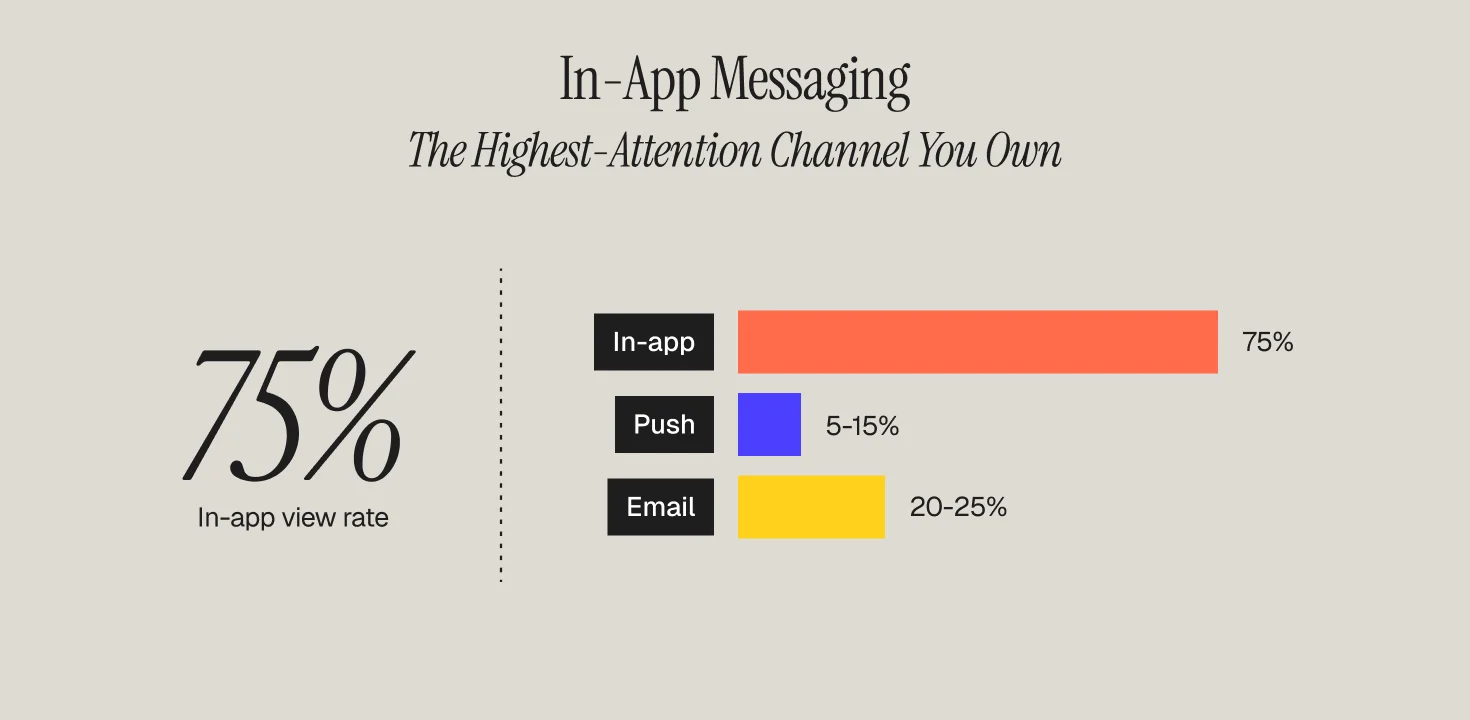
The distinction from push matters more than it sounds. Push interrupts someone who is elsewhere; in-app converses with someone who is already here. That is why the benchmark gap is so wide: in-app messages see view rates around 75%, roughly three times the open rate of push notifications, and apps that use in-app messaging well see retention improve by about 30%.
This definition guide covers the message types, where in-app fits against push and email, the benchmarks that matter, and the flows where in-app does its best retention work.
In-App Messaging vs Push Notifications vs Email
The three channels form a reach hierarchy based on where the user is. In-app reaches users who are present: no opt-in required, highest attention, zero deliverability risk. Push reaches users who are absent but reachable: opt-in gated (60% blended opt-in, with iOS around 51% and Android around 81%), with reaction rates of 4.6% on Android and 3.4% on iOS. Email reaches everyone, including users who uninstalled, and carries the most depth per message.
Used together they compound: onboarding campaigns that pair a push with a second channel like in-app or email increase two-month retention by 130%, versus 71% for push alone. The channels are teammates with different jobs, a principle we unpack in triggered messaging and our push notification strategy playbook.
The 5 Types of In-App Messages (And When to Use Each)
1. Modals and Full-Screen Takeovers
Highest attention, highest interruption cost. Reserve for moments that justify a full stop: onboarding steps, major feature launches, plan upgrades, and critical account actions. One per session, maximum.
2. Banners and Slide-Ups
Persistent but polite: announcements, promos, and status updates that ride along the top or bottom of the screen without blocking the task.
3. Tooltips and Coach Marks
Contextual pointers attached to specific UI elements. The workhorse of feature adoption: show the tooltip when the user is near the feature, not on a calendar schedule.
4. Cards and Content Feeds
A persistent inbox or feed of messages users browse on their own time. Ideal for content-rich apps where messages have a shelf life.
5. Surveys and NPS Prompts
Micro-forms delivered at natural pauses. Because in-app view rates are so high, this is the cheapest voice-of-customer channel you own.
In-App Messaging Benchmarks (2026)
The numbers that matter when you build the business case. View rate: ~75% average, vs 5-15% push open rates. Engagement: users who receive in-app messages show +131% higher engagement than users who receive none, per Braze research. Retention: roughly +30% when properly implemented, and AppsFlyer research finds users receiving personalized in-app messages retain at 61-74% within 28 days versus 49% for generic messaging. Personalization is not a garnish here; it is most of the effect, the same behavioral segmentation logic that drives every other retention channel.
The 4 Retention Flows Where In-App Messaging Earns Its Keep
- Onboarding completion. Guided in-app flows at drop-off points are the fastest churn fix in mobile: one app that added proactive in-app messages at known abandonment moments cut onboarding churn by over 35% and lifted overall retention 27%.
- Feature adoption. Users who adopt a second core feature retain disproportionately better. Tooltip campaigns triggered by usage context move this number more cheaply than any acquisition dollar.
- Upgrade and paywall moments. In-app is where monetization conversations belong, because the user is mid-value. Trigger on usage ceilings, not calendars.
- Save-the-sale moments. Cancellation and downgrade flows intercepted with a well-timed in-app offer (pause, skip, plan switch) recover revenue that email discovers too late. This is a core part of the mobile app retention programs we run, and of any full app lifecycle program.
Choosing an In-App Messaging Platform
Every major mobile engagement platform ships in-app messaging: Braze and MoEngage lead for consumer apps at scale (compared in our Braze vs MoEngage breakdown), OneSignal wins on speed for earlier-stage apps, and Customer.io fits teams orchestrating app plus web from one profile. The differentiators that actually matter: trigger granularity, template flexibility without app releases, frequency capping shared with push, and experiment tooling. Cross-channel coordination is the point, as we argue in personalized campaigns across email, SMS, and push.
How Propel Uses In-App Messaging
At Propel, in-app is one layer of the lifecycle programs we build for consumer apps and subscription brands: orchestrated with push, email, and SMS from a single customer profile, so every channel knows what the others said.
Frequently Asked Questions
What is in-app messaging?
In-app messaging is any message shown to a user inside an app while they're actively using it, like modals, banners, tooltips, card feeds, and surveys, triggered by their behavior rather than sent to their lock screen.
How is in-app messaging different from push notifications?
Push reaches users who have left the app and requires opt-in; in-app reaches users who are already inside the app with no opt-in needed. That's why in-app view rates run around 75% versus 5-15% for push open rates.
What are the main types of in-app messages?
Five types cover most use cases: modals and full-screen takeovers for high-attention moments, banners and slide-ups for lower-friction announcements, tooltips and coach marks for feature adoption, card feeds for content-rich inboxes, and surveys for voice-of-customer capture.
What retention lift can in-app messaging drive?
Apps that implement in-app messaging well see roughly 30% better retention, and personalized in-app messages retain users at 61-74% within 28 days versus 49% for generic messaging, per AppsFlyer research.
Which platforms support in-app messaging?
Braze and MoEngage lead for consumer apps at scale, OneSignal is fastest to implement for earlier-stage apps, and Customer.io fits teams that need to orchestrate app and web messaging from one customer profile.