
Summarize this documentation using AI
A push notification strategy is the system that decides which users get which message, on which trigger, at which frequency, so that notifications drive retention instead of uninstalls. Done right, push is the cheapest re-engagement channel a consumer app owns. Done wrong, it is the fastest way to lose a user you paid $40 to acquire. This guide covers permission priming, segmentation, triggers, frequency caps, and the measurement loop, with benchmarks for health and wellness apps where the stakes of a deleted app are highest.
Key Takeaways
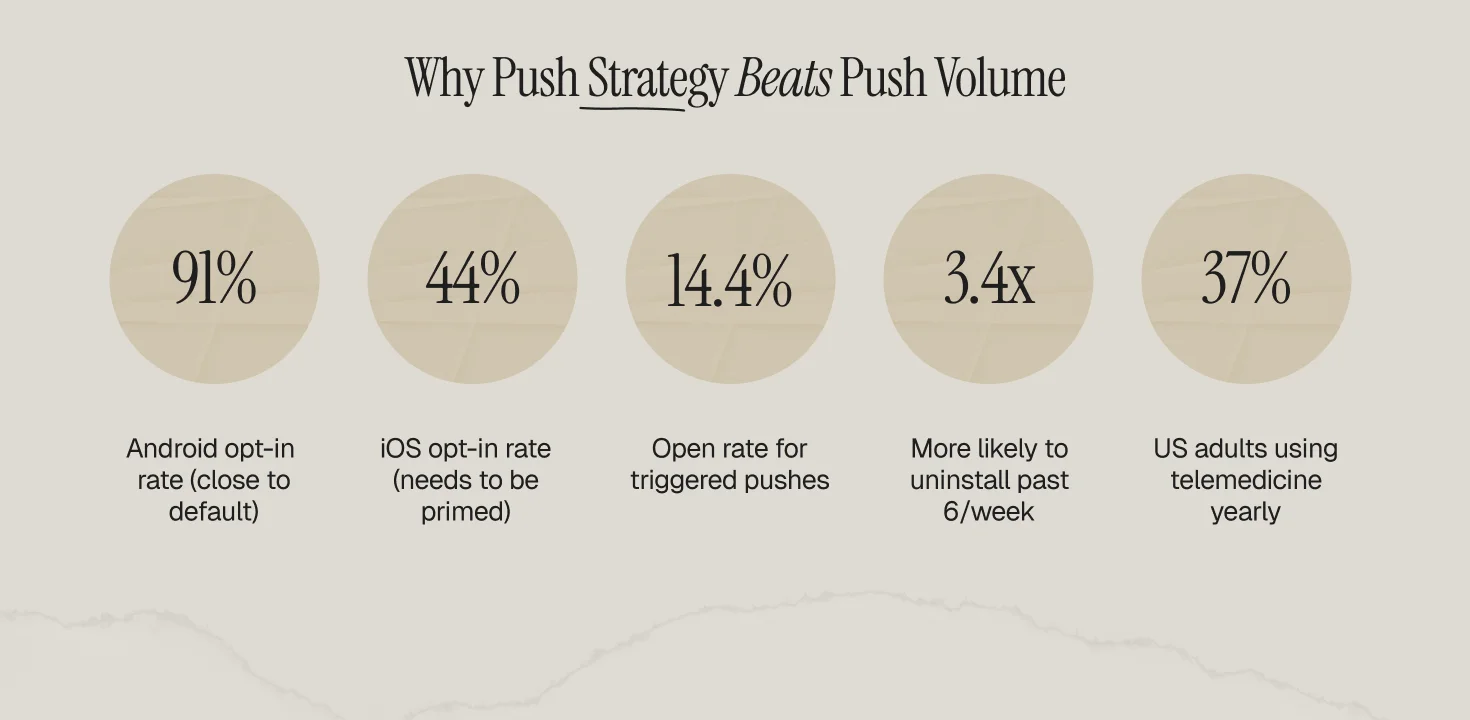
- The overall push opt-in rate is 67.5% across platforms, but it splits into roughly 91% on Android and 44% on iOS, so iOS permission priming is where strategies win or die.
- Contextual, behavior-triggered pushes get a 14.4% open rate versus 4.19% for generic blasts, a 3.4x difference from targeting alone.
- Users receiving more than 6 pushes per week from one brand are 3.4x more likely to uninstall within 30 days than users receiving 1-2.
- For health apps, push is a clinical adherence tool, not just a marketing channel: 37% of US adults used telemedicine in a 12-month period, and those journeys depend on refill, dose, and appointment nudges.
- The frequency cap, quiet hours, and trigger map below are the same system we describe in our lifecycle marketing handbook, applied to the push channel.
What a Push Notification Strategy Actually Is
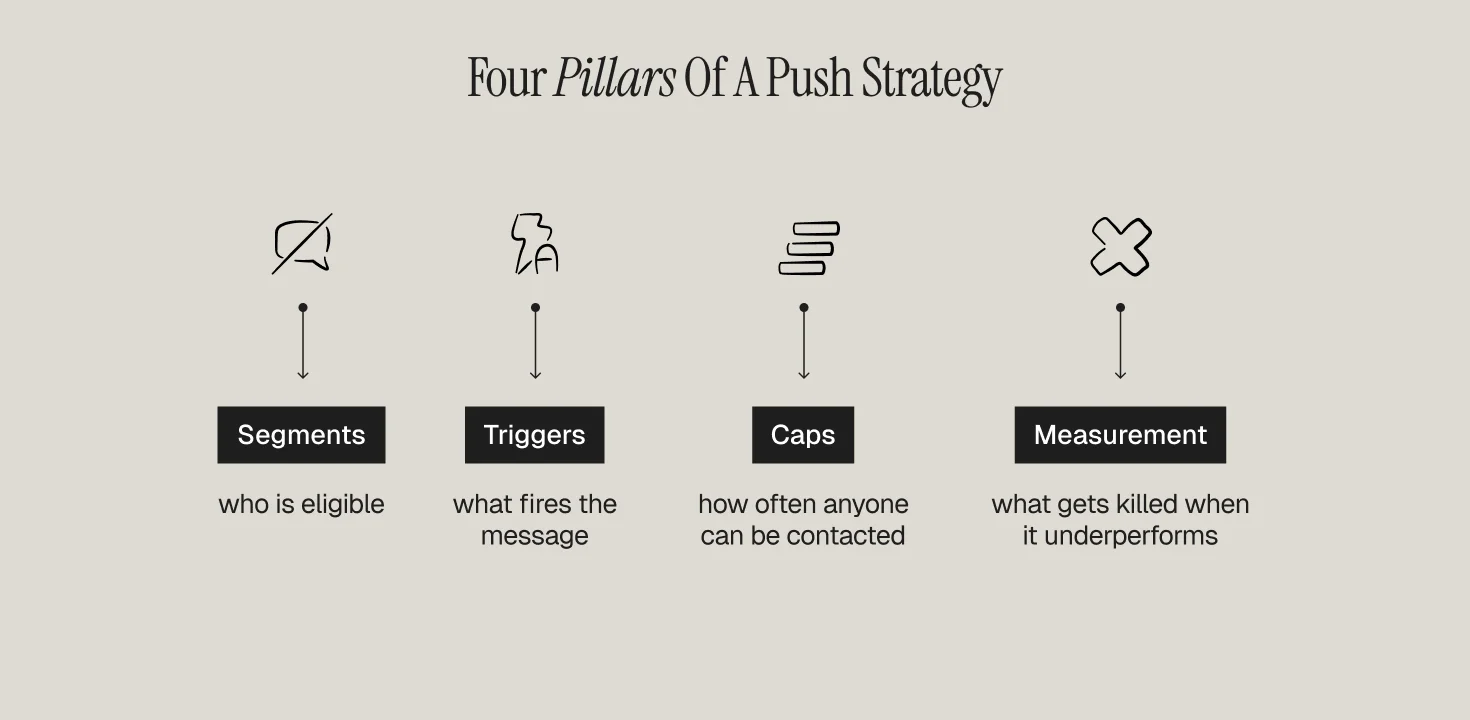
Most consumer apps do not have a push strategy. They have a send button. A strategy is four documented decisions: who is eligible (segments), what fires the message (triggers), how often anyone can be contacted (caps), and what gets killed when it underperforms (measurement). If any of the four is missing, the channel decays. The decay is measurable: opt-out rates climb, notification centers get muted at the OS level, and the app joins the graveyard of icons users scroll past.
The economics matter because push is owned, not rented. Paid channels charge you per re-engagement. Push costs nothing per send, which is exactly why teams over-send and burn it.
Step 1: Earn the Permission (Priming)
On Android the permission is close to default: roughly 91% opt in. On iOS it is a coin flip at ~44%. The difference between a 30% and a 60% iOS opt-in rate is usually one screen: the pre-permission prime. Show a custom screen BEFORE the OS prompt that names the specific value ("Get notified when your lab results are ready"), then trigger the native prompt only after a yes. Apps that fire the OS prompt on first open waste their one guaranteed impression on a user who has no reason to trust them yet.
Timing rules that hold up across portfolios: prime after the first value moment (first workout logged, first order placed, first consult booked), never on session one's first screen; re-prime declined users only at a moment of obvious need ("Want a reminder when your refill ships?").
Step 2: Segment Before You Send
The 14.4% vs 4.19% open-rate gap between contextual and generic pushes is the single biggest lever in the channel. Minimum viable segmentation for a consumer app is four cohorts: new (first 7 days), activated (hit the core action), at-risk (core action stopped), and dormant (30+ days silent). Each cohort gets its own trigger set and its own cap. Sending the same push to a day-2 user and a day-200 user is the push equivalent of the retention mistake of sending one email to first-time and fifth-time buyers. We map the behavioral signals that should drive these cohorts in our guide to behavioral triggers in retention marketing.
Step 3: Build the Trigger Map
Rank triggers by intent, then automate down the list:
- Transactional (order shipped, results ready, appointment confirmed): near-100% expectation, always on, exempt from caps.
- Behavioral (streak about to break, cart abandoned, dose window open): the workhorse tier where the contextual open-rate advantage lives.
- Lifecycle (day-3 activation nudge, day-21 habit consolidation, day-45 win-back): calendar-relative to signup, personalized by cohort.
- Promotional (sale, feature launch): lowest intent, strictly capped, first to cut.
Apps like Calm run this hierarchy well, anchoring push to a user-chosen daily mindfulness window rather than a marketing calendar. MyFitnessPal's streak and logging reminders are another reference implementation, covered in our MyFitnessPal retention teardown.
Step 4: Set Frequency Caps and Quiet Hours
The uninstall math is brutal: more than 6 pushes a week makes a user 3.4x more likely to uninstall within 30 days. Defaults that survive contact with real portfolios: 3-5 non-transactional pushes per user per week, hard cap; quiet hours 9pm-9am local unless the user sets a window; promotional pushes never more than 2 of the weekly allowance; every push suppressed if the user completed the target action in the last 24 hours. Caps are per-user, not per-campaign — the user experiences your total volume, not your org chart.
Step 5: Measure the Right Metrics
Open rate alone rewards clickbait. Track four numbers weekly: opt-in rate by platform, open rate by trigger tier, action completion within 24h of the push, and uninstall/opt-out rate within 48h of each campaign. Kill any recurring campaign whose 48h opt-out exceeds its 24h action completion. Feed at-risk signals (declining opens, muted channels) into your churn model — the same early-warning logic in our guide to identifying users about to churn.
Benchmarks Table
Where Health and Wellness Apps Differ
For telehealth, GLP-1, HRT, and supplement apps, push is not a growth hack; it is part of the care experience. 37% of US adults used telemedicine within a 12-month window, and the retention curve of those services is decided in refill windows, dose reminders, and appointment follow-ups — moments where a missed notification is a missed clinical outcome. Three adjustments: (1) treat adherence pushes (dose, refill, appointment) as transactional tier, uncapped and unpromotional; (2) keep PHI out of the lock screen — "Your order has an update" beats naming the medication; (3) route around notification fatigue with channel arbitration, falling back to email or SMS when a push goes unopened for 24 hours. The first 30 days carry most of the weight, the same pattern we document in how healthtech apps improve customer retention and in our fitness and weight-loss app retention guide.
Frequently Asked Questions
What is a good push notification opt-in rate?
Around 67.5% blended, but expectations should split by platform: ~91% on Android, ~44% on iOS. If your iOS opt-in is under 40%, fix permission priming before anything else.
How many push notifications should an app send per week?
3-5 non-transactional pushes per user per week is the defensible ceiling. Beyond 6, uninstall risk rises 3.4x within 30 days. Transactional and adherence messages sit outside the cap.
What is the best time to send push notifications?
The honest answer is: the user's own behavioral window. Trigger off their historical active hours rather than a global send time, and enforce quiet hours (9pm-9am local) as a floor.
Do push notifications improve retention?
Yes, when contextual. Contextual pushes open at 14.4% versus 4.19% for generic ones — but volume without segmentation reverses the effect and drives uninstalls.
How is push different for healthcare apps?
Adherence nudges (refill, dose, appointment) are part of care delivery, exempt from marketing caps, and must keep protected health information off the lock screen.

![Featured image: How HealthTech Apps Can Improve Customer Retention in 2025? [Expert Guide]](https://cdn.prod.website-files.com/69bbf9f7f2a3f75341357ebc/69f4b4952b919dd9bd4f1aa9_69c7cebde8051f4e1dd257e4_698ae4536010effb729a65f9_684e6b4fbf7e32c28a8f0eae_Health%25252520Tech%25252520Retention%25252520(1).png)


![Featured image: How to Identify Users Who Are About to Churn [2026 Guide for Retention Marketers]](https://cdn.prod.website-files.com/69bbf9f7f2a3f75341357ebc/69f4b4ad14f8c675169e0cba_69c7cec26de0e50005c6e495_698ae45b9ecbf9983380f731_6909f1e088d37bed0144f247_Identify%25252520User%25252520churn-2-min.png)