Summarize this documentation using AI
Key Takeaways
- A preference center is the page where subscribers control what you send them, how often, and on which channel, instead of facing a single all-or-nothing unsubscribe.
- The strongest preference centers offer five controls: topics, frequency, channel, a pause option, and a few optional profile fields that capture zero-party data.
- It does not replace one-click unsubscribe. Gmail requires bulk senders to support RFC 8058 one-click unsubscribe, and a link to a preference page does not count as one-click.
- CAN-SPAM allows a menu of opt-out choices but requires an option to stop all marketing email. GDPR requires that withdrawing consent be as easy as giving it.
- Klaviyo, Braze and Customer.io all ship native versions, built around lists, subscription groups and topics respectively.
- Every choice a subscriber makes is a segmentation signal. Most brands collect it and never route on it.
A preference center is a hosted page, linked from every marketing email and often from SMS and the account area, where subscribers choose which types of messages they receive, how often, and through which channel, without having to unsubscribe from everything. It turns the unsubscribe moment from a binary exit into a set of adjustable controls.
For a retention program, it does two jobs at once. It keeps people on the list who would otherwise leave entirely, and it collects declared preferences you can use to send fewer, better targeted messages.
What a preference center is (and is not)
An unsubscribe page has one outcome: the subscriber is removed. A preference center has many: a subscriber can drop promotional email but keep product launches, move from daily to weekly, switch from SMS to email, or tell you their skin type so you stop sending irrelevant routines.
It is also not a consent form. Consent is collected at sign-up, checkout or keyword opt-in. The preference center is where that consent is maintained over time, refined, narrowed or withdrawn.
What to include in a preference center
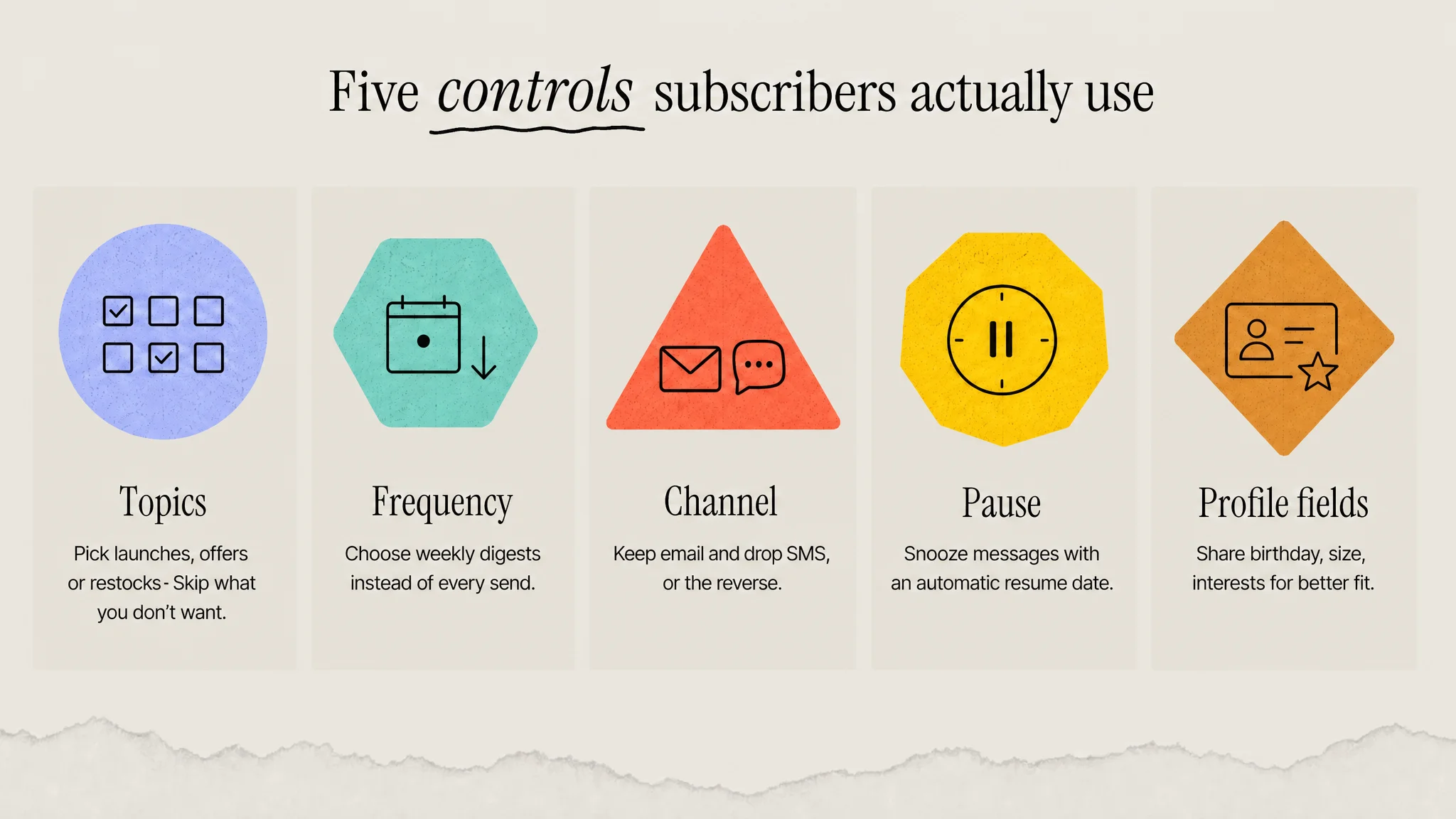
The useful components fall into five groups. Each one closes a specific reason people leave.
1. Topics
Let people choose content categories that map to how you actually send: new arrivals, sales and offers, restock alerts, editorial or education, loyalty updates. Keep the list short, usually four to seven options, and name them the way a customer would, not the way your team labels campaigns internally.
2. Frequency
Offer a lower-volume option, such as a weekly digest or only major announcements. When the problem is volume rather than relevance, a frequency choice gives subscribers a way to stay without feeling overwhelmed. Only offer it if your sending logic can honour it.
3. Channel
Show email, SMS and push side by side so a subscriber can keep one and drop another. Someone tired of texts may still want order updates and launches by email. Channel choice works best when your email and SMS calendars are planned together, which is covered in how to integrate email and SMS campaigns.
4. Pause or snooze
A temporary pause, such as 30 or 90 days, keeps a subscriber who is simply busy, has just bought, or is avoiding a sale season. It is the closest thing to a save offer that does not involve a discount. Automate the resume date and tell people when you will be back.
5. Zero-party data fields
A small number of optional fields, such as birthday, product interests, size or sizing preference, or replenishment timing, turn the page into a data capture point. This is zero-party data: information a customer intentionally gives you, which is more reliable than anything inferred. Ask only for fields you will actually use in a flow or segment.
Above all of these sits a clear option to unsubscribe from all marketing. It is legally required, and hiding it only pushes frustrated subscribers toward the spam button.
How it relates to unsubscribe rules
A preference center sits alongside unsubscribe requirements, not in place of them. Three sets of rules matter most for B2C senders.
Gmail and Yahoo one-click unsubscribe
Since February 1, 2024, Google's email sender guidelines require anyone sending more than 5,000 messages a day to Gmail accounts to support one-click unsubscribe using the List-Unsubscribe and List-Unsubscribe-Post headers defined in RFC 8058, and to include a clearly visible unsubscribe link in the message body. The same guidelines ask senders to keep spam rates reported in Postmaster Tools below 0.10% and never reach 0.30%. Yahoo applies a matching one-click requirement to bulk senders.
The important nuance: the header-based one-click unsubscribe must remove the person without sending them to a landing page. Your visible footer link can still lead to a preference center. Configure both, so subscribers who want a quick exit get one and subscribers who want to adjust have somewhere to go.
CAN-SPAM
The FTC's CAN-SPAM compliance guide explicitly allows a menu that lets recipients opt out of certain types of messages, provided it includes an option to stop all marketing messages. Opt-outs must be honoured within 10 business days, the mechanism must keep working for at least 30 days after a send, and you cannot require any information beyond an email address or more than a single page visit. Each violating email can draw penalties of up to $53,088.
GDPR
Under GDPR Article 7, a person can withdraw consent at any time, and it must be as easy to withdraw as to give consent. In practice that means no login walls, no multi-step confirmation mazes, and no pre-ticked boxes when the center is used to grant new consent.
How Klaviyo, Braze and Customer.io implement it
| Platform | Native feature | Built around | Worth knowing |
|---|---|---|---|
| Klaviyo | Manage preferences page (one of its consent pages) | Lists and profile properties | Supports input fields such as dates and checkboxes, plus custom properties, so it doubles as a zero-party data form |
| Braze | Preference center (drag-and-drop or API) | Subscription groups | Each subscription group can be listed in the center; unsubscribing from all sets the global email state to unsubscribed |
| Customer.io | Subscription center | Topics plus channel preferences | Topics default to opt-out or opt-in; preferences live in the cio_subscription_preferences attribute |
Klaviyo's consent pages documentation describes the preferences page as the place where existing subscribers can update preferences and share details such as birthday, preferred email frequency or product interests. Braze's email subscriptions documentation describes the preference center as the way to manage which users receive subscription group newsletters, with a drag-and-drop builder and an API option for custom builds. Customer.io's subscription center documentation requires a person to be subscribed to both the topic and the channel for a message to send, and warns that opt-out topics should only be used where you already have consent.
The common failure across all three is the same: the center is switched on, but campaigns are not filtered by the preferences it stores. A subscriber who opts out of sales email and then receives the next promo has learned that the controls are decorative.
Using preference data in segmentation
Preference choices are some of the clearest signals in your stack, because the customer stated them directly. Use them in four ways.
- Suppression first. Every campaign and flow should exclude people who opted out of that topic or channel. Build this into the base segment, not campaign by campaign.
- Interest routing. Send category launches only to people who chose that interest, and combine declared interest with behavioral segmentation such as browse and purchase history.
- Value context. Overlay preference data on RFM analysis. A high-value customer who downgrades to a weekly digest is a signal to protect, not to ignore.
- Lifecycle triggers. A frequency downgrade or pause is an early fatigue indicator. Watch these subscribers before they reach a sunset flow, and time any win-back flow around the pause end date.
Common mistakes
- Too many options. Twenty checkboxes is a form, not a choice. Start with the topics you send regularly.
- Offering what you cannot honour. A weekly digest option with no digest send is worse than no option.
- Requiring a login. Authenticated preference pages add friction, which conflicts with the spirit of CAN-SPAM's single-page rule and GDPR's ease-of-withdrawal standard.
- Burying unsubscribe-all. If people cannot find it, they report spam instead, which damages email deliverability for the whole list.
- Email-only scope. SMS subscribers need equivalent control, and SMS fatigue is real, as covered in ecommerce SMS marketing.
The bottom line
A preference center gives subscribers a middle option between receiving everything and leaving. Built well, it keeps compliant, keeps more people reachable, and hands you declared data to segment on.
Keep it short, honour every choice in your sending logic, and pair it with one-click unsubscribe rather than using it as a barrier.
Sources
- Google, Gmail Help: Email sender guidelines
- Federal Trade Commission, CAN-SPAM Act: A Compliance Guide for Business
- GDPR Article 7, Conditions for consent
- Klaviyo Help Center, Getting started with consent pages
- Braze Documentation, Email subscriptions
- Customer.io Documentation, The subscription center
Frequently Asked Questions
Do I need a preference center if I already have an unsubscribe link?
Legally, an unsubscribe link is the minimum, but a preference center is strongly worth adding for any brand sending more than one type of message. Without it, a subscriber annoyed by promotional frequency has only one option, which is to leave entirely. A preference center lets them reduce volume or drop one topic while staying reachable for launches, loyalty updates or restocks they still value.
Can the one-click unsubscribe header link to my preference center?
No. Google's guidance says header-based one-click unsubscribe must follow RFC 8058, which means the mailbox provider posts the request and the person is removed without visiting a page. Linking that header to a preference page does not qualify. You can still point the visible unsubscribe or manage preferences link in your email footer to the preference center, so both paths exist side by side.
What is the difference between a preference center and a subscription center?
Mostly naming. Customer.io calls its version a subscription center, Braze calls it a preference center, and Klaviyo calls it a manage preferences page. All three let subscribers choose which categories of message they receive. The differences sit in the underlying data model: Klaviyo uses lists and profile properties, Braze uses subscription groups, and Customer.io uses topics combined with channel preferences.
Should SMS subscribers have access to a preference center?
Yes. SMS is usually the more intrusive channel, so giving texting subscribers a way to reduce frequency, switch to email or pause temporarily can prevent a full opt-out by replying STOP. Link to the preference page from your SMS welcome message and account area, and make sure a channel switch updates consent records in your platform rather than only in a spreadsheet.
How many options should a preference center have?
Fewer than most brands think. Four to seven topics that match how you actually send, one frequency choice, channel toggles, a pause option and a couple of optional profile fields is enough. Every option you add must be honoured in your segments and flows, so only offer choices your sending logic can filter on. A long checklist reads as a form and lowers completion.