.webp)
Summarize this documentation using AI
Key Takeaways
- Most Customer.io accounts run the basics (welcome, cart, win-back) on person attributes alone. The platform's advanced building blocks are objects, webhook actions, Create Event, random cohorts, Wait Until and LLM actions.
- Object-triggered journeys let you time messages to the order or subscription itself instead of copying order data onto the profile.
- Webhook actions can fetch live data mid-journey and store the response as a journey attribute, so a message reflects stock, points or price at the moment of send.
- Every recipe below should ship with a random cohort holdout so you can prove incremental revenue, not just attributed revenue.
Customer.io earns its reputation with technical teams because it lets you model your business the way it actually works: people, the things they buy, the accounts they belong to and the events they generate. Yet in audits we keep finding accounts that use it like a simpler ESP. Every journey is triggered by a profile attribute, every delay is a fixed number of days, and nobody can say which flows are truly incremental.
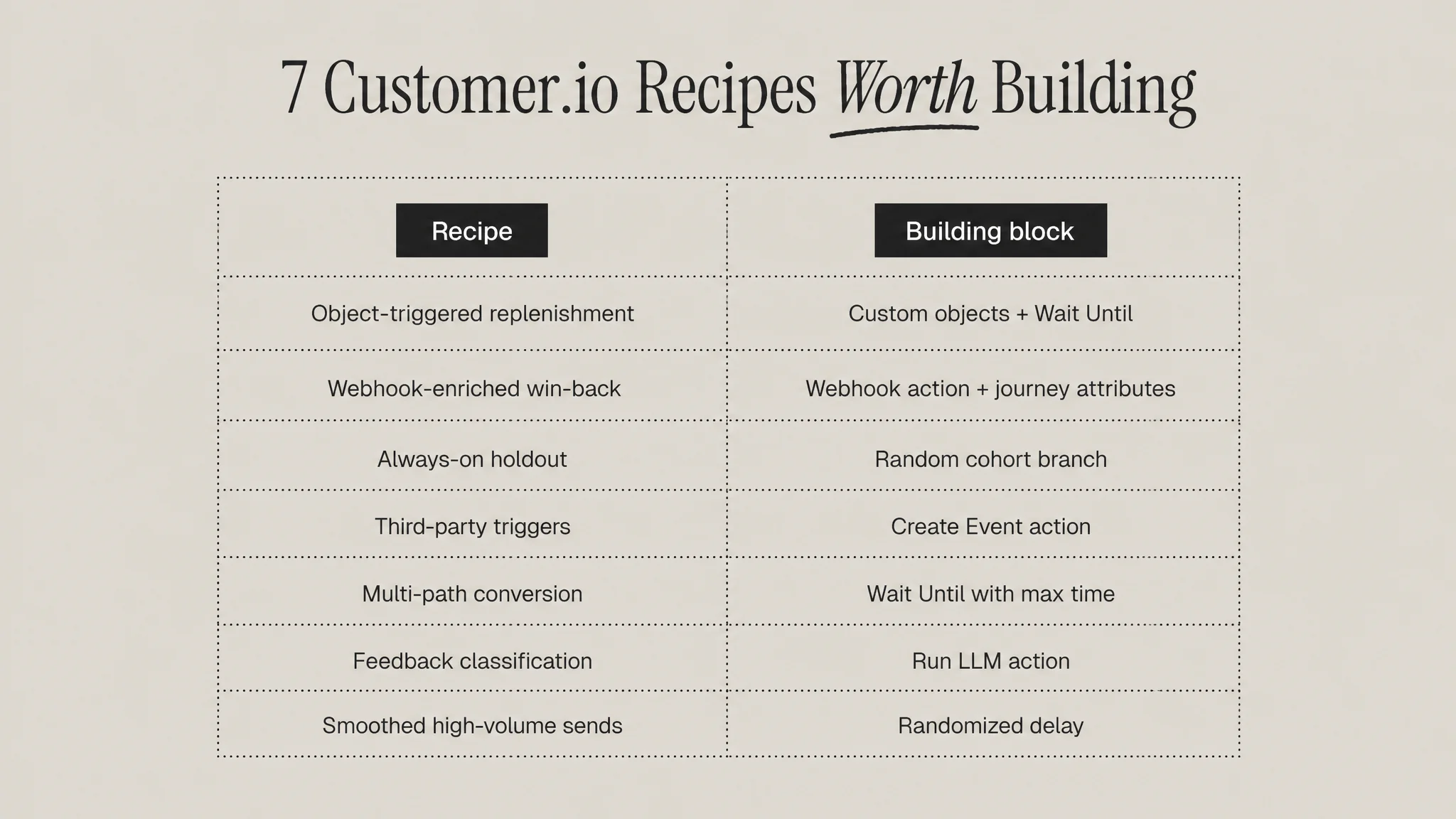
These seven recipes are the journeys we would build first in a DTC or subscription account that already has the basics live. Each one names the Customer.io building blocks it depends on, the setup, and the mistake that usually breaks it. If your account is struggling with the fundamentals first, start with our guide to why Customer.io is not performing.
Recipe 1: Object-triggered replenishment
Building blocks: custom objects, object-triggered journey, Wait Until on the triggering object.
In Customer.io, an object is a non-person entity related to one or more people, such as an order, a subscription or an account. Instead of writing "last order date" onto the profile and overwriting it with every purchase, model each order (or each subscription) as an object related to the customer, with properties like product, quantity and days of supply.
Trigger the journey when the relationship is created, then use Wait Until against the object. Since December 2025, Customer.io lets you hold a journey until a condition on the triggering object or its relationship is true. Hold until the projected run-out date minus a few days, then send the reorder reminder. If the customer reorders first, the condition path exits them cleanly.
Common mistake: one replenishment timer per person. Customers who buy two products with different supply lengths get one badly timed reminder. Object-level timing fixes that. For the strategy side, see our explainer on what a replenishment flow is.
Recipe 2: Webhook-enriched win-back
Building blocks: webhook action, journey attributes, true/false branch.
Webhook actions let a journey call almost any public API and store parts of the response. Responses can be saved as journey attributes, which live only for that run of the journey, or written to the customer profile. Customer.io supports up to 100 journey attributes per journey.
For win-back, call your loyalty or commerce API at the moment a lapsed customer enters. Pull their points balance, whether their last product is in stock, and whether a newer version exists. Branch on the result: customers with a meaningful points balance get a "your points are waiting" message, customers whose favourite product is back in stock get that, and everyone else gets the standard offer.
Common mistake: broken JSON from unescaped Liquid. Customer.io recommends filters such as strip, escape and normalize_whitespace so Liquid outputs valid JSON. Also note the retry behaviour: requests time out after 16 seconds and failed requests are retried up to 11 times over roughly an hour, so design your messages to stay correct if the data arrives late. For win-back strategy, see our win-back email flow guide.
Recipe 3: The always-on holdout
Building blocks: random cohort branch.
A random cohort branch splits people across up to 20 paths by percentage. The most valuable use is not A/B testing subject lines. It is a permanent holdout: put a small share of entrants on a path that sends nothing, and compare their conversion against everyone else.
Without this, your flow revenue is attributed revenue, which credits the flow for purchases many customers would have made anyway. With it, you can report incremental revenue with a straight face. Our guide to incrementality testing covers how to size the holdout and how long to run it.
Common mistake: reading results too early. Customer.io notes that cohort distribution is truly random, so splits will not look exact until the journey reaches a meaningful sample.
Recipe 4: Turn third-party webhooks into journey triggers
Building blocks: data-in webhook, Create Event action.
Many retention moments happen in tools that are not your ESP: a review platform, a helpdesk, a returns portal, a subscription billing tool. The Create Event action reshapes incoming webhook data of any structure and associates it with a person as a proper event. Once it is an event, it can trigger journeys and power segments like any first-party event.
Practical examples: a one-star review triggers a service recovery journey that suppresses promotional email for 14 days; a returns-portal event triggers an exchange offer instead of a refund confirmation; a failed payment from your billing tool triggers dunning across email and SMS.
Common mistake: inconsistent identifiers. Decide upfront whether the incoming payload maps to email or to your customer ID, and stick to it. Our guide to integrating Segment with Customer.io covers identity resolution in more depth.
Recipe 5: Multi-path Wait Until for trial and first-order conversion
Building blocks: Wait Until with multiple condition paths and a max time.
Fixed delays are blunt. Wait Until holds a person until they meet attribute, event, segment or message conditions, and a person progresses down the first path whose conditions they meet. A max time acts as the fallback so nobody waits forever.
For a new subscriber or trial user, build three paths: "placed first order" exits into post-purchase, "viewed product twice" routes to a product-specific nudge, and "opened but did not click" routes to a different angle. Set the max time to the end of your welcome window and send everyone left over to the standard final message.
Common mistake: forgetting that multiple conditions within a single path are joined with AND. If you want OR logic, use separate paths.
Recipe 6: LLM classification of free-text feedback
Building blocks: Run LLM action, journey attributes, branches.
Customer.io's Run LLM action prompts a large language model inside a journey and stores the response as an attribute. Inputs can include the prompt text, profile attributes, journey attributes, trigger data and workspace business context. Outputs can be typed as text, numbers, booleans, dates or lists.
A strong first use is classification. When a cancellation survey or NPS response arrives, ask the model to label the reason as one of a fixed list (price, product fit, delivery, too much product, other) and return it as a single value. Branch on that value: "too much product" gets a skip or frequency-change offer, "price" gets a smaller pack, "delivery" goes to a service apology and a ticket.
Common mistake: open-ended prompts. Constrain the output to a short list so your branches stay deterministic. The feature is in beta, available on Essentials, Premium and Enterprise plans, and it cannot read events or objects that did not trigger the journey.
Recipe 7: Randomized delay for high-volume sends
Building blocks: randomized delay.
When a single trigger releases thousands of people at once, for example a back-in-stock event or a price drop, a randomized delay holds each person for a random time between a minimum and maximum you set. Customer.io positions it as a way to avoid overloading rate-limited endpoints with webhook requests, and it also spreads traffic to your site and limits the damage if something in the message turns out to be wrong.
Common mistake: using it on time-sensitive messages like order confirmations. Keep randomized delays for marketing journeys where a short wait does not hurt.
How to roll these out without breaking your account
- Model data first. Objects and Create Event are only as good as the IDs and properties behind them. Map the data before building journeys.
- Ship one recipe at a time. Launch with a holdout, read results after a meaningful sample, then move to the next.
- Document journey attributes. Keep a short list of every journey attribute, where it comes from and which branches read it.
- Review quarterly. Our lifecycle audit checklist is a good quarterly routine.
If you are still deciding whether Customer.io is the right home for these journeys, our comparison of Customer.io and Braze for subscription brands and our Customer.io migration guide lay out the trade-offs.
The bottom line
The gap between an average Customer.io account and a great one is rarely more messages. It is better structure: journeys timed to the order rather than the person, live data fetched at the moment of send, clean events from every tool in the stack, and a holdout on every flow so you know what is actually working.
Sources
- Customer.io Docs: Objects and relationships
- Customer.io Release Notes: Wait until objects and relationships meet conditions
- Customer.io Docs: Send and receive data with webhook actions
- Customer.io Docs: Random cohort branch
- Customer.io Release Notes: Create Event action
- Customer.io Docs: Wait until
- Customer.io Docs: LLM actions
- Customer.io Docs: Randomized delay
Frequently Asked Questions
What are custom objects in Customer.io?
Custom objects are non-person entities that you relate to one or more people, such as orders, subscriptions, accounts or courses. Each object has its own attributes that can be used in segments, journey triggers and Liquid personalization. For DTC brands, modelling orders or subscriptions as objects lets you time messages to each purchase instead of overwriting a single last-order field on the customer profile.
How do webhook actions work in a Customer.io journey?
A webhook action sends a GET, POST, PUT, PATCH or DELETE request to an external API at a point in the journey. You can store parts of the response as journey attributes, which last only for that journey run, or write them to the customer profile. Requests time out after 16 seconds and failed calls are retried up to 11 times over about an hour.
How do I set up a holdout group in Customer.io?
Add a random cohort branch near the start of the journey and send a small percentage of entrants down a path with no messages. Compare that group's conversion rate against the people who received messages over the same period. Because assignment is random, splits may look uneven until the journey has a meaningful sample, so wait before reading results.
What is the difference between Wait Until and a time delay in Customer.io?
A time delay holds everyone for a fixed period. Wait Until holds each person until they meet a condition based on attributes, events, segments or message activity, with a maximum wait as a fallback. You can add several condition paths, and each person follows the first path they qualify for. Conditions inside a single path must all be true.
Can Customer.io use AI inside a journey?
Yes. The Run LLM action, currently in beta on Essentials, Premium and Enterprise plans, prompts a language model mid-journey and saves the response as an attribute you can use in later messages and branches. It can read the prompt, profile and journey attributes, trigger data and workspace context, but it cannot browse the web or read events and objects that did not trigger the journey.