

Summarize this documentation using AI
If you're moving to Braze, you're not switching email tools. You're re-architecting your entire customer engagement infrastructure.
Braze is not a campaign sender. It is a cross-channel orchestration engine — one that rewards technical depth with measurable revenue outcomes. The brands that migrate to Braze successfully treat it as an infrastructure investment, not a platform swap. The ones that don't treat it that way spend months debugging broken Canvases and misfired push notifications while their lifecycle marketing program stalls.
At Propel, we've managed Braze migrations for enterprise and high-growth teams across fintech, healthtech, and consumer apps. The difference between a migration that unlocks 40% higher engagement rates and one that results in six months of rework comes down to three things: data architecture decisions made before go-live, channel-by-channel migration sequencing, and SDK instrumentation precision.
Why Enterprises Migrate to Braze
Teams don't migrate to Braze because they want better email templates. They migrate because their current tool has become a structural ceiling on what their omnichannel orchestration program can do.
The real-time data gap. Most platforms — including tools like Iterable, Salesforce Marketing Cloud, and Klaviyo — operate on batch data sync. Braze operates on a real-time event stream. The difference isn't abstract: it's the difference between a push notification sent 4 hours after cart abandonment and one sent within 90 seconds. At scale, that timing differential translates directly to conversion rate and is one of the most consistent drivers of improvement teams see when they review their customer retention metrics.
Cross-channel orchestration. Braze treats email, push, in-app messaging, SMS, Content Cards, and web push as a unified canvas, not siloed channels. Most competing tools bolt these channels together via integrations. Braze's data model treats them natively — which is why its conditional branching logic is genuinely cross-channel rather than channel-specific with workarounds. This is the foundation of true omnichannel customer experience rather than parallel-channel marketing.
Connected Content and Liquid. Braze's Liquid templating and Connected Content API allow teams to pull real-time external data into any message at send time. Personalization that would require a custom integration on other platforms is native in Braze. This capability is what DTC and consumer tech brands hit the ceiling on within 12 months of scaling their lifecycle programs, particularly when they want to create personalized campaigns across email, SMS, and push from a single workflow.
Currents. Braze's data export pipeline sends a real-time stream of all engagement events to your data warehouse. For companies running Amplitude or Segment, this is the infrastructure that closes the attribution loop. It's also the foundation for DTC revenue and LTV attribution that finance and leadership can actually trust.
Who Should Migrate to Braze
Braze is not the right tool at every stage. Understanding where you fit before initiating a migration determines whether it will be a growth catalyst or an expensive distraction.
Migrate now if:
- You send across more than two channels — email, push, in-app, SMS — and your current tool requires separate builders or integrations for each.
- Your product team generates behavioral event data that your marketing tool cannot consume in real time.
- You need Connected Content — dynamic, real-time API-driven personalization — for a meaningful portion of your sends.
- You have a dedicated lifecycle team or a certified partner to manage the implementation. Braze rewards technical depth. Self-serve setup at enterprise scale is a risk, not a shortcut.
- Your send volume, channel complexity, or compliance requirements have outgrown tools like Klaviyo, Iterable, or Salesforce Marketing Cloud. This is often the inflection point where brands begin looking at Braze alternatives and realize they need to move toward Braze, not away from it.
Hold off if:
- You are within 8 weeks of a major product launch, peak sales season, or an IPO quiet period. Braze migrations require a structured channel-by-channel go-live. Rushing the sequencing to meet a calendar deadline is the most common cause of critical errors.
- You do not have a data engineering resource available to instrument the SDK and validate your event schema. Braze without clean data is more liability than asset.
- Your lifecycle program is still primarily email-only and your list is under 100k contacts. The ROI on Braze's full feature set does not materialize without multi-channel complexity.
What Braze Migration Actually Involves
Most teams dramatically underestimate the scope of a Braze migration because they're thinking about it in terms of previous platform migrations. Moving to Braze from an ESP is not like moving between ESPs. It is a fundamentally different class of project — closer to a martech stack architecture decision than a tool upgrade.
Data Architecture First
Before a single Canvas is built, you need a validated event schema. Braze organizes customer data around Custom Attributes (static profile properties) and Custom Events (behavioral actions with associated properties). Every downstream automation depends on these being correctly named, consistently fired, and comprehensively documented.
This is the work that determines everything else. Teams that skip it spend months debugging broken Canvas entry conditions, misfired triggers, and personalization fields returning null values — exactly the kind of structural failure that our events and attributes architecture service is designed to prevent.
Channel Migration Sequencing
A Braze migration runs in phases, not in parallel. The recommended sequence for most enterprise teams:
Phase 1 — Email. Migrate your highest-volume broadcast channel first. This lets you validate deliverability, authenticate domains, and build your email deliverability and channel health baseline before adding cross-channel complexity.
Phase 2 — Push Notifications. SDK-instrumented channel. Requires app release coordination and APNs/FCM credential transfer. Run parallel to Phase 1 validation, not before it's stable.
Phase 3 — In-App Messaging. Lower stakes than push but requires SDK validation. Trigger logic needs to be tested against real user sessions, not staging environments.
Phase 4 — SMS and Other Channels. Last in sequence because of compliance dependencies — TCPA opt-in re-confirmation — that are easier to manage once the rest of the stack is stable. If your brand operates in the fintech space or health and fitness, SMS compliance requirements are particularly layered and worth dedicated planning time.
The Canvas Rebuild
Canvas Flow is Braze's lifecycle orchestration builder. It is more powerful than most competing tools' equivalents and structurally different from all of them. Workflows from any other platform cannot be imported into Canvas Flow — they must be re-architected natively.
This is not a technical limitation, it's an opportunity. Most teams migrating to Braze are moving from a tool where their lifecycle logic was constrained by what the builder could support. Canvas Flow removes most of those constraints. Starting from a blank Braze onboarding Canvas template rather than replicating old logic is how the best migrations produce step-change improvements rather than incremental ones.
SDK Instrumentation and Validation
If your migration involves any app channel — push, in-app, Content Cards — Braze's SDK must be instrumented in your iOS and Android (or web) application, and every event must be validated against your schema before go-live. This is non-negotiable. An event that fires but passes null values for required properties will break Canvas logic silently — no error message, just a failed send.
The Propel Braze Migration Framework
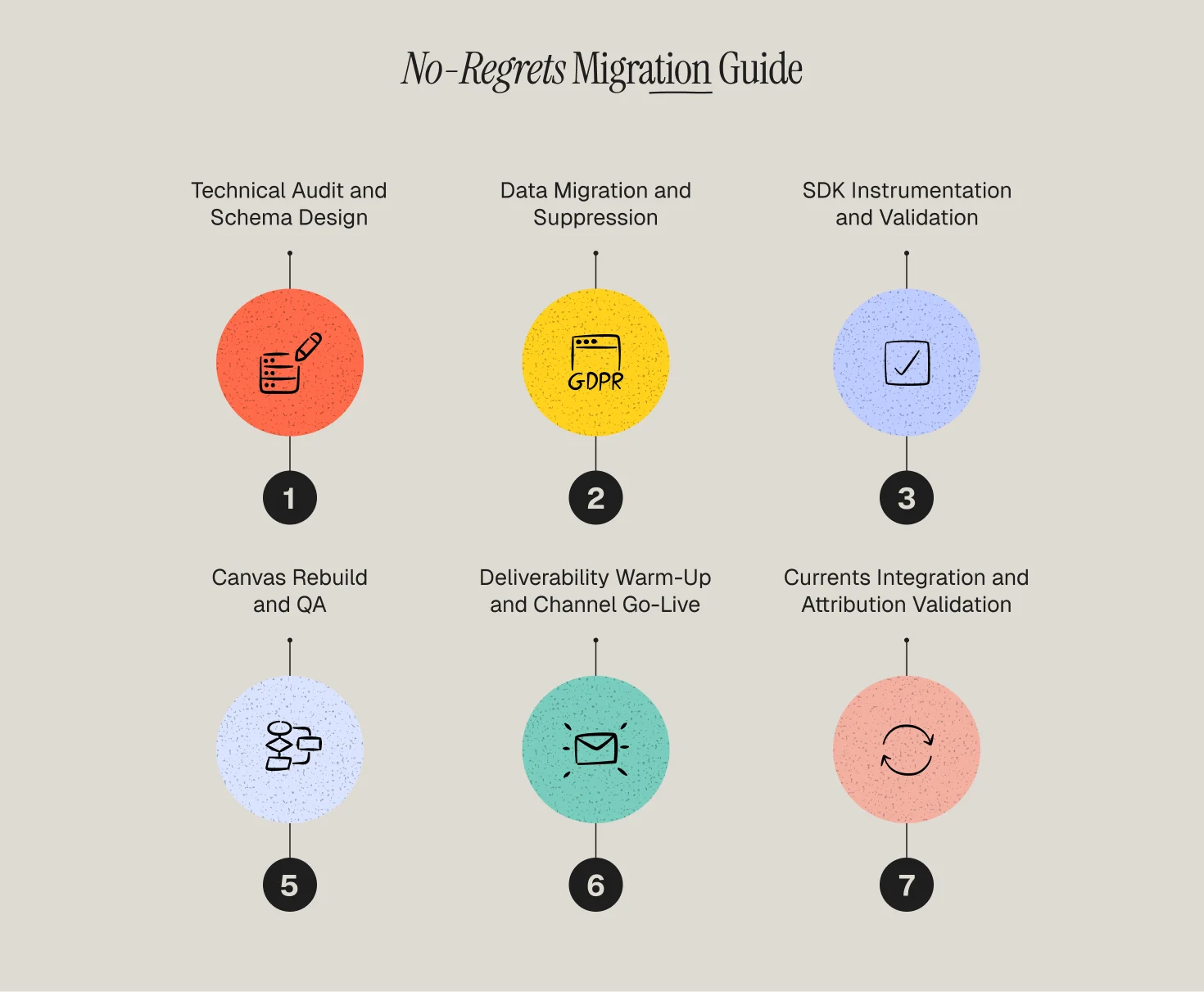
1️⃣ Phase 1 — Technical Audit and Schema Design
Before any platform work begins, we document your full lifecycle program: every campaign, every automation, every segment, and every data dependency. We use our martech stack audit checklist as the structural foundation, then define your Braze event schema — the complete taxonomy of Custom Attributes and Custom Events that your Canvas logic will be built on.
2️⃣ Phase 2 — Data Migration and Suppression
Suppression data moves first. Every unsubscribe, hard bounce, and opt-out — across every channel — is imported before active contacts. This is a compliance requirement, not a preference. For push notifications, this also includes managing channel-level opt-in status.
3️⃣ Phase 3 — SDK Instrumentation and Validation
For app channels: SDK integration, event instrumentation, and QA against your schema. We run this in parallel with Phase 2 so that the SDK layer is validated before Canvas builds begin. Our approach here is informed directly by our events and attributes architecture practice — not just instrumentation, but schema design that supports analytics downstream.
4️⃣ Phase 4 — Canvas Rebuild and QA
We rebuild your lifecycle program in Canvas Flow, prioritizing by revenue impact. Onboarding first, then conversion and retention flows, then re-engagement. Every Canvas goes through end-to-end QA — including trigger validation, Liquid logic testing, and cross-channel timing checks — before it goes live. Our pre-send email QA checklist and win-back campaign blueprint are integrated into this phase for the relevant Canvas types.
5️⃣ Phase 5 — Deliverability Warm-Up and Channel Go-Live
Email goes live first with a structured warm-up: engaged contacts only in Week 1, expanding weekly over 4–6 weeks. Push and in-app follow once email deliverability is stable. Each channel has defined metrics — bounce rate, opt-out rate, uninstall rate — that gate the next phase.
6️⃣ Phase 6 — Currents Integration and Attribution Validation
Once all channels are live, we connect Braze Currents to your data warehouse or analytics platform and validate that engagement events are flowing correctly. This closes the attribution loop and gives your analytics team visibility into the full cross-channel customer journey. For teams looking to build a retention metrics dashboard, this is the data foundation it runs on.
Choose Your Migration Path
Select your current platform to see the specific data mapping, Canvas rebuild strategy, and technical "gotchas" that apply to your migration:
- Klaviyo to Braze Migration Guide
- Iterable to Braze Migration Guide
- Salesforce Marketing Cloud to Braze Migration Guide
- Adobe Campaign to Braze Migration Guide
- Moengage to Braze Migration Guide
- Customer.io to Braze Migration Guide
- HubSpot to Braze Migration Guide
- Airship to Braze Migration Guide
- CleverTap to Braze Migration Guide
- OneSignal to Braze Migration Guide
Stakeholder Expectations During a Braze Migration
Lifecycle and CRM team: Expect 8–12 weeks of elevated workload. Canvas rebuilding is the most time-intensive phase and requires both strategic and technical input from your lifecycle operators. Campaign output typically decreases by 30–40% during the rebuild phase. Plan for it before the migration starts. Our campaign analytics and performance insights service runs in parallel during migrations to keep leadership visibility intact even as send volume temporarily contracts.
Engineering and mobile teams: Braze migrations require real engineering involvement for any app channel. SDK instrumentation, event schema design, and APNs/FCM credential transfer are not tasks that can be handed off to a marketing operations team without technical support. Budget 2–4 weeks of part-time engineering resources for a standard app migration.
Data and analytics teams: If you're connecting Braze Currents to your data warehouse, your data engineering team needs to be involved in schema design from Phase 1. The event naming and property structure you establish in Braze will propagate directly into your analytics tables. Changing it post-migration is expensive. Teams with an existing behavioral segmentation strategy will want their segment taxonomy mapped to Braze Custom Attributes before the first import.
Leadership: Engagement and revenue metrics from lifecycle channels will fluctuate during the migration period. Email revenue may dip during the deliverability warm-up. Push opt-out rates may spike if notification timing isn't calibrated correctly during the first two weeks. Brief leadership before migration starts — not after the first dashboard shows a drop. Our lifecycle strategy team prepares stakeholder briefing materials as part of every managed migration.
When to Use a Managed Braze Migration
A self-serve Braze migration is technically possible. It is also the most expensive path for any team that relies on lifecycle revenue for more than 20% of their business.
The risk surface of a Braze migration is different from other platform migrations. A misconfigured Canvas entry condition doesn't just fail silently — it can misfire to hundreds of thousands of users simultaneously. An SDK event that fires with wrong property values will corrupt your analytics and break personalization across every affected flow. A deliverability warm-up that's rushed will suppress your sender reputation at precisely the moment you're trying to prove ROI on a major infrastructure investment.
You should work with a Braze-certified partner if:
- You have an app channel — push, in-app, Content Cards — as part of your migration scope.
- Your Braze implementation needs to be connected to a data warehouse, CDP, or analytics platform via Currents or a data transformation layer. See how we handle Braze and Amplitude integration and Braze and Mixpanel integration as part of our migration practice.
- You have compliance requirements — HIPAA, GDPR, TCPA — that affect how customer data is stored, processed, or opted out in Braze. This is especially relevant for brands in telemedicine or other regulated verticals.
- Your current lifecycle program is generating meaningful revenue and a 30-day deliverability failure would have measurable business impact.
Move to Braze with Confidence
A Braze migration is the highest-leverage infrastructure decision in your lifecycle marketing program. Done right, it unlocks real-time personalization, genuine cross-channel orchestration, and the data infrastructure that separates brands operating at scale from brands that have outgrown their tools.
At Propel, we manage Braze migrations from schema design through Canvas go-live. We bring the technical depth of a certified Braze implementation team and the lifecycle strategy experience of operators who've rebuilt programs across fintech, healthtech, consumer apps, and enterprise brands. Review our best Braze partners guide to understand what to look for in a migration partner — then talk to us about yours.
Frequently Asked Questions
How long does a full Braze migration take?
For an enterprise team migrating from a tool like Iterable or Salesforce Marketing Cloud, with multiple app channels, the full migration typically runs 12–16 weeks. Email-only migrations with a simpler existing stack can complete in 8–10 weeks. The Canvas rebuild phase is where most of the variability sits.
Do I need to rebuild all my automations from scratch?
Yes. There is no import path from any competing platform into Braze's Canvas Flow. However, rebuilding from scratch is an opportunity, not just a cost. Most teams migrating to Braze discover that their previous tool's constraints had shaped their lifecycle logic in ways they didn't realize. Canvas Flow removes those constraints.
Can I migrate to Braze without involving engineering?
Not if you have any app channel in scope. Email-only Braze migrations have minimal engineering requirements — primarily DNS changes and sending domain authentication. But any app channel requires mobile engineering involvement for SDK instrumentation.
What happens to my current segments and lists?
Contact identity data transfers via import. Segment logic must be rebuilt in Braze using your Custom Attributes and Custom Events. For teams moving from platforms with complex behavioral segmentation, the rebuilding process is an opportunity to simplify segment logic that has accumulated technical debt.
How does Braze's pricing model work compared to my current platform?
Braze pricing is typically structured around monthly active users (MAU) rather than contact volume or send volume. For high-frequency senders with large lists, this can represent a significant structural difference from ESP-style pricing. We recommend a volume analysis before committing to a contract structure.
