
Summarize this documentation using AI
Klaviyo built your email and SMS program. Braze is where it goes when email and SMS are no longer enough.
The moment your lifecycle program expands to include push notifications, in-app messaging, or real-time behavioral triggers from your app, you've hit Klaviyo's architectural ceiling. Not because Klaviyo is a bad tool — it's exceptional for what it was built to do — but because it was built for ecommerce retention, and Braze was built for cross-channel customer engagement at product-led, app-first scale.
At Propel, we've run Klaviyo to Braze migrations for consumer tech brands, fintech platforms, and DTC companies that have grown into multichannel complexity. The migration is fundamentally different from any other platform switch because the data model changes underneath you. Understanding that before you start is what separates a smooth 10-week transition from a six-month detour.
Why Teams Move From Klaviyo to Braze
The pattern is consistent. Brands don't leave Klaviyo because they're unhappy with it. They leave because they've built a product that needs more than Klaviyo's model can give.
The push notification gap. Klaviyo supports push notifications, but its data model treats push as an extension of its email-first architecture. Braze's push infrastructure is native — built on a real-time event stream from your mobile SDK, with APNs and FCM handling deeply integrated into the platform's orchestration logic. Brands with apps at meaningful daily active user counts feel this difference acutely. When your retention marketing for mobile apps strategy depends on precise push timing, near-real-time isn't enough.
Real-time triggers vs. near-real-time. Klaviyo's fastest trigger speeds — the "Started Checkout" event from its Shopify integration — operate in near-real-time. Braze's SDK events fire in true real-time, because they come directly from the app. For lifecycle programs built around high-intent behavioral moments — a user completing a critical onboarding step, reaching a milestone, or triggering a churn signal — this timing difference is material. It's directly connected to why reducing subscriber churn is measurably easier in a real-time system.
In-app messaging. Klaviyo has no native in-app messaging capability. Braze's in-app messaging is one of its strongest channels — full-screen, modal, and slideup formats triggered in real time by SDK events, with no notification permission required. For app-first teams, this channel often becomes the highest-engagement touchpoint in the entire lifecycle program and a primary driver of feature adoption for product-led brands.
Data infrastructure. Klaviyo connects to Shopify, BigCommerce, and other ecommerce platforms via native integrations. Braze connects to everything: your mobile app, your web app, your data warehouse, your CDP, your product analytics platform. The data surface is orders of magnitude larger — and with Braze Currents, every engagement event streams back to your warehouse in real time, enabling the kind of DTC revenue and LTV attribution that gives finance teams confidence in lifecycle ROI.
One fintech team we migrated had been running Klaviyo for 18 months and had built a best-in-class ecommerce email program. When they launched their app and needed in-app onboarding, real-time push, and a cross-channel Canvas that bridged app behavior to email, Klaviyo couldn't support the architecture. The decision to move to Braze wasn't a criticism of Klaviyo — it was an acknowledgment that they'd built a product that needed a different class of tool.
The Fundamental Architecture Difference
This is the most important thing to understand before starting a Klaviyo to Braze migration — and the thing most teams underestimate.
Klaviyo's model: Profile-centric and ecommerce-native. Every contact has a profile. Events are ecommerce events — purchases, checkouts, product views. Flows trigger off these events. Segments filter by profile properties and event history. Everything is organized around the customer's relationship with your store.
Braze's model: Event-driven and channel-agnostic. Every user has a profile, but the profile is structured around Custom Attributes (static properties) and Custom Events (behavioral events with nested properties). Canvases can trigger off any event from any source — your app SDK, your API, your data warehouse, your ecommerce integration. The channel logic is genuinely unified: a single Canvas step can send an email, a push notification, an in-app message, or an SMS based on real-time conditions. This is the infrastructure that makes omnichannel orchestration function as a real-time system rather than a multi-channel scheduling exercise.
When you migrate from Klaviyo to Braze, you're not moving data between similar systems. You're re-architecting how your lifecycle program sees your customers. That re-architecture is where the migration value lives — and where shortcuts create the most expensive problems. The martech stack audit we run before every migration is specifically designed to surface these architectural dependencies before they become mid-migration surprises.
What Transfers and What Doesn't
Transfers With Mapping
Contact identity data. Email addresses, phone numbers, names, and external user IDs transfer via import. In Braze, these map to standard User Profile attributes. If you're using Braze's user aliasing for anonymous user tracking, your external ID mapping needs to be planned in the schema design phase.
Suppression data. Every unsubscribe — email and SMS — and every hard bounce transfers, and it must move before any active contacts. In Braze, email unsubscribes map to the email_subscribe attribute. SMS opt-outs map separately, by subscription group. Channel-level suppression is more granular in Braze than in Klaviyo, so this mapping needs to be explicit.
Custom profile properties. Klaviyo's custom properties — the profile-level attributes you've built over time: loyalty tier, product preferences, cohort membership — transfer as Custom Attributes in Braze. These custom attributes become the foundation of your lifecycle stage segmentation in Braze. Field types must match — strings, numbers, arrays, and booleans each have specific Braze implementations.
Historical purchase data (with conditions). Klaviyo pulls purchase history from Shopify natively. In Braze, historical ecommerce data is ingested via the /users/track API or through a Shopify integration. For teams that need purchase history to power Canvas entry conditions from day one, this data migration must be planned explicitly.
Must Be Rebuilt in Braze
Every Flow becomes a Canvas. There is no import path. Every flow — welcome series, abandoned cart, post-purchase, win-back, re-engagement — must be rebuilt in Canvas Flow. This is the most time-intensive phase of the migration and the one with the highest revenue impact if done well. Starting from a Braze onboarding Canvas template gives your team a validated structural foundation rather than a blank slate.
All segments. Klaviyo segments use property and event-based conditions specific to Klaviyo's logic engine. Braze segments use Custom Attributes and Custom Events with Braze's filter syntax. Every segment must be recreated. This is an opportunity to audit which segments are actually used and clean out the ones that aren't — a process we detail in our behavioral segmentation guide.
All templates. Klaviyo's Liquid syntax is platform-specific. Braze uses a different Liquid dialect. Templates must be rebuilt in Braze's composer, and Liquid personalization tags must be rewritten to reference Braze's Custom Attribute naming conventions. The pre-send email QA checklist is essential for catching template rendering issues before go-live.
Suppression logic. Klaviyo manages suppression at the profile level. Braze manages it at the channel level, via subscription groups. Your suppression architecture needs to be mapped explicitly — which subscription groups map to which Klaviyo suppression states.
Lost or Replaced
Klaviyo's predictive analytics. Klaviyo has built-in predictive CLV, churn risk, and next-order date models. Braze has its own predictive suite — Predictive Churn, Predictive Purchases — but the models are calibrated differently. Expect a data warm-up period of 30–60 days before Braze's predictive features produce reliable outputs. During this window, use your RFM analysis from Klaviyo's historical data as a manual proxy for predictive segments.
Historical engagement metrics. Opens, clicks, and campaign attribution data from Klaviyo does not transfer to Braze. Your Braze engagement history starts at zero on migration day. Export your Klaviyo performance data before closing the account — it's your baseline for measuring Braze's incremental impact.
Klaviyo's ecommerce revenue attribution. Klaviyo's revenue attribution model is tightly integrated with its Shopify connection. Braze's attribution is managed via Braze's conversion tracking and, for comprehensive attribution, via a connected analytics platform. Teams relying on Klaviyo's attributed revenue dashboard should set up a retention metrics dashboard in their analytics stack before the migration cutover.
The Klaviyo to Braze Migration Checklist
Pre-Migration
- Document every active Klaviyo flow: trigger, entry conditions, email count, 30-day revenue attribution.
- Audit all Klaviyo segments in active use: identify the 20% of segments driving 80% of sends.
- Export all custom profile property names and data types for Braze schema mapping.
- Confirm your Shopify (or ecommerce platform) Braze integration path — native integration or API-based.
- Assess app channel scope: push, in-app messaging, Content Cards. Confirm engineering availability for SDK instrumentation.
- Map Klaviyo suppression states (unsubscribed, SMS opt-out, hard bounce) to Braze subscription groups.
Data Migration
- Export Klaviyo unsubscribes (email) → import to Braze as email_subscribe: unsubscribed.
- Export Klaviyo SMS opt-outs → import to Braze SMS subscription group as opted-out.
- Export Klaviyo hard bounces → import to Braze as hard_bounced: true.
- Export active contacts with all custom properties → map to Braze Custom Attributes.
- Validate historical purchase data import via Braze /users/track API or Shopify integration.
- Segment import into engagement tiers: 30-day active, 60-day active, 90-day active, lapsed.
Technical Setup
- Add and verify sending domain in Braze (DKIM, SPF, DMARC). Refer to our email deliverability channel health standards for the authentication baseline.
- Configure Braze Subscription Groups for each communication channel.
- Instrument Braze SDK in iOS, Android, and/or web — validate every Custom Event and Custom Attribute against your schema.
- Connect Shopify (or ecommerce platform) to Braze — verify "Made Purchase," "Abandoned Cart," and "Product Viewed" events in the Braze dashboard.
- Set up Braze Currents if connecting to a data warehouse or analytics platform.
Canvas Rebuild and QA
- Rebuild Canvases in priority order: onboarding → abandoned cart → post-purchase → re-engagement.
- For win-back Canvases, use the win-back campaign blueprint as the structural starting point.
- Test every Canvas with a test user profile — validate trigger conditions, Liquid personalization, and step timing.
- Run cross-channel timing tests for any Canvas involving both email and push.
- Deactivate the corresponding Klaviyo flow the moment its Braze Canvas equivalent is validated and live.
Go-Live and Warm-Up
- Week 1: Email to 30-day engaged segment only. Monitor bounce rate (flag >2%) and spam complaint rate (flag >0.08%) daily.
- Week 2–3: Expand to 60-day then 90-day engaged segments.
- Week 4+: Full list sends. Push channels go live once email deliverability is stable.
- Keep Klaviyo in read-only mode for 30 days post-migration.
The Step-by-Step Migration: Klaviyo to Braze
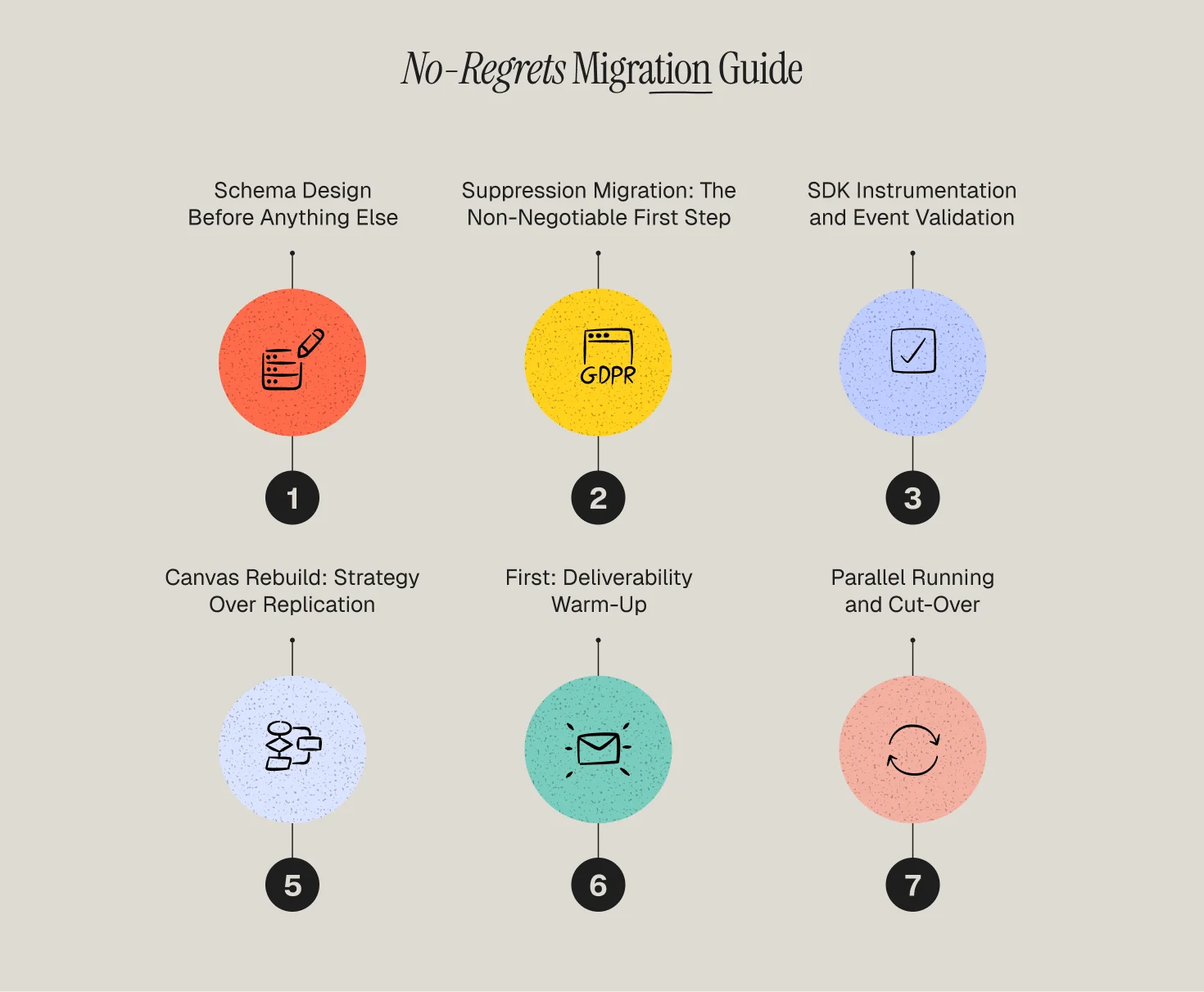
1️⃣ Step 1 — Schema Design Before Anything Else
The most expensive mistake in a Klaviyo to Braze migration is starting the Canvas build before the data schema is finalized. In Klaviyo, your data schema is relatively forgiving — profile properties can be created on the fly. In Braze, your Custom Attributes and Custom Events are the foundation that every Canvas entry condition, every segment, and every Liquid personalization tag is built on. If naming conventions change mid-migration, you're rebuilding.
Before any platform work begins, document your complete event schema: every Custom Event with its name, trigger source, and associated properties; every Custom Attribute with its data type and the Canvas logic that will reference it. This document is your source of truth for SDK instrumentation and Canvas rebuild. Our events and attributes architecture service runs this schema design exercise as a formal deliverable before any Braze implementation begins.
One consumer app we migrated had 47 Custom Events in their initial schema draft. After the audit, 23 were actually needed for Canvas logic. The rest were analytics events that belonged in Amplitude, not in Braze as marketing triggers. Cleaning that distinction in the schema phase saved weeks of SDK instrumentation time.
2️⃣ Step 2 — Suppression Migration: The Non-Negotiable First Step
Export your Klaviyo suppression data before anything else moves. Three exports: email unsubscribes, SMS opt-outs, and hard bounces. Each maps to a different suppression mechanism in Braze.
Email unsubscribes map to Braze's global email subscription state (email_subscribe: unsubscribed). SMS opt-outs map to the relevant Braze SMS Subscription Group — your opt-out list needs to be uploaded to the correct group, not just imported as a profile attribute. Hard bounces require setting the hard_bounced flag on each profile.
The sequence matters for compliance. If you import active contacts before suppression data is loaded, an active Canvas could fire to a previously unsubscribed user in the window between the two imports. For teams operating under GDPR or CAN-SPAM, this is a direct violation. For brands in regulated verticals like telemedicine or fintech, the stakes are even higher. Suppression goes first, without exception.
3️⃣ Step 3 — SDK Instrumentation and Event Validation
If your migration includes any app channel — push notifications, in-app messaging, Content Cards — this is the technical core of the project. The Braze SDK needs to be instrumented in your iOS, Android, and/or web application, and every event in your schema needs to be validated as firing correctly before Canvas builds begin.
What "validated correctly" means in practice: the event fires at the right moment in the user journey, with the right properties, at the right data type, every time. A push trigger that fires "App Session Started" works perfectly in testing but fails to pass the user's city property in production will silently break every Canvas that uses location-based personalization — with no error message to tell you why. This kind of invisible failure is why martech optimization for Braze requires event validation as a formal phase, not an assumption.
4️⃣ Step 4 — Canvas Rebuild: Strategy Over Replication
Canvas Flow is not a more complicated version of Klaviyo Flows. It is a different paradigm — built for cross-channel orchestration rather than email-first automation. Building Canvases that replicate your Klaviyo flow structure is a waste of the tool's capability. This is the phase where how to build personalized email flows without manual work takes on a different meaning — because in Braze, the personalization is dynamic at send time, not static at build time.
Rebuild in priority order by revenue impact: onboarding Canvases first, then conversion and cart recovery, then post-purchase and loyalty, then re-engagement. This sequencing ensures your highest-revenue touchpoints go live earliest.
Use Audience Paths instead of flat conditional splits. Klaviyo's conditional splits branch a flow into two paths. Braze's Audience Paths can segment a single Canvas step into multiple simultaneous tracks — VIP users, first-time buyers, lapsed customers, high churn-risk users — each with their own timing, channel mix, and messaging strategy.
Leverage Action Paths for real-time behavioral branching. The most powerful Canvases in Braze don't just branch on profile attributes — they branch on what a user does or doesn't do during the Canvas. A user who opens the first email gets a different second step than one who ignores it. A user who completes a purchase exits the Canvas immediately; one who doesn't gets a push reminder 24 hours later. This is the omnichannel orchestration that genuinely moves retention metrics, not just multi-channel delivery.
A note from the field: One thing that surprises teams new to Braze is how Canvas entry re-eligibility works. Define your re-eligibility settings explicitly — especially for Canvases triggered by recurring events like purchases. A Canvas that allows re-entry on every qualifying event with no cooldown will over-message users before you've had a chance to notice.
5️⃣ Step 5 — Deliverability Warm-Up: Email First, Then Everything Else
Braze's sending reputation starts at zero on migration day. Klaviyo's domain authority does not transfer. Your warm-up follows the same logic as any platform migration: start with your highest-engagement segment, expand weekly, monitor daily.
Monitor bounce rate (flag if above 2%) and spam complaint rate (flag if above 0.08%) every day during the warm-up. If either metric spikes, pause volume expansion and investigate before continuing. Our email deliverability and channel health service runs active monitoring through this period for managed migrations.
Push doesn't require a deliverability warm-up in the same way, but it does require careful opt-out rate monitoring in the first two weeks. Start push sends at conservative frequency and expand once you've validated what your audience tolerates. For consumer apps and mobile retention, getting push frequency right in week one is more important than send volume.
6️⃣ Step 6 — Parallel Running and Cut-Over
Never run the same lifecycle logic in both Klaviyo and Braze simultaneously. The moment a Braze Canvas is validated and live, deactivate its Klaviyo Flow equivalent. Parallel operation sends duplicate messages — which generates complaints and harms the deliverability you're working to build.
Keep Klaviyo in read-only mode for 30 days after the final Canvas cut-over. Don't close the account. You'll need to reference historical flow performance, pull any segments missed in the audit, and export campaign data before the retention window closes.
Canvas Logic: What Braze Does That Klaviyo Can't
True cross-channel real-time branching. A Braze Canvas can send an email at 9am, check at 9:30am whether the user opened it, and if not, send a push notification — all within a single workflow, in real time. Klaviyo flows can send email and SMS, but the branching logic is not real-time and push is not deeply integrated into the flow builder.
Connected Content. A Braze email can make a live API call at send time to pull dynamic content — current pricing, personalized product recommendations, real-time inventory status — from any external endpoint. This isn't Klaviyo's profile-property personalization, which is static at send time. Connected Content makes every send a live data pull and is the engine behind behavioral triggers in retention marketing at their most dynamic.
In-app messages with no notification permission required. Klaviyo has no in-app messaging. Braze's in-app messages appear during active app sessions, require no push permission, and can be triggered by any SDK event. For apps trying to drive feature adoption or guide user behavior inside the product, this channel often outperforms push in engagement rate. It's particularly effective for customer retention in lifestyle apps and fitness and weight loss apps where the product experience is the retention mechanism.
Predictive targeting at scale. Braze's Predictive Churn and Predictive Purchases models use your Custom Event data to surface users at risk of churning or likely to purchase — and these predictions can be used directly as Canvas entry conditions or audience filters. The more behavioral data your SDK fires, the more accurate these models become. Combine this with how to identify users who are about to churn and you have a genuinely proactive retention system rather than a reactive one.
Stakeholder Expectations
Lifecycle team: Rebuilding your full Canvas program from scratch takes 8–10 weeks for a program of typical Klaviyo complexity. Campaign output will decrease during this period. Build this into your roadmap before the migration starts. Our campaign analytics and performance insights service runs in parallel during migrations to maintain visibility into what's working even as the platform transitions.
Engineering team: Plan for 2–4 weeks of mobile engineering time for SDK instrumentation, depending on the complexity of your app's event schema and the number of platforms in scope. This is not compressible without creating quality risk.
Analytics and data team: If you're connecting Braze Currents to your warehouse, involve your data engineering team in the schema design phase. Event names and property keys in Braze flow directly into your analytics tables. Renaming them post-launch means updating all downstream queries. Teams running a modern customer engagement stack will want their warehouse schema finalized before Currents goes live.
Leadership: Plan for an email revenue dip during the 4–6 week deliverability warm-up. This is structural, not a failure. The tradeoff is a sending infrastructure that's more capable and more scalable than Klaviyo could support for your current product stage. Use the customer retention impact calculator to set the 90-day revenue recovery target before the migration starts.
Why Propel for Your Klaviyo to Braze Migration
Propel is a certified Braze partner with direct experience running Klaviyo to Braze migrations for consumer app brands, DTC companies scaling into omnichannel, and fintech platforms with compliance-sensitive customer data.
Our migration framework covers the full program: schema design, SDK instrumentation, Canvas rebuild, deliverability warm-up, and Currents integration. We don't hand off a Braze account and disappear. What we bring that generalist agencies don't:
- Braze SDK instrumentation and event schema validation, not just Canvas building.
- Klaviyo-to-Braze Liquid migration — rewriting your personalization tags for Braze's dialect.
- Deliverability management through the full warm-up curve, supported by our email deliverability channel health practice.
- Braze Currents setup and warehouse integration for teams running Amplitude, Segment, or BigQuery.
- Lifecycle strategy review built into the Canvas rebuild phase — not just moving your old flows, but rearchitecting them for Braze's capabilities.
Talk to a Propel operator about your Klaviyo to Braze migration.
Frequently Asked Questions
Can I migrate from Klaviyo to Braze without an agency?
Yes — if your migration is email-only, your list is under 200k, and you don't have app channels in scope. If you're migrating push or in-app messaging, or building Canvases with real-time behavioral branching from day one, a certified Braze partner reduces your risk surface significantly.
Will my Klaviyo flow revenue attribution carry over to Braze?
No. Braze starts attribution from zero. Set up Braze's conversion tracking and connect Braze Currents to your analytics platform before your first Canvas goes live.
How does Braze pricing compare to Klaviyo?
Klaviyo prices on active profile count. Braze prices on Monthly Active Users (MAU). For high-DAU apps or large contact lists with low monthly activity, these models produce very different costs. Run a volume analysis against your actual MAU count before committing to a Braze contract.
Do I need to re-confirm email consent after migrating to Braze?
Generally no — provided your original consent met applicable legal requirements and you're migrating suppression data correctly. For SMS, TCPA opt-ins obtained for one sender don't automatically transfer to another platform's Subscription Groups. Your legal team should review SMS consent portability before the SMS channel goes live in Braze.
How long before Braze's predictive models start working?
Meaningful predictions typically appear 30–60 days after your SDK events begin firing at production volume. The more behavioral events your SDK fires, the faster the models calibrate. In the interim, use your Klaviyo historical data to manually define the at-risk segments these models will eventually replace.
