
Summarize this documentation using AI
TL;DR
- A Lateral Move: Unlike moving from a newsletter tool, an Omnisend-to-Klaviyo migration is a transition between two ecommerce-native platforms. The goal isn't just parity; it’s unlocking deeper predictive data.
- Predictive Data Gap: Klaviyo’s core advantage lies in its native data science models (CLV, Churn Risk, and Next Order Date) which allow for more advanced segmentation than Omnisend’s standard rules.
- Reporting Sophiciency: Klaviyo offers more granular attribution and custom reporting dimensions, making it the preferred choice for brands scaling past $10M+ GMV.
- The Warm-Up Phase: Even with a clean reputation on Omnisend, a 4-week sending domain warm-up is required to establish your new infrastructure with mailbox providers.
The Revenue Case for Switching
Omnisend and Klaviyo are both purpose-built for ecommerce. However, for brands making data-driven decisions about their retention program, the switch to Klaviyo is often a move to gain a more sophisticated reporting and predictive layer.
The structural difference is in how the platforms interpret customer value. Omnisend excels at "backward-looking" data—responding to what a customer just did. Klaviyo’s strength is "forward-looking" data—predicting what a customer is likely to do next.
At Propel, we’ve found that brands migrating from Omnisend aren't necessarily fixing a "broken" system, but rather upgrading their engine. The revenue lift (often 15–25% within 90 days) comes from applying Klaviyo’s predictive analytics to your flows. For example, instead of a generic win-back flow triggered at 90 days, you can trigger a "high-churn-risk" flow specifically for high-LV customers before they actually lapse. This proactive approach to retention is the primary driver of ROI for this migration.
Should You Migrate from Omnisend to Klaviyo?
Because both tools are high-performance, the decision to move requires more nuance than a standard migration.
The migration is likely beneficial if:
- You need deeper predictive segments: You want to automate your marketing based on Predicted CLV, Churn Probability, or Expected Next Order Date.
- You require granular reporting: Your team needs to analyze revenue attribution by segment, flow, or A/B test variation across custom timeframes.
- Your tech stack is Shopify-centric: Klaviyo is the "center of gravity" for the Shopify ecosystem, offering deeper native integrations with loyalty (Yotpo/Smile), reviews (Okendo), and helpdesk (Gorgias) tools.
- You are scaling your team: Most senior retention managers and specialized agencies are "Klaviyo-native," making it easier to hire and scale your operations on this platform.
Hold off if:
- Omnisend meets your current KPIs: If your team is highly proficient in Omnisend and you aren't yet hitting the "ceiling" of their segmentation or reporting, the switching cost may not be justified.
- Margin Compression is a priority: Klaviyo can be more expensive at higher contact volumes. If your brand has a low AOV and a very large list, the pricing delta needs to be modeled against the expected revenue lift.
- Peak Season Proximity: Avoid migrating within 8 weeks of BFCM. Mailbox providers evaluate your sending reputation based on engagement and authentication; a rushed warm-up during a peak window is a high-risk gamble.
What Transfers and What Doesn’t
Because both platforms share an ecommerce-first data model, the mapping is more intuitive than a Mailchimp migration, but it is not a 1:1 mirror.
A. Transfers Cleanly ✅
- Identity Data: Standard fields (Email, Phone, First/Last Name) map directly.
- Custom Properties: Omnisend "Tags" and "Properties" can be exported and imported as Klaviyo Profile Properties.
- Suppression Lists: Your unsubscribes and hard bounces must be moved first to maintain compliance.
- Ecommerce History: This is backfilled via the native Shopify/BigCommerce integration, ensuring you don't lose purchase context.
B. Requires Rebuilding 🔄
- Automation Workflows: While the triggers are similar (e.g., "Started Checkout"), the logic trees, time delays, and conditional splits must be rebuilt in Klaviyo.
- Email Templates: Omnisend’s proprietary code does not work in Klaviyo. All templates need a native rebuild in Klaviyo’s drag-and-drop editor.
- Segments: You must recreate your segment logic. This is an opportunity to add predictive filters (e.g., "Predicted CLV is High") to your existing logic.
C. Does Not Transfer ❎
- Historical Engagement: Historical opens and clicks typically stay in Omnisend. Klaviyo starts tracking engagement from day one of your first send.
- Campaign Reporting: Your performance history for past newsletters does not migrate.
Omnisend to Klaviyo Migration Checklist
1. Pre-Migration Audit
- Document all active Omnisend Workflows (Triggers, Filters, and Logic).
- Inventory all third-party integrations (Loyalty, Reviews, Support).
- Identify your most profitable segments in Omnisend to replicate first.
2. Data Preparation
- Export "Unsubscribed" and "Bounced" contacts for suppression.
- Export "All Contacts" including custom properties and tags.
- Segment your export into engagement tiers (30, 60, 90-day active).
- Clean your list using a tool like ZeroBounce if it hasn't been scrubbed recently.
3. Platform Setup
- Add DKIM and SPF records to your DNS to verify your sending domain.
- Install the native Shopify/BigCommerce integration.
- Create Custom Properties in Klaviyo to match your Omnisend data.
- Upload suppression files first before importing active contacts.
4. QA and Launch
- Rebuild priority flows (Abandoned Cart, Welcome, Post-Purchase).
- Place a test transaction to verify SKU-level data and "Started Checkout" events.
- Test all email templates in Gmail, Apple Mail, and Outlook.
- Begin the warm-up by sending to your 30-day engaged segment only.
The Technical Migration: Step-by-Step
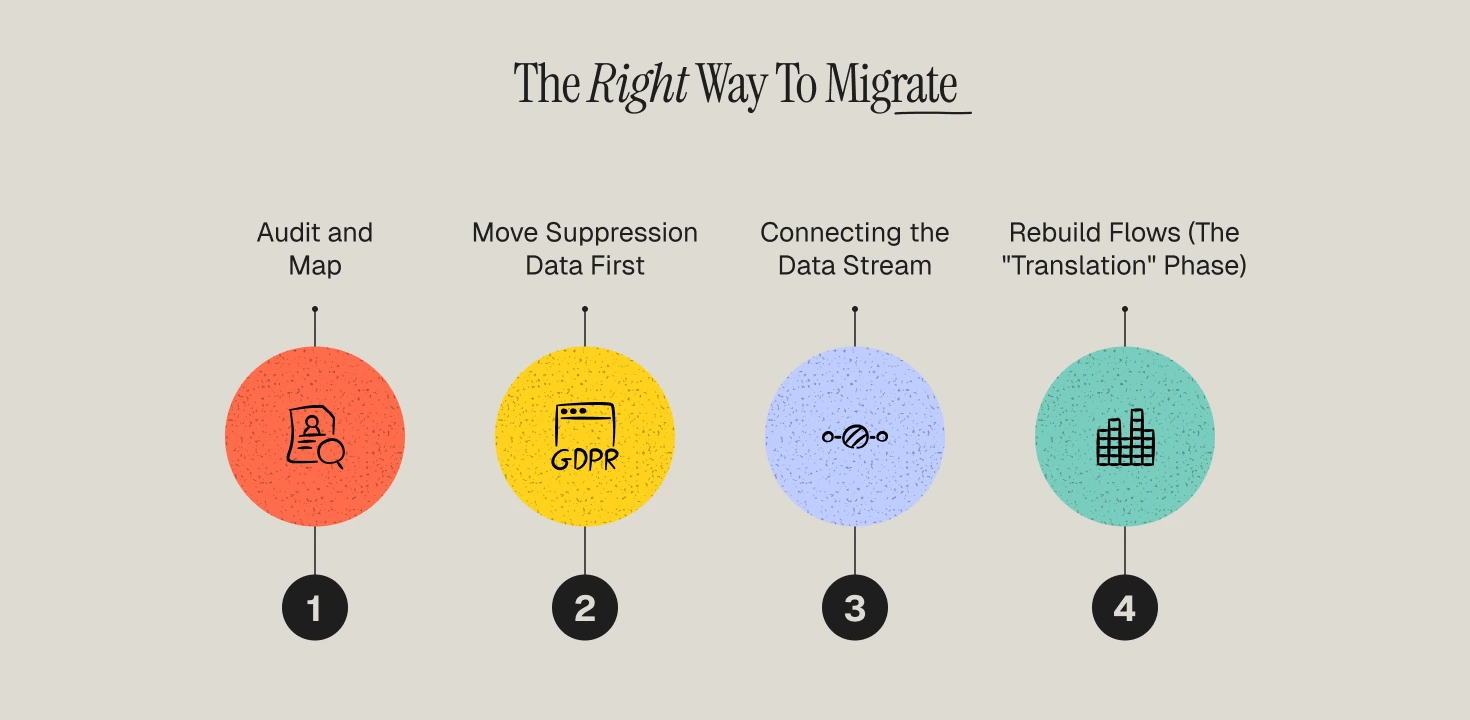
1️⃣ Step 1 — Audit and Map
Don't just export data; map the logic. Document every Omnisend tag.
The Operator Move: Many Omnisend users use tags like Customer_Bought_Once. In Klaviyo, you don't need a tag for this—Klaviyo’s segment builder sees the purchase event in real-time. Only migrate "static" tags (like Preference: Vegan) and let Klaviyo’s event-driven logic handle the "behavioral" tags.
2️⃣ Step 2 — Move Suppression Data First
In Omnisend: Audience → Export → Unsubscribed/Bounced.
In Klaviyo: Lists & Segments → Suppressions → Upload.
Why: This eliminates the "compliance window." If you import active contacts while a Welcome Flow is live, Klaviyo could accidentally email a suppressed contact before you've had a chance to upload the second file.
3️⃣ Step 3 — Connect the Ecommerce Stream
Install the Klaviyo app. Unlike general ESPs, Klaviyo’s Shopify integration is two-way and real-time.
The Verification: Once connected, add an item to your cart and enter your email, but don't buy. Then, complete a separate purchase. Check Klaviyo’s activity feed to ensure "Started Checkout" and "Placed Order" events fire with SKU images and price values. This event depth is what powers behavioral triggers in retention marketing.
4️⃣ Step 4 — Rebuild Flows (The "Translation" Phase)
Because Omnisend is also ecommerce-native, this is more of a translation exercise than a total redesign.
- Abandoned Cart: Trigger on "Started Checkout" (matches Omnisend’s Abandoned Checkout).
- Welcome Series: Trigger on List Subscription.
- Post-Purchase: Trigger on "Placed Order."
- The Upgrade: Use this rebuild to implement advantages of customer segmentation. In Klaviyo, split your Abandoned Cart flow by "Predicted CLV." Offer a larger incentive to a "High CLV" prospect than a "Low CLV" one.
Rebuilding Flows: Strategy Over Replication
Do not simply copy your Omnisend paths. Use this transition to implement strategies that Omnisend’s logic doesn't easily support:
- The CLV Welcome Series: Add a split after Email 1. If a customer has a "High Predicted CLV," move them into a brand-story-focused track. If they are "Low Predicted CLV," move them into a discount-heavy "Flash Sale" track.
- The Predictive Win-Back: In Omnisend, you likely trigger this 60 days after the last purchase. In Klaviyo, trigger it 7 days before the "Expected Next Order Date" for your VIPs. This proactive approach prevents churn before it happens.
- SKU-Specific Post-Purchase: Use Klaviyo’s deeper event data to trigger instructions or cross-sells based on the specific SKU purchased, rather than just the general order event. This is essential for improving customer retention in ecommerce.
Stakeholder Expectations
Marketing Team
The workload is front-heavy. While the data moves quickly, rebuilding 8–12 high-performing flows and 20+ templates takes significant manual effort. Expect campaign output to slow down during the 6-week migration window.
Engineering
On standard Shopify/BigCommerce themes, engineering involvement is minimal (DNS updates). For headless stores, expect 5–10 hours of dev time to ensure all custom events (like "Viewed Product") are mapped to the Klaviyo snippet.
Leadership
Be transparent about the "warm-up curve." Send volume will be restricted for the first 30 days. This means campaign revenue may dip initially, but it will be offset by the increased efficiency of the new flow logic by day 90.
Revenue Expectations: The 90-Day Timeline
- Days 1–30 (Infrastructure): Deliverability stabilization. You are sending only to your 30-day engaged list. Open rates will be high, but total volume (and thus revenue) may be lower than your Omnisend average.
- Days 31–60 (Optimization): Volume expands to the 90-day engaged list. Revenue recovers as your new, branched flows (Welcome, Abandoned Cart) begin to outperform the linear Omnisend versions.
- Days 61–90 (Scaling): You begin using behavioral segmentation and predictive models. This is where most brands see the 15–25% lift in email-attributed revenue as the system begins to proactively target high-value customers.
The Migration Opportunity: Beyond Data Plumbing
Most agencies treat an Omnisend to Klaviyo migration as a technical task. We treat it as a Lifecycle Reset.
Moving from Omnisend to Klaviyo gives you a "clean slate" to fix the structural inefficiencies in your retention program. If you simply replicate your Omnisend setup, you are paying for a premium tool to execute a legacy strategy. Our migration framework focuses on:
- Predictive ROI: Implementing CLV-based branching immediately.
- Deliverability Insurance: Managing the warm-up at the DNS level to ensure you hit the inbox.
- Data Integrity: Auditing the event stream to ensure zero-latency triggers.
Our framework is built on proven customer retention strategies that leverage Klaviyo's unique data science layer.
Secure Your Retention Infrastructure
A migration from Omnisend to Klaviyo is a high-stakes technical event where a single mapping error can lead to deliverability collapse or revenue leakage. At Propel, we specialize in de-risking the transition for high-volume ecommerce brands.
We architect your Klaviyo environment for maximum capital efficiency, ensuring your data extensions are clean, your flows are branched for ROI, and your sending reputation is bulletproof from day one.
Ready to upgrade your retention stack? Book a Migration Strategy Session with a Propel Operator.
Frequently Asked Questions
How long does an Omnisend to Klaviyo migration take?
Typically 4–6 weeks for a standard brand. This includes the technical setup, flow rebuilding, and the first half of the deliverability warm-up.
Will I lose my SMS subscribers?
No. You can export your SMS list with the "SMS Consent" timestamp and import it into Klaviyo. Ensure you set up your Klaviyo SMS settings (including your toll-free number or shortcode) before importing to maintain compliance.
Can I run Omnisend and Klaviyo simultaneously?
Technically yes, but we advise against it for the same flow. If you run an Abandoned Cart flow in both, customers will receive duplicate emails, leading to high unsubscribes and spam reports. Deactivate the Omnisend flow the second the Klaviyo version goes live.
What happens to my historical Omnisend reporting?
It does not transfer. We recommend exporting your "Campaign Performance" and "Flow Performance" reports as CSVs or PDFs for your records before closing your Omnisend account.
How much effort is required from my internal team?
Expect 5–10 hours per week from your retention lead. The primary tasks are auditing existing logic, approving new templates, and monitoring the deliverability warm-up metrics. For a completely hands-off experience, many brands choose to work with a top retention marketing agency.
