
Summarize this documentation using AI
TL;DR
- Structural Differences: Drip is built on a "Workflow" and "Tag" architecture; Klaviyo is built on a "Flow" and "Event" architecture. Migration requires a pivot from static tags to dynamic behavioral triggers.
- The Predictive Advantage: While Drip has solid automation, Klaviyo provides native predictive modeling for Customer Lifetime Value (CLV) and Churn Risk that Drip does not offer.
- WooCommerce/Shopify Strength: Klaviyo’s native integrations are deeper, pulling SKU-level data, refunds, and product views more reliably than Drip’s third-party or legacy connectors.
- The Warm-Up Phase: A 4–6 week deliverability warm-up is non-negotiable to establish your new sending domain and avoid the spam folder.
The Revenue Case for Switching
Drip has long been a favorite for DTC brands due to its intuitive visual workflow builder. However, as ecommerce moves toward hyper-personalization, many brands find themselves hitting a "data ceiling" in Drip.
The move to Klaviyo is a move toward data depth. In our experience, brands migrating from Drip aren't necessarily fixing a "broken" tool, but rather upgrading to a platform that interprets ecommerce events more granularly. Drip triggers are often based on a contact's "Tag" changing; Klaviyo triggers are based on the actual "Event" happening in real-time.
At Propel, we’ve observed that this shift allows for more precise attribution. Brands typically see a 20%+ lift in email-attributed revenue within the first 90 days, largely because they move from broad "if/then" workflows to sophisticated flows branched by predictive CLV and real-time SKU data.
Should You Migrate from Drip to Klaviyo?
Before committing to the switching cost, evaluate your brand's growth stage and technical needs.
The migration is likely beneficial if:
- You are buried in "Tag Debt": If your Drip account has 500+ tags and you’re manually tagging users to keep automations running, Klaviyo’s event-based segments will eliminate that manual work.
- You need Predictive Intelligence: You want to target customers based on their Expected Next Order Date or Predicted LTV rather than just their past behavior.
- You want unified SMS: If you are currently using a separate tool for SMS or find Drip’s SMS integration limited, Klaviyo’s unified profiles provide a single source of truth for omnichannel retention.
- You are on WooCommerce or Shopify: Klaviyo’s integrations with these platforms are arguably the most robust in the market, capturing events like "Viewed Product" and "Added to Cart" with zero-latency.
Hold off if:
- You are in a Peak Trade Window: Do not migrate within 8 weeks of BFCM or a major launch. Deliverability warm-up takes time, and rushing it during a high-revenue period is a common—and expensive—mistake.
- Team Proficiency is the only barrier: If your team loves the Drip visual builder and isn't ready for the steeper learning curve of Klaviyo’s logic-heavy flow builder, ensure you have an agency partner or internal champion to bridge the gap.
How Drip and Klaviyo Store Customer Data Differently
The primary hurdle in this migration is the structural shift from a CRM-centric model to an event-centric model.
- Drip’s Model: Relational and Tag-based. It organizes contacts through a series of "Workflows" where tags act as the glue between steps.
- Klaviyo’s Model: Profile-centric and Event-based. It organizes people by "Profile Properties" (who they are) and "Metric Events" (what they did).
When you migrate, you must "flatten" your tags. For example, a Drip tag like Has_Purchased_Twice becomes a dynamic Klaviyo Segment that automatically looks at the Placed Order event. This transition ensures your data is always up-to-date without manual tag updates.
What Transfers and What Doesn’t
A Drip-to-Klaviyo migration is a "Lifecycle Reset"—a chance to purge old data and focus on what drives revenue.
A. Transfers Cleanly ✅
- Identity Fields: Email, Phone, Name, and Address map 1:1 to Klaviyo Profile Properties.
- Custom Fields: Your bespoke Drip fields (e.g., Favorite Color, Skin Type) map to Custom Profile Properties.
- Suppression Data: Unsubscribes and hard bounces are portable and must be moved first.
- Order History: This is backfilled via your store integration, not exported from Drip.
B. Requires Rebuilding 🔄
- Workflows to Flows: Drip's visual workflows cannot be imported. You must re-map and rebuild every sequence as a Klaviyo Flow.
- Email Templates: Drip’s code is incompatible with Klaviyo’s editor; templates must be rebuilt from scratch.
- Segments: Logic for "Saved Searches" must be recreated in Klaviyo’s Segment builder.
C. Does Not Transfer ❎
- Historical Engagement: Historical engagement data (opens and clicks) typically remains in Drip and is not available in Klaviyo.
- Drip-Specific Event Data: Custom events configured specifically for Drip’s tracking pixel will need to be re-setup using Klaviyo’s native snippets.
Drip to Klaviyo Migration Checklist
1. Pre-Migration Audit
- Inventory every active Drip Workflow — triggers, delays, and emails.
- Audit your Drip Tag library — decide which tags to convert to Properties and which to discard.
- Document all third-party integrations — Loyalty, Reviews, Forms.
2. Data Preparation
- Export "Unsubscribed" and "Bounced" contacts for suppression.
- Export "All Subscribers" with all custom fields and relevant tags.
- Run your list through a verification tool if it hasn't been cleaned in 12+ months — NeverBounce, ZeroBounce.
- Segment your export into engagement tiers — 30-day active, 60-day active, 90-day active.
3. Platform Setup
- Verify your sending domain in Klaviyo — DKIM, SPF.
- Connect the native Shopify or WooCommerce integration.
- Create Custom Properties in Klaviyo to match your Drip export columns.
- Import suppression files first before any active contacts.
4. QA and Launch
- Rebuild priority flows — Welcome, Abandoned Cart, Post-Purchase.
- Place a test order and a test checkout to verify that events are firing.
- Test templates across Gmail, Apple Mail, and Outlook.
- Launch your first campaign to the 30-day engaged segment only.
The Technical Migration: Step-by-Step
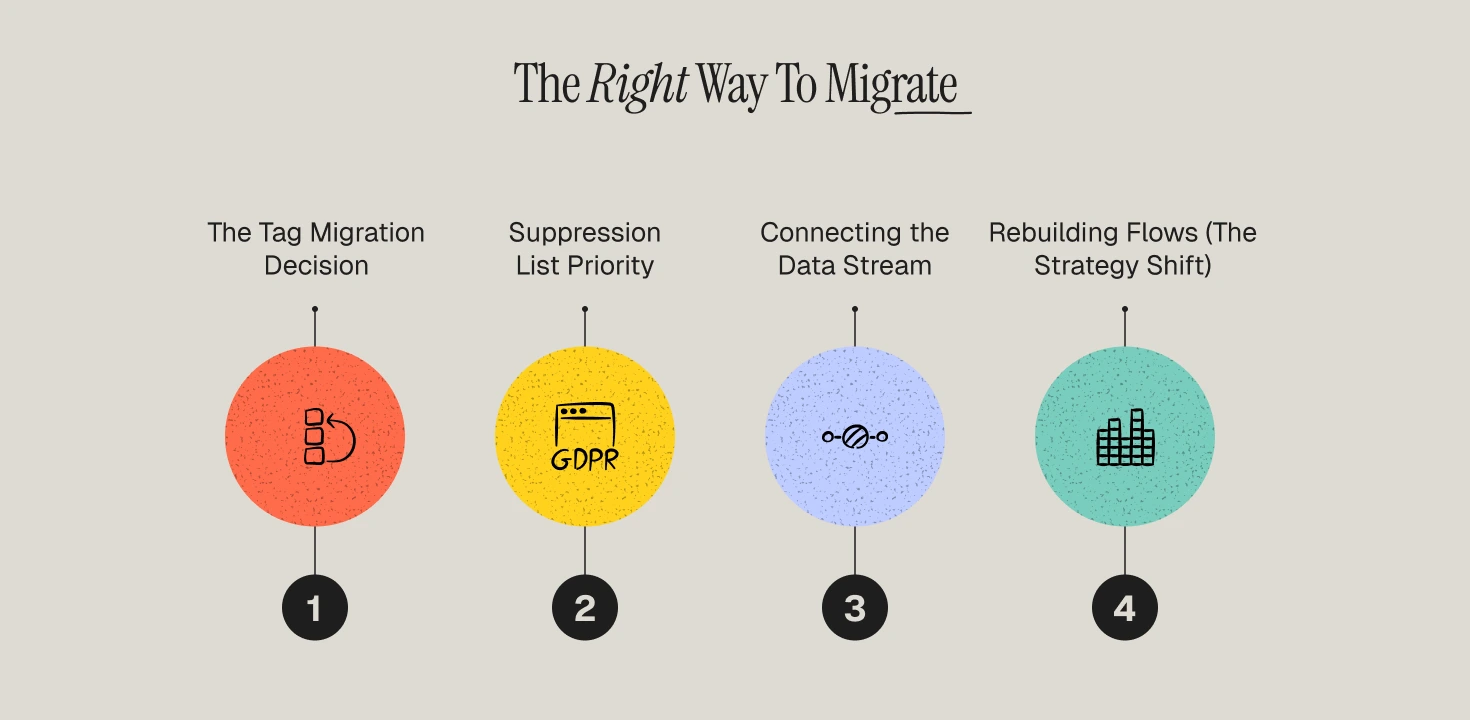
1️⃣Step 1 — The Tag Migration Decision
Drip users rely heavily on tags. Before importing, you must decide how each tag translates.
- Segmentation Tags: (e.g., VIP_Customer) → Convert these into dynamic Klaviyo Segments.
- Preference Tags: (e.g., Prefers_SMS) → Convert these into Custom Profile Properties.
- Workflow Tags: (e.g., In_Welcome_Series) → Discard. Klaviyo manages flow status natively without needing a tag.
2️⃣ Step 2 — Suppression List Priority
This is the most critical step for compliance. Export Drip's "Unsubscribes" and "Bounces" and upload them to Klaviyo’s Suppression List before importing active contacts.
Why: If you import active contacts while an automated Welcome Flow is live, Klaviyo could accidentally email an unsubscribed user in the minutes before you upload the suppression list. This triggers immediate spam complaints.
3️⃣ Step 3 — Connecting the Ecommerce Stream
For WooCommerce brands, Klaviyo’s integration is a major upgrade over Drip. It pulls the full ecommerce event model—placed orders, fulfilled orders, and even refunds—natively.
The Operator Move: Once connected, place a test order. Verify that the Placed Order event in Klaviyo includes the Product Name, SKU, and Image URL. This data depth is essential for improving customer retention in ecommerce.
4️⃣ Step 4 — Rebuilding Flows (The Strategy Shift)
Do not just replicate Drip’s workflows. Use this move to implement advantages of customer segmentation.
- Welcome Series: Trigger on list subscription. Add a split: Has Placed Order zero times. This ensures customers who buy from the first email are diverted into a post-purchase experience.
- Abandoned Cart: Trigger on "Started Checkout." Add a split based on Cart Value. Offer a steeper discount only to high-value carts.
- Win-Back: Replace Drip’s time-based logic with Klaviyo’s Predictive Analytics. Trigger the email 7 days before the customer’s "Expected Next Order Date."
Stakeholder Expectations
Marketing Team
The workload is front-heavy. Rebuilding 10+ flows and 20+ templates takes significant manual effort. Expect your campaign cadence to slow down during the 6-week migration window as the team focuses on infrastructure.
Engineering
For standard Shopify or WooCommerce themes, engineering effort is minimal (DNS updates). For custom themes, you may need 3–5 hours of dev time to ensure "Active on Site" and "Viewed Product" tracking snippets are installed correctly.
Leadership
Brief leadership on the "warm-up curve." Send volume is restricted for the first 30 days to protect your reputation. This means total email revenue may dip slightly in month one, but it is the prerequisite for mastering customer retention metrics long-term.
Revenue Expectations: The 90-Day Timeline
- Days 1–30 (Infrastructure): Deliverability stabilization. You are sending only to 30-day engaged contacts. Open rates will be high, but total volume will be lower than your Drip average.
- Days 31–60 (Optimization): Volume expands to the 90-day engaged list. Revenue recovers as your new, branched flows (Welcome, Abandoned Cart) begin to outperform the linear Drip workflows.
- Days 61–90 (Scaling): You begin using behavioral segmentation and predictive models. This is where brands see the incremental lift as the system proactively targets high-value customers.
The Migration Opportunity: Beyond Data Plumbing
Moving from Drip to Klaviyo is more than a technical switch; it is a shift to a more sophisticated retention strategy.
If you simply copy your old logic, you are paying for a premium tool to execute a legacy strategy. Our migration framework at Propel focuses on three operational outcomes:
- Revenue Capture: Implementing SKU-specific and CLV-based branching immediately.
- Deliverability Insurance: Managing the warm-up at the DNS level to ensure you hit the inbox during critical windows.
- Data Integrity: Auditing the Shopify/WooCommerce event stream to ensure zero-latency triggers.
Our framework is built on proven customer retention strategies that leverage Klaviyo's unique predictive layer.
Secure Your Retention Infrastructure
A migration is a high-stakes technical event where a single mapping error can lead to deliverability collapse or revenue leakage. At Propel, we specialize in de-risking the transition for high-volume ecommerce brands.
We architect your Klaviyo environment for maximum capital efficiency, ensuring your data extensions are clean, your flows are branched for ROI, and your sending reputation is bulletproof from day one.
Ready to upgrade your retention stack? Book a Migration Strategy Session with a Propel Operator.
Frequently Asked Questions
How long does a Drip to Klaviyo migration take?
A standard migration for a brand with 50,000 contacts takes 4–6 weeks. This includes auditing, data cleaning, flow rebuilding, and the initial deliverability warm-up.
Will I lose my email history?
Historical opens and clicks typically remain in Drip and are not available in Klaviyo. However, your purchase history (the more important metric for DTC revenue attribution) is backfilled natively via your store integration.
Can I run Drip and Klaviyo simultaneously?
You can, but you must deactivate the Drip workflow the moment the Klaviyo flow is live. Running both simultaneously will lead to customers receiving duplicate emails, which will damage your sending reputation.
What happens to my Drip tags?
You should convert them into Klaviyo "Custom Profile Properties." This preserves the data without the clutter of a tag-based system.
How much effort is required from my internal team?
Expect 5–10 hours per week from your marketing lead. The primary tasks are logic auditing, approving template rebuilds, and monitoring warm-up performance. For a completely hands-off experience, many brands choose to work with a top retention marketing agency.
