
Summarize this documentation using AI
TL;DR
- Structural Pivot: Brevo is a contact-and-list model; Klaviyo is an event-and-profile model. Migration is the process of turning static lists into dynamic, behavioral triggers.
- The Pricing Shift: Moving from Brevo’s "pay-per-send" to Klaviyo’s "pay-per-profile" requires rigorous list hygiene. Expect to prune 20–40% of your list to optimize ROI.
- Unified SMS: Unlike Brevo’s siloed SMS features, Klaviyo allows for truly coordinated omnichannel flows (e.g., if email not opened, send SMS) within a single builder.
- Deliverability Milestone: Changing infrastructure requires a 4-week warm-up period. Rushing this process is the #1 cause of "spam folder" placement for new Klaviyo accounts.
The Revenue Case for Switching
Brevo (Sendinblue) is a highly cost-effective tool for brands with large lists and low sending frequency. However, for scaling DTC brands, Brevo’s "general purpose" infrastructure eventually becomes a bottleneck for revenue.
The gap is in how the platforms treat ecommerce data. In Brevo, purchase history is often treated as an "attribute" or an imported field. In Klaviyo, a purchase is a "Metric Event." This isn't just semantics—it means every SKU viewed, every cart abandoned, and every dollar spent is a real-time trigger for automation.
At Propel, we find that brands migrating from Brevo often see a 20–35% lift in email-attributed revenue within 90 days. This lift isn't because they are sending more mail; it's because they are replacing generic newsletters with high-intent behavioral flows that Brevo’s data model simply cannot support natively.
Should You Migrate from Brevo to Klaviyo?
The decision to switch is usually driven by a need for deeper integration and more sophisticated automation logic.
The migration is likely beneficial if:
- You are on Shopify or WooCommerce: Klaviyo’s native integrations pull SKU-level data, refunds, and browsing behavior that Brevo requires custom API work to replicate.
- You want to launch SMS: If you want your SMS and email to work together (e.g., sharing the same coupon code or avoiding duplicate notifications), Klaviyo is the industry standard.
- Manual Segmentation is slowing you down: If your team spends hours each week exporting CSVs to create segments, Klaviyo’s real-time dynamic segments will automate that entire workflow.
- You need Ecommerce Attribution: If you can’t tell exactly which email drove which SKU purchase, you are outgrowing Brevo.
Hold off if:
- You have a "Zombie List": if you have 500k+ contacts but only 10k are active, and you aren't ready to delete the inactive ones, Klaviyo’s pricing will be prohibitive.
- Peak Season is looming: Do not start a Brevo-to-Klaviyo migration in October. You need 6 weeks of "clean air" for a deliverability warm-up before your highest-volume sales days.
The List Size Reality Check: Pruning for Profit
The biggest "culture shock" for Brevo users is the pricing model. Brevo charges by the number of emails sent; Klaviyo charges by the number of people in your account.
The Operator Move: Before you export a single contact from Brevo, run a "Sunset Audit."
- Identify contacts who haven't opened an email in 12 months AND have never purchased.
- Delete them.
- Moving "dead weight" from Brevo to Klaviyo serves no purpose other than increasing your monthly bill and damaging your new sending reputation. In our experience, cleaning a legacy Brevo list reduces contact counts by 30% on average with zero impact on revenue.
What Transfers and What Doesn’t
A migration is an opportunity to reset your data architecture.
A. Transfers Cleanly ✅
- Subscriber Identities: Email, Phone, and Name map 1:1.
- Custom Attributes: Brevo "Attributes" map to Klaviyo "Profile Properties."
- Suppression Data: Unsubscribes and bounces are portable and must be imported first.
- Transactional History: This is backfilled via your store integration, not exported from Brevo.
B. Requires Rebuilding 🔄
- Automation Workflows: Brevo’s visual workflows must be re-architected as Klaviyo Flows.
- Email Templates: Brevo’s HTML/Drag-and-drop code is not compatible with Klaviyo; a full rebuild is required.
- Dynamic Segments: Brevo’s filter logic needs to be recreated in Klaviyo’s segment builder.
C. Does Not Transfer ❎
- Historical Opens/Clicks: This engagement data stays in Brevo. Klaviyo starts tracking engagement from your first send.
- Legacy Campaign Reports: Export your past performance data as CSVs for your internal records before closing your Brevo account.
Brevo to Klaviyo Migration Checklist
1. Pre-Migration Audit
- Inventory all active Brevo Workflows (Triggers, Delays, and Conditions).
- Audit your Brevo Attributes list—discard what you don't use for segmentation.
- Identify any GDPR-specific consent flags that need to be preserved.
2. Data Preparation
- Export "Unsubscribed" and "Hard Bounced" contacts for suppression.
- Export "All Contacts" including all relevant attributes.
- Verify the list through a tool like NeverBounce to remove invalid emails.
- Segment the export into 30, 60, and 90-day engagement buckets.
3. Platform Setup
- Authenticate your sending domain (DKIM/SPF) in Klaviyo.
- Install the native Shopify/BigCommerce/WooCommerce integration.
- Create Custom Profile Properties in Klaviyo to receive Brevo data.
- Upload suppression files first to prevent accidental sends.
4. QA and Launch
- Rebuild "The Big Four" flows: Welcome, Abandoned Cart, Browse Abandon, Post-Purchase.
- Place a test order to verify that "Started Checkout" and "Placed Order" events fire.
- Test templates in an inbox preview tool (Gmail, Outlook, Apple Mail).
- Launch the first campaign to your 30-day engaged segment only.
The Technical Migration: Step-by-Step
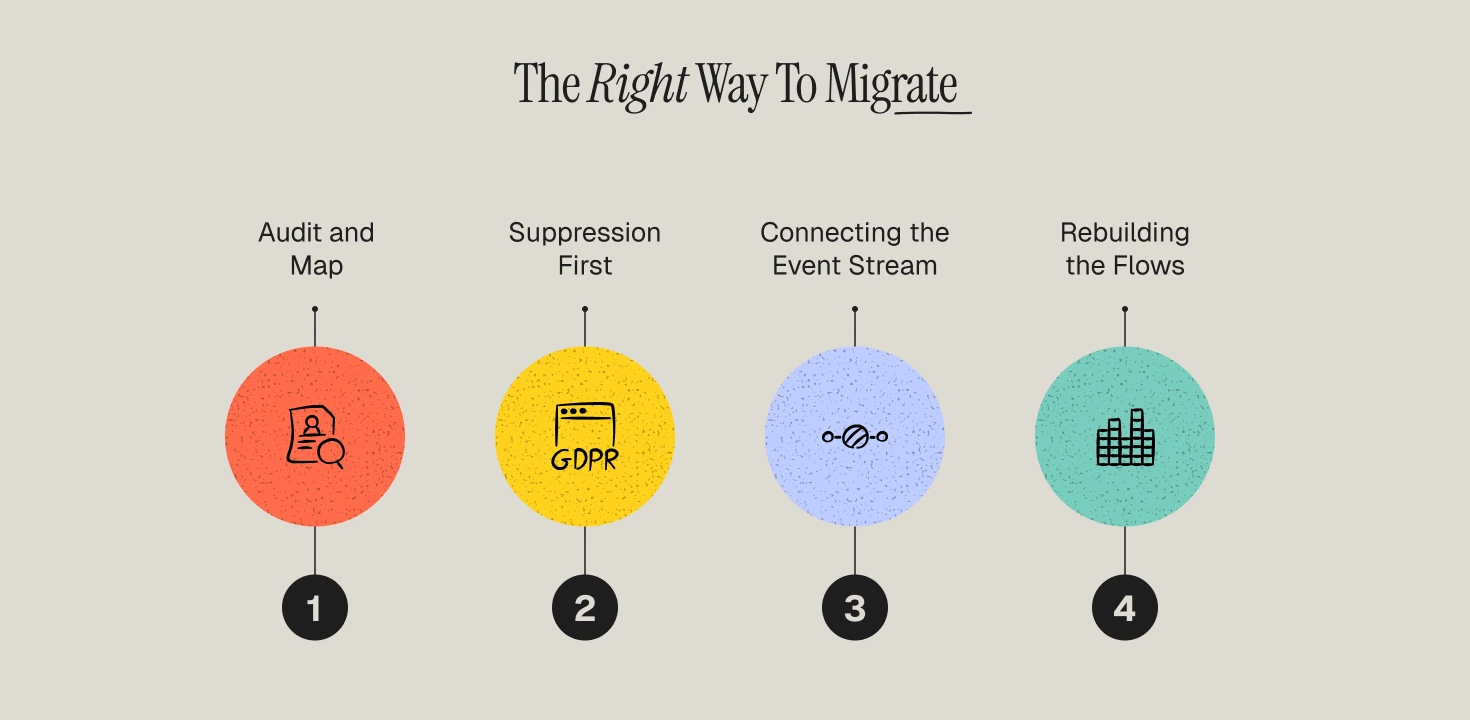
1️⃣ Step 1 — Audit and Map
In Brevo, you might use attributes like LAST_PURCHASE_DATE. In Klaviyo, this is redundant because the integration tracks this event-level data automatically.
The Move: Only migrate "Preference" data (e.g., Favorite_Category) or "Source" data. Let Klaviyo’s native ecommerce integration handle the "Behavioral" data.
2️⃣ Step 2 — Suppression First
This is non-negotiable for compliance. Export Brevo's "Master Unsubscribe List" and upload it to Klaviyo’s Suppression List before importing any active subscribers.
Why: This closes the "dead window" where a Welcome Flow could accidentally trigger to someone who unsubscribed years ago.
3️⃣ Step 3 — Connecting the Event Stream
Install the Klaviyo app on your store.
The Verification: Once connected, perform a "Browse Abandon" test. View a product on your site, then check your Klaviyo profile. You should see a "Viewed Product" event with the product image and price. This real-time visibility is the foundation of behavioral triggers in retention marketing.
4️⃣ Step 4 — Rebuilding the Flows
Do not replicate Brevo’s linear logic. Use this as an opportunity to implement advantages of customer segmentation.
- Abandoned Cart: Trigger on "Started Checkout." Split by Cart Value—offer a discount only if the cart is above your AOV.
- Welcome Series: Add a conditional split: Has Placed Order zero times. This keeps the flow focused only on conversion.
- Post-Purchase: Trigger on "Placed Order." Branch by First Time vs. Repeat Buyer to tailor the "Thank You" experience.
The Deliverability Warm-up
Moving from Brevo to Klaviyo means moving to a new sending infrastructure. Mailbox providers (Gmail/Yahoo) will treat your new IP/domain with suspicion unless you warm it up.
Stakeholder Expectations
Marketing Team
The transition is manual. Rebuilding 10+ flows and 20+ templates is a 4–6 week project. Expect a temporary reduction in newsletter frequency while the team builds the new "automated" foundation.
Engineering
On standard platforms (Shopify), engineering time is under 1 hour for DNS records. For custom builds, budget 5 hours for event snippet verification.
Leadership
Be clear about the "List Pruning" phase. You are deleting "zombie" contacts to save money and improve performance. Total subscriber counts will go down, but Revenue Per Recipient (RPR) and Open Rates will go up significantly.
Revenue Expectations: The 90-Day Timeline
- Days 1–30 (Infrastructure): Focus is on deliverability. Total revenue might be slightly lower than Brevo as you restrict volume to your "best" users.
- Days 31–60 (Flow Gains): As the new, branched flows (Abandoned Cart, Browse Abandon) ramp up, you should see a significant increase in flow-attributed revenue.
- Days 61–90 (Scaling): With a warmed-up domain and behavioral segmentation in place, you begin to capture the 20–35% lift that justifies the migration.
The Migration Opportunity: Beyond Data Plumbing
Most brands treat a Brevo to Klaviyo migration as a technical task. We treat it as a Lifecycle Reset.
Moving to Klaviyo gives you a "clean slate" to fix the structural inefficiencies in your retention program. If you simply replicate your Brevo setup, you are paying for a premium tool to execute a legacy strategy. Our migration framework focuses on proven customer retention strategies that leverage Klaviyo's unique event-based architecture.
Need to right-size your retention stack?
At Propel, we specialize in high-stakes Brevo-to-Klaviyo migrations for DTC brands. We handle all the nuances of the migration so your team can focus on growth. Schedule a Migration Diagnostic with Propel today.
Frequently Asked Questions
How long does a Brevo to Klaviyo migration take?
A standard migration takes 4–6 weeks. This includes auditing, list cleaning, flow rebuilding, and the initial stages of the deliverability warm-up.
Will I lose my GDPR compliance records?
No. You should export your Brevo consent timestamps and import them as custom properties in Klaviyo. This ensures you maintain a clear audit trail for your EU subscribers.
What is the biggest mistake brands make?
Importing their entire Brevo list without cleaning it first. This leads to high costs and poor deliverability from day one. Always prune the "unengaged" before you pay to import them.
Do I need a developer for this?
For standard Shopify or WooCommerce stores, no. Klaviyo’s app-based integration handles the data flow. However, if you have a complex custom theme, a top retention marketing agency can help ensure your event triggers are accurate.
Can I run Brevo and Klaviyo simultaneously?
You should not run the same flow (like Abandoned Cart) in both systems at once. Customers will receive duplicate emails, leading to high spam complaint rates. Deactivate the Brevo workflow as soon as the Klaviyo flow is live.
