
Summarize this documentation using AI
TL;DR
- The Data Shift: ActiveCampaign is a general-purpose CRM and automation tool; Klaviyo is an event-driven ecommerce engine. Migration requires converting a tag-heavy architecture into a property-and-event-based model.
- Trigger Logic: While ActiveCampaign is sophisticated, its ecommerce triggers are often "bolted on" via integrations. Klaviyo’s native data depth allows for SKU-level branching and predictive analytics that ActiveCampaign cannot match without extensive custom coding.
- The Warm-Up Essential: Transitioning from ActiveCampaign’s shared or private IPs to Klaviyo requires a 4–6 week sending domain warm-up to protect inbox placement.
- Revenue Potential: Brands that transition from general automation to ecommerce-specific flows often see a meaningful increase in email-attributed revenue within the first 90 days.
The Revenue Case for Switching
ActiveCampaign is a powerful marketing automation tool, but it was built to serve a broad range of industries—from B2B SaaS to professional services. For a scaling DTC brand, this "general purpose" architecture eventually creates a revenue ceiling.
The gap lies in how data is utilized. ActiveCampaign sees what you explicitly sync through tags and custom fields. Klaviyo, through its deep-rooted integration with platforms like Shopify and BigCommerce, sees every granular action: product views, specific items added to a cart, checkout starts, and even predicted churn risk.
In our experience, brands migrating from ActiveCampaign are often leaving significant untapped revenue on the table because their current automation logic is "contact-centric" rather than "transaction-centric." By moving to an event-driven model, you replace broad interest tags with real-time behavioral triggers. One brand we transitioned found that by replacing ActiveCampaign’s manual "Interest Tags" with Klaviyo’s "Category Affinity" segments, they improved their flow-attributed revenue by 22% within the first quarter.
Should You Migrate from ActiveCampaign to Klaviyo?
The decision to migrate from ActiveCampaign to Klaviyo should be based on your technical needs and growth trajectory.
The migration is likely beneficial if:
- You are outgrowing "Tag Soup": If your ActiveCampaign instance relies on hundreds of manual tags to trigger flows, your data architecture has likely become unmanageable.
- Attribution is a "Black Box": If you cannot easily tie a specific automation path to a SKU-level purchase without complex custom reporting, you are flying blind.
- You need unified SMS: While ActiveCampaign offers SMS, Klaviyo’s unified profiles allow for coordinated "if/then" logic across both channels in one view (e.g., if email not opened, send SMS).
- You want Predictive Analytics: If you want to target customers based on "Expected Next Order Date" rather than an arbitrary lead score, Klaviyo’s data science models provide a significant advantage.
Hold off if:
- High-Touch Sales Pipeline: If your business relies heavily on ActiveCampaign’s "Deals" and CRM pipeline for manual sales outreach, Klaviyo is not a direct replacement.
- Peak Season Proximity: Never migrate within 8 weeks of BFCM or a major brand anniversary. A gradual warm-up of your sending domain is essential to avoid deliverability failures during high-traffic periods.
How ActiveCampaign and Klaviyo Store Customer Data Differently
Understanding the structural mismatch is the key to a successful migration.
- ActiveCampaign’s Model: Contact-centric and Relational. It relies on Tags and Lists to organize people and Lead Scoring to measure value.
- Klaviyo’s Model: Profile-centric and Event-driven. It relies on Properties (who they are) and Events (what they did).
When you migrate, you must "flatten" your ActiveCampaign tags. In ActiveCampaign, you might have a tag called Customer_High_Spender. In Klaviyo, that is no longer a static tag; it is a dynamic Segment that looks at the Total Value property and Placed Order events. This shift ensures your segments are always accurate without manual tag maintenance.
What Transfers and What Doesn’t
A migration from ActiveCampaign to Klaviyo is an opportunity to clean your data infrastructure.
A. Transfers Cleanly ✅
- Contact Identity: Standard fields (Email, Phone, First/Last Name) map 1:1.
- Custom Fields: ActiveCampaign custom fields map directly to Klaviyo Profile Properties.
- Suppression Lists: Your unsubscribes and hard bounces must be moved first to maintain compliance.
- Purchase History: This is backfilled natively via your store integration (Shopify/BigCommerce), not exported from ActiveCampaign.
B. Requires Rebuilding 🔄
- Automations: ActiveCampaign’s "Recipes" and logic trees must be re-architected as Klaviyo "Flows."
- Email Templates: ActiveCampaign’s campaign editor is not compatible with Klaviyo; all templates require a native rebuild.
- Lead Scoring: ActiveCampaign’s points-based scoring should be replaced with Klaviyo’s predictive metrics (Churn Risk/LTV).
- Segments: Dynamic list logic must be recreated using Klaviyo’s event-based builder.
C. Does Not Transfer ❎
- Historical Engagement: Historical engagement data (opens and clicks) typically remains in ActiveCampaign and is not available in Klaviyo.
- Site Tracking Data: Historical page view data from ActiveCampaign’s "Site Tracking" does not move, though Klaviyo begins tracking this natively once the snippet is installed.
ActiveCampaign to Klaviyo Migration Checklist
1. Pre-Migration Audit
- Inventory every active ActiveCampaign automation (document triggers and logic).
- Audit your tag library—decide which to convert to properties and which to discard.
- Identify any "Deals" or CRM data that needs a separate home (like HubSpot).
- Confirm you are outside an 8-week peak trading window.
2. Data Preparation
- Export "Unsubscribed" and "Bounced" contacts for suppression.
- Export "All Contacts" including all tags and custom fields.
- Run your export through an email verification tool if the list is older than 12 months.
- Segment your export into engagement buckets (30, 60, 90-day openers).
3. Platform Setup
- Authenticate your sending domain (DKIM/SPF) in Klaviyo.
- Install the native ecommerce integration (Shopify, BigCommerce, etc.).
- Create Custom Properties in Klaviyo to receive your ActiveCampaign field data.
- Upload suppression files before active contacts.
4. QA and Launch
- Rebuild priority flows (Abandoned Cart, Welcome, Post-Purchase).
- Place a test order to verify that "Placed Order" and "Started Checkout" events fire.
- Rebuild email templates and test across multiple clients (Gmail, Outlook).
- Launch the first campaign to your most engaged 30-day segment.
The Technical Migration: Step-by-Step
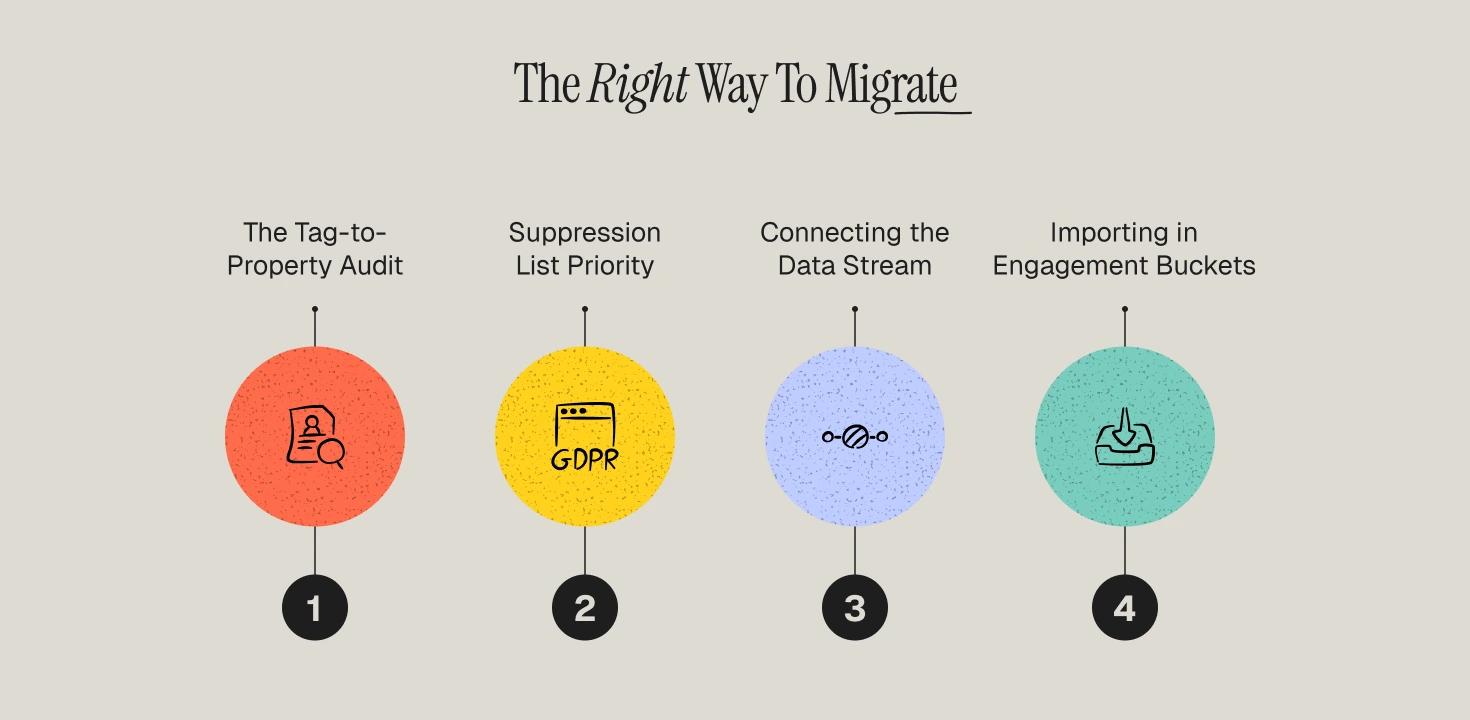
1️⃣ Step 1 — The Tag-to-Property Audit
ActiveCampaign users often have "Tag Debt." Before exporting, audit every tag.
- Keep: Tags that indicate a preference (e.g., Prefers_Menswear) or a source (e.g., Source_FB_Ad).
- Discard: Tags that track temporary behavior (e.g., Opened_Email_June_12) or lifecycle stages that Klaviyo calculates automatically (e.g., Repeat_Customer).
- Convert the "Keep" tags into Profile Properties (e.g., Property: Preference | Value: Menswear) to ensure a cleaner data structure in Klaviyo.
2️⃣ Step 2 — Suppression List Priority
This is the most critical step for compliance. Export your ActiveCampaign "Unsubscribes" and "Hard Bounces" and upload them to Klaviyo’s Suppression List before you import any active subscribers.
Why it matters: If you import your active list first, and a Welcome Flow is live, Klaviyo could accidentally email an unsubscribed user in the window before you upload the suppression list. This is a primary cause of high initial complaint rates.
3️⃣ Step 3 — Connecting the Data Stream
Install the Klaviyo app on your store. Once connected, place a test order and a test checkout.
The Operator Move: Verify the "Started Checkout" event in Klaviyo’s activity feed. Ensure it captures SKU-level data (Product Name, Price, Image URL). Many brands find that once they have a real-time behavioral data stream, they can trigger flows with much higher precision than was possible in ActiveCampaign.
4️⃣ Step 4 — Importing in Engagement Buckets
Do not import your ActiveCampaign database as one large file. Export contacts based on their "Last Open/Click Date" and import them into separate lists (e.g., 30-day active, 60-day active, etc.). This allows you to manage the deliverability warm-up by sending only to your "best" contacts initially.
Rebuilding Flows: Strategy Over Replication
Do not simply replicate your ActiveCampaign automations. Use this as an opportunity to move from "linear" paths to "behavioral" branches.
1. Welcome Series (Priority: High)
Structure: Email 1 (Immediate - Value & Offer), Email 2 (24 hrs - Brand Mission), Email 3 (48 hrs - Social Proof).
The Upgrade: Add a conditional split: Has Placed Order zero times. If they buy from Email 1, they should exit the Welcome Flow and enter a Post-Purchase sequence immediately.
2. Abandoned Cart (Priority: Critical)
Structure: Email 1 (1 hour - Reminder), Email 2 (24 hours - Trust/Scarcity), Email 3 (72 hours - Incentive).
The Upgrade: Trigger on "Started Checkout" (Klaviyo native) rather than a tag change. Add a split based on Cart Value. Offer a steeper discount or a free gift only to those with a high-value cart to protect your margins.
3. Post-Purchase (Priority: High)
Structure: Split by Order Count.
- First-time Buyers: Focus on "How-to-use" content and community onboarding.
- Repeat Buyers (VIPs): Focus on early access and referral rewards.
- The Upgrade: Use Klaviyo’s "Placed Order" data to trigger SKU-specific instructions or replenishment reminders based on the actual product purchased.
4. Win-Back (Priority: Medium)
Structure: Triggered 60–90 days after the last purchase.
The Upgrade: Replace ActiveCampaign’s time-based triggers with Klaviyo’s Predictive Analytics. Trigger the win-back email when a customer hits their "Expected Next Order Date" but hasn't purchased yet.
The Deliverability Warm-up
When you begin sending from Klaviyo, mailbox providers evaluate your sending reputation based on engagement, authentication, and list quality. A gradual warm-up remains essential.
Stakeholder Expectations
Marketing Team Workload
Expect a 6–8 week period of increased workload. Because ActiveCampaign automations and templates cannot be imported, the team must spend significant time re-architecting logic and rebuilding the visual brand identity in a new editor.
Engineering Involvement
For most Shopify or BigCommerce brands, engineering involvement is minimal (under 2 hours for DNS updates). However, if you use a custom headless setup or complex third-party checkout tools, engineering will need to verify that all event snippets are firing correctly.
Leadership Expectations
Leadership must be briefed on the "warm-up dip." Because you are restricting send volume to only the most engaged contacts in the first 30 days, absolute email revenue may fluctuate. This is a strategic trade-off for long-term deliverability.
Revenue Expectations: The 90-Day Timeline
- Days 1–30 (Stabilization): Focus on domain reputation. Email revenue may stay flat as you limit volume to the 30-day engaged segment.
- Days 31–60 (Recovery): As you expand to the full list and stabilize your flows, revenue typically returns to the ActiveCampaign baseline with higher open and click rates due to a cleaner list.
- Days 61–90 (Optimization): Many brands see stronger performance as real-time flows, predictive segmentation, and SKU-level branching begin to outperform the previous general-purpose setup.
The CRM Question: What to do with ActiveCampaign’s CRM Features?
If your sales team uses ActiveCampaign for deal tracking and pipelines, you have two options:
- The Split Stack: Keep ActiveCampaign for B2B/Sales and move all DTC marketing to Klaviyo. Use an integration to keep contact data in sync.
- The Full Migration: If your "CRM" use is just tracking customer attributes, move everything to Klaviyo. While Klaviyo is not a CRM in the traditional "Sales Pipeline" sense, its profile-rich data is often more actionable for ecommerce brands.
The Migration Opportunity: Beyond Data Plumbing
Moving from ActiveCampaign to Klaviyo is a chance to audit your entire retention strategy. If you simply replicate your old logic, you are paying for a premium tool to execute a legacy strategy.
Our migration framework focuses on data integrity, behavioral automation, and deliverability stability. We prioritize the technical details that turn a platform switch into a growth catalyst. As a specialized Klaviyo agency, we help brands bridge the gap between their customer data and their revenue goals.
Book a ActiveCampaign-to-Klaviyo migration assessment to receive a tailored roadmap covering data mapping, flow rebuild priorities, and deliverability planning.
Frequently Asked Questions
Can I run ActiveCampaign and Klaviyo simultaneously?
Yes, but you must deactivate each ActiveCampaign automation the moment its Klaviyo equivalent is live. Running both simultaneously will lead to customers receiving duplicate emails and increasing your complaint rate.
What happens to my ActiveCampaign tags?
You should export them and map them as "Custom Profile Properties" in Klaviyo. This allows you to maintain historical context without cluttering your new account with "tag-based" logic.
How much internal effort does the migration require?
Typically, it requires a dedicated lead for 5–10 hours per week over 6 weeks. The bulk of the effort is in logic mapping and template rebuilding.
Will my email templates work in Klaviyo?
No. Templates must be rebuilt in Klaviyo, which also provides an opportunity to improve mobile responsiveness and loading speed.
What are the biggest migration risks?
The most common risks are rushing the deliverability warm-up and failing to import the suppression list before the active list. Both can lead to your emails being flagged as spam by Gmail and Yahoo.
